Home
BenQ
Speakers
treVolo U
Page 22
BenQ treVolo U - Page 22
48 pages
Manual
Save Page as PDF
To Next Page
To Next Page
To Previous Page
To Previous Page
Loading...
19
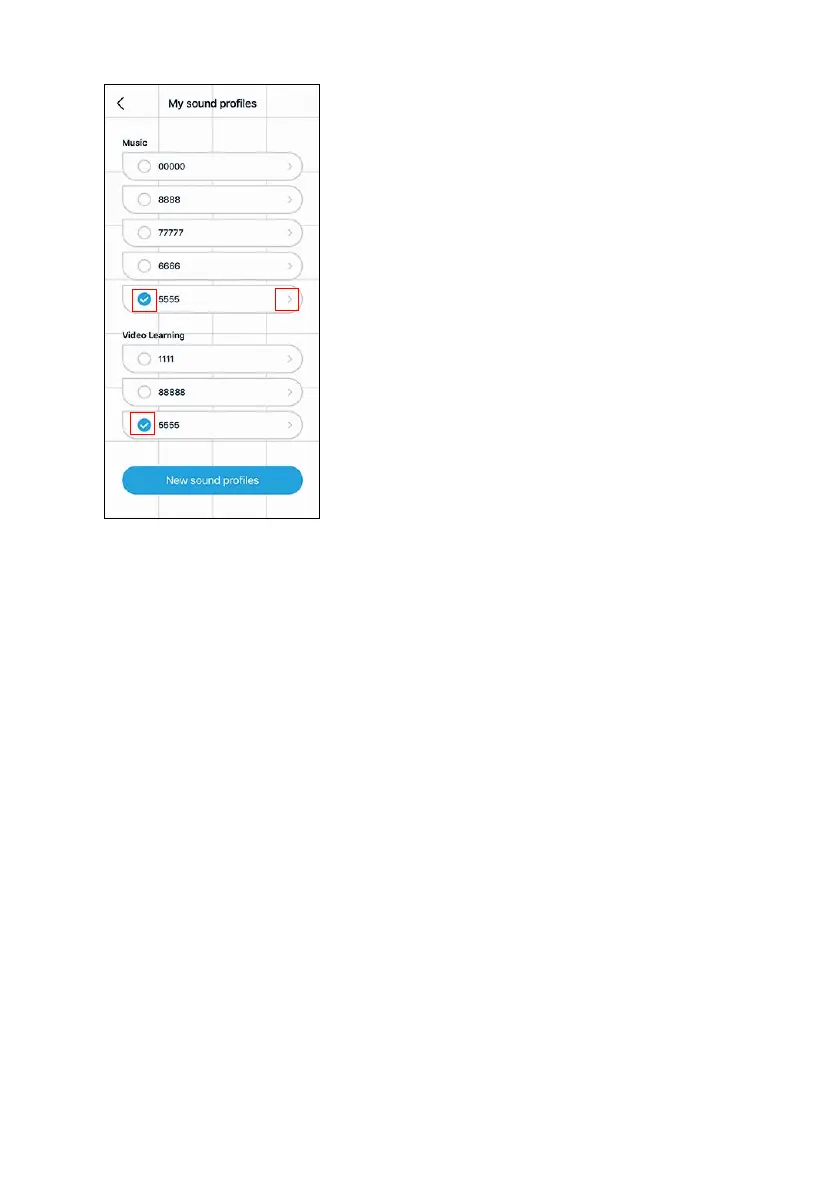
3.
• After the setting is completed, select
the sa
v
ed option to apply y
our sound
prof
ile
.
•
Click the arr
ow icon to e
nter the
individual sound pr
ofile, edit the current
name
, or delete the sound pr
ofile.
21
23
Table of Contents
Main Page
Table of Contents
3
Introduction
4
Function
4
Trevolo U App
4
Package Contents
6
Operation
7
Buttons and Connection
7
Charge Device
9
Power On/Off Device
11
Pairing Device (Bluetooth Connection)
12
Connecting with Audio Cable
13
Adjusting Volume Level
14
Muting the Microphone
14
The Three Sound Modes
15
Safe Volume
16
Using the Trevolo U App
18
True Wireless Stereo
26
Voice Control
28
Firmware Upgrade
31
Maintenance and Care
33
Troubleshooting
33
Cleaning the Speaker
47
Contacting Customer Service
47
Specification
47
Other manuals for BenQ treVolo U
Firmware Upgrade User Guide
42 pages
Related product manuals
BenQ treVolo
19 pages
BenQ treVolo S
12 pages
BenQ XL2731
51 pages



 To Next Page