Operation 26
Upgrading firmware
1. Go to BenQ website and enter Product page > Support > Software to download the
latest firmware file.
2. Unzip the downloaded file, find and save the file named "V5000iUpgrade.bin" to a USB
flash drive. (It is recommended to use a USB drive in FAT32 format)
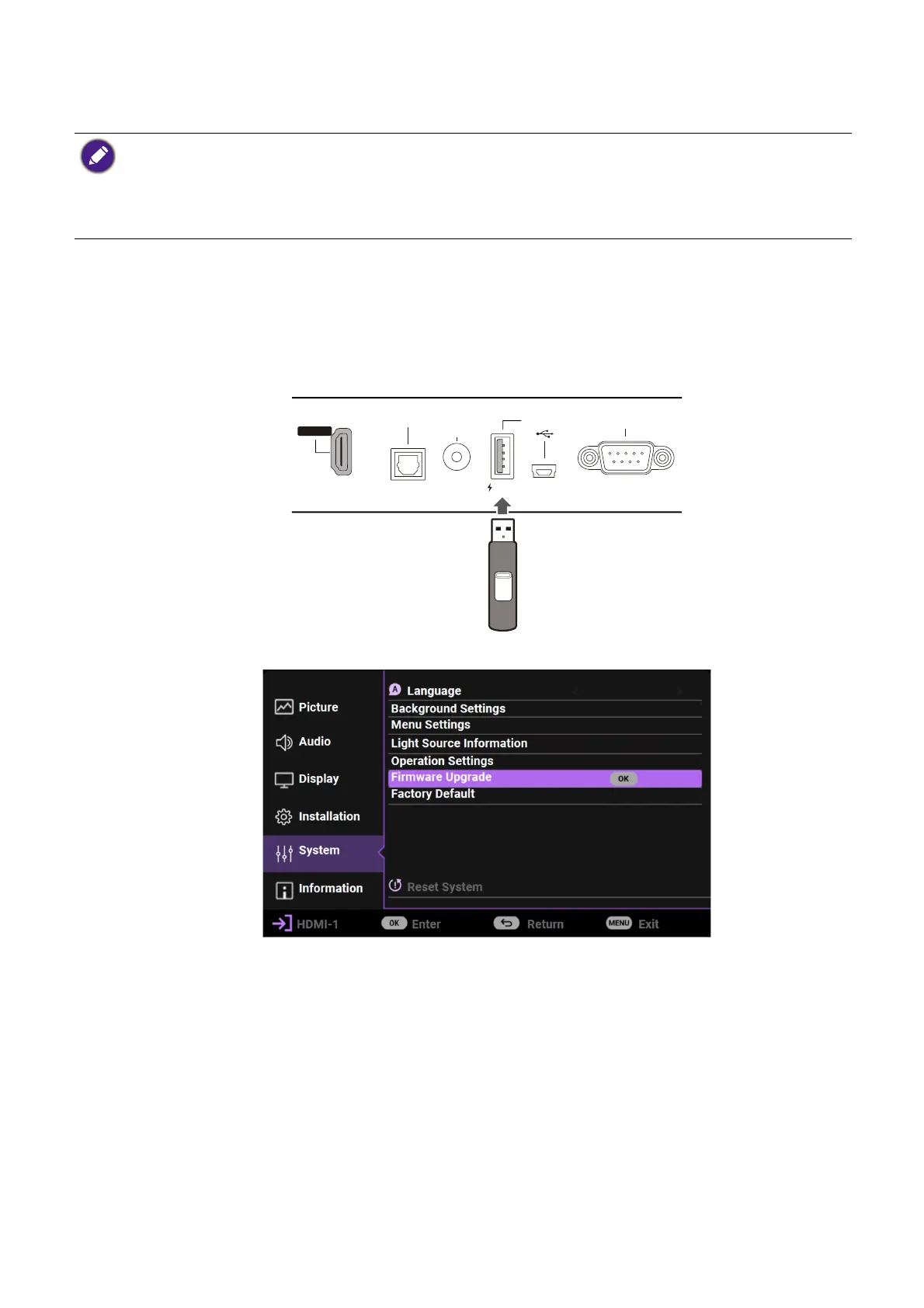
3. Plug the USB flash drive into the 1.5A SERVICE USB-A port on the back of the
projector.
4. Go to the Advanced menu > System > Firmware Upgrade menu, and press OK.
5. Select Yes to upgrade the firmware version. Keep the projector power on until the
firmware upgrade is finished.
To ensure a smooth process, please perform the following steps before upgrading the firmware.
1. Check and write down your firmware version from the Information > Firmware Upgrade menu.
2. Call BenQ service center to provide the version number and verify the projector is free from firmware
compatibility problem.Avoid turning on the projector immediately after turning it off as excessive heat may
shorten light source life.
RS-232
1.5A
HDMI 1
HHD CPP 2. 2
AUDIO
OUT
SPDIF
SERVICE


 To Next Page