18
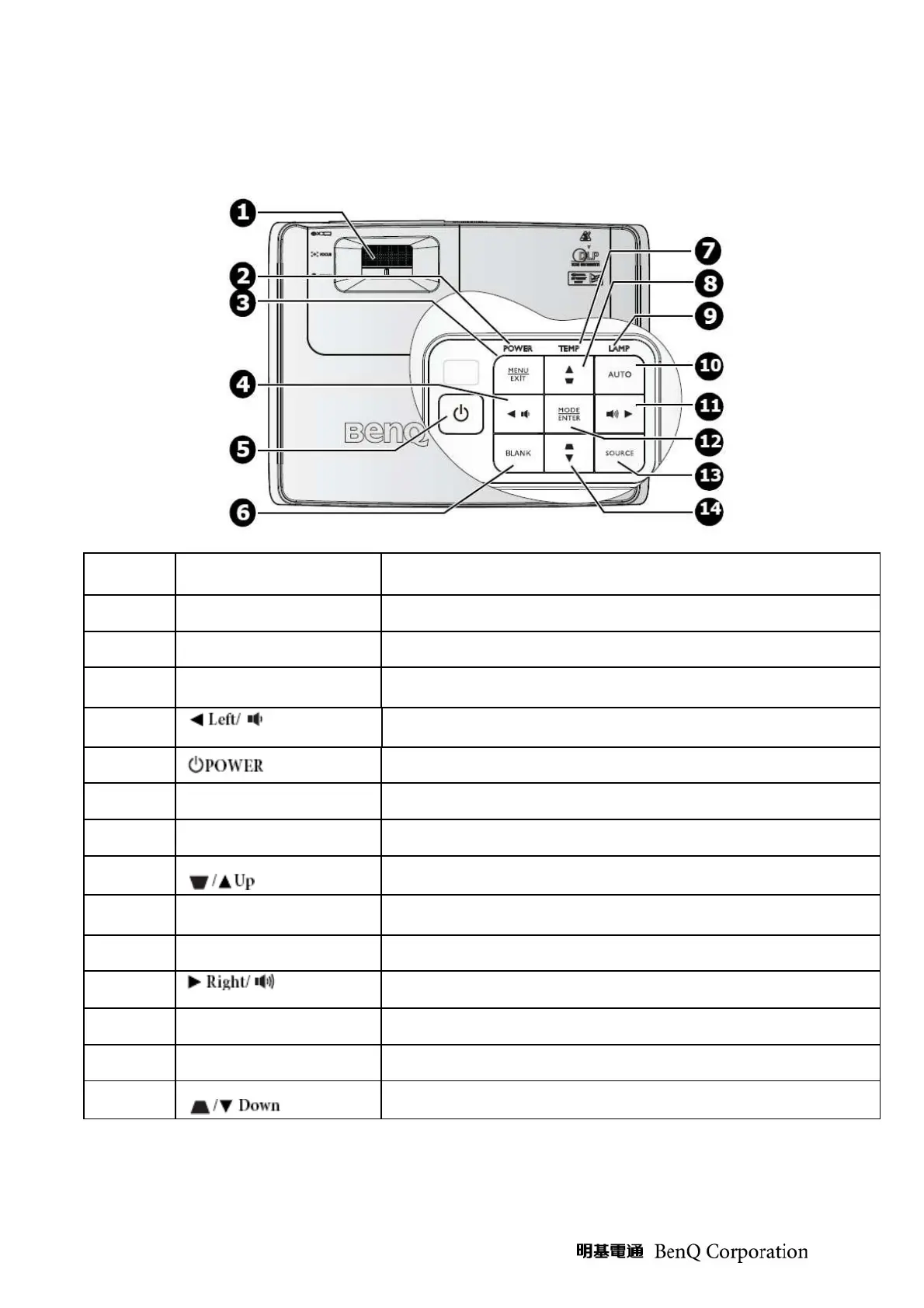
Control Key Pad and LED
I
TEM
L
ABEL
D
ESCRIPTION
1
FOCUS/ZOOM Ring
Used to adjust the projected image appearance
2
Power indicator light
Lights up or flashes when the projector is under operation
3
Menu/Exit
Turns on the On-Screen Display (OSD) menu. Goes back to previous
OSD menu, exits and saves menu setting
4
Decrease volume level
Decrease volume
5
Toggles the projector between standby mode and on
6
Blank
Hides the screen picture
7
Temperature indicator light
Lights up red if the projector’s temperature becomes too high
8
Keystone/Arrow keys
( )
Manually corrects distorted images resulting from an angled projection
9
Lamp indicator light
Indicates the status of the lamp. Light up or flashes when the lamp has
developed a problem
10
Auto
Automatically determines the best picture timings for the display image
11
increase volume level
Increase volume
12
Mode/Enter
Selects an available picture setup mode
13
SOURCE
Display the source selection bar
14
Keystone/Arrow keys
( )
Manually corrects distorted images resulting from an angled projection



 To Next Page