37
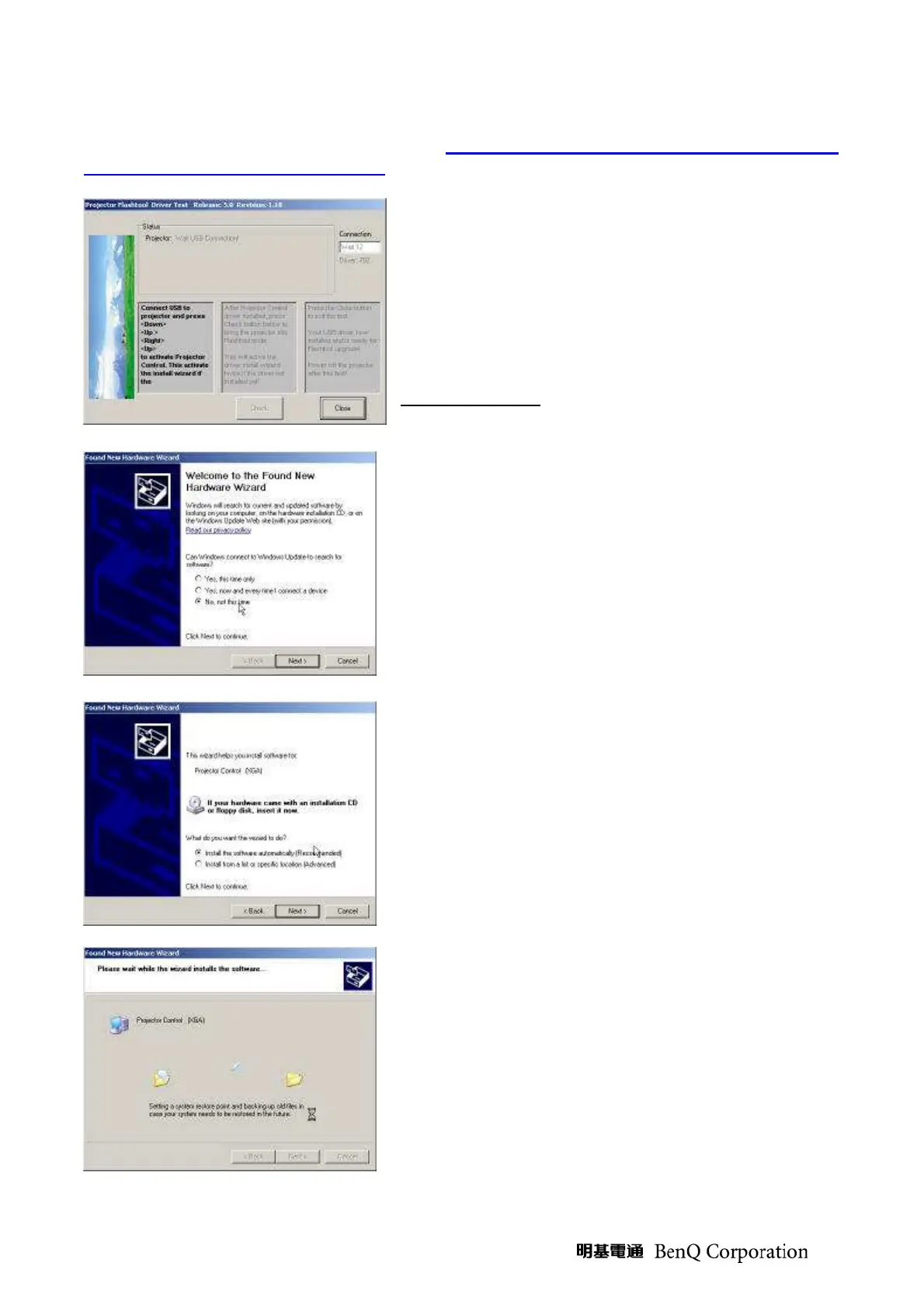
If the driver test application does not launch automatically, run the “Launch
FlashToolBL.exe” from installed short cut at Program> Digital Zoom Projector> projector
flashtool> Launch FlasToolBL.exe
(Step 10) Make sure that the USB cable is firmly
connected between projector and computer connect
the power cord to the projector, and move the power
switch in its ON position (if available) so that projector
is in the STAND BY mode
Press <Down>, <Up>, <Right>, <Up> key in sequence
on keypad. The power and lamp LED will blink and the
Projector Control mode will be enabled.
(Step 11) The New Hardware Wizard launched at the
first time Windows detects a new USB device attached.
Select “No, not this time” and Click on the “Next”
button to continue. (This dialog may change on
different Windows version)
(Step 12) Select “Install the software automatically”
Click on the “Next” button to continue.
In case the wizard cannot find the driver (the
ProjectorControl.inf), please select the other advanced
option and specify the driver location manually.
(Normally at C:\Program Files\Digital Zoom
Projector\Projector Flash Tool)
(Step 13) Windows updates the USB Projector Control
driver when found.



 To Next Page