10 Universal Cellular Communicator
Fault LED
This LED is usually off. It flashes to indicate a fault. The communicator monitors faults in the order given in table 9. The most
important fault status is indicated, with the respective number of flashes of the RED LED, as shown in the following table.
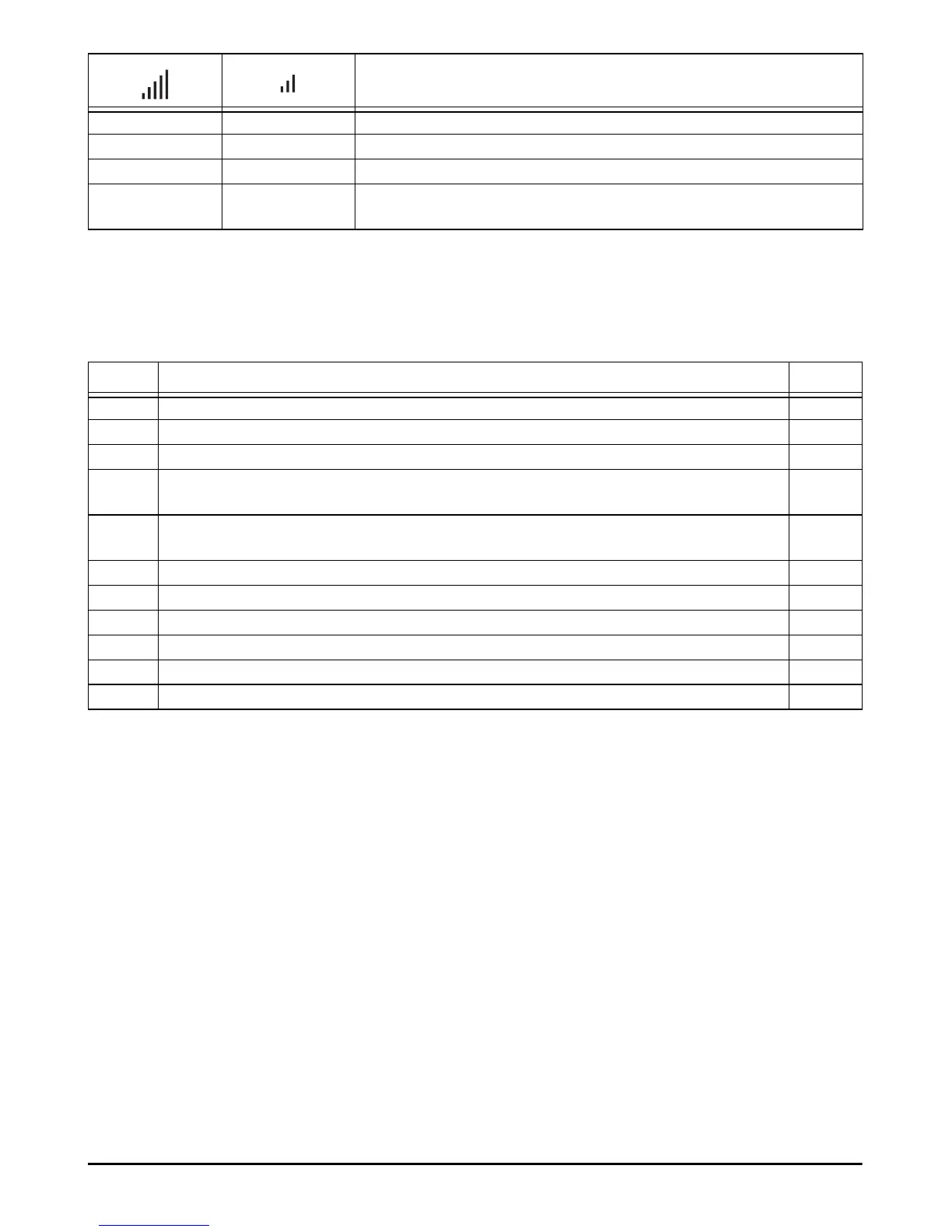
Type of communication
Slow flashing Slow flashing Initialisation: the LEDs flash until the communicator receives a GSM signal.
Fast flashing Off SMS incoming: the LED flashes for a few seconds.
Slow flashing Off Remote session: the LED may flash for a few seconds after the end of the session.
Off Slow flashing Voice call: reports the communicator's voice call, NOT that of the panel to which it is
connected, if any.
Table 8 – Type of communication.
Priorities Description Flashes
1 (HIGH) Firmware problem (incorrect firmware): invalid data in external flash memory. 1
2 Power problems: the power voltage falls below 10 V. 2
3 Battery problems: the battery voltage falls below 3.4 V. 3
4 Factory PIN: the EN50136 option is enabled and the User, Installer or Level 4 PIN is that set in the
factory.
4
5 GSM module fault: the microprocessor is unable to communicate with the GSM module during the
initialisation sequence.
5
6 SIM problem: SIM card PIN check enabled. 6
7 GSM network problem: the radio module is unable to connect to the GSM network. 7
8 GPRS/HSPA network problem: the radio module is unable to connect to the GPRS/HSPA network. 8
9 Future use. 9
10 IP 1 receiver problem: initialisation failure; supervision failure; no ACK. 10
11 (LOW) IP 2 receiver problem: initialisation failure; supervision failure; no ACK. 11
Table 9 – Fault LED.



 To Next Page