10
bernette SEWING MACHINE WORKBOOK
STITCH SELECTION, CONTINUED
bernette Model b05
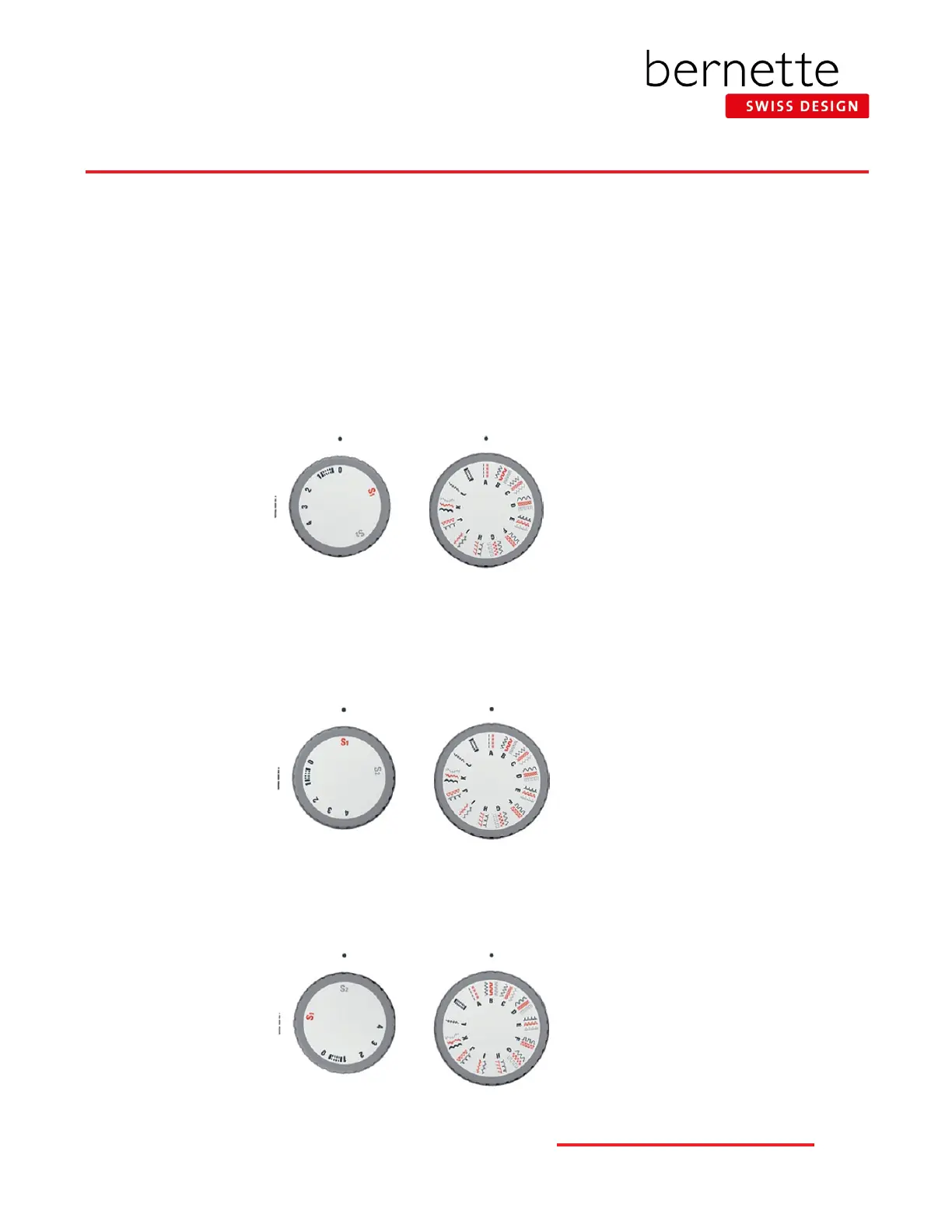
The stitch patterns are divided into categories A to L. Each category can include up to three stitch patterns,which are indicated
by the colors black, gray and red.
NOTE: To prevent damage to the needle and the fabric, ALWAYS move the needle to the topmost position before turning the
Stitch Pattern Selection knob.
Black Stitch Patterns: With the needle up, select the black stitch pattern in a category, set the stitch length knob to a
value between 0 and 4, then turn the Stitch Pattern Selector knob to the left or right until the chosen stitch pattern category
engages in the center underneath setting position «•».
Red Stitch Patterns: With the needle up, select the red stitch pattern in a category, set the stitch length knob to «S1»,
then turn the stitch pattern selector knob to the left or right until the chosen stitch pattern category engages in the center
underneath setting position «•».
Gray Stitch Patterns: With the needle up, select the gray stitch pattern in a category, set the stitch length knob to «S2»,
then turn the stitch pattern selector knob to the left or right until the chosen stitch pattern category engages in the center
underneath setting position «•».
Stitch Pattern
Selector knob
Stitch Pattern
Selector knob
Stitch Pattern
Selector knob
Stitch Length knob
Stitch Length knob
Stitch Length knob



 To Next Page