EasyManua.ls Logo

Bernina 1230 - Test H1; Step Motors, Print S-1230 Functionality; Test H2; Hall Sensors

Bernina 1230
39 pages
Print Icon
To Next Page IconTo Next Page
To Previous Page IconTo Previous Page
Loading...
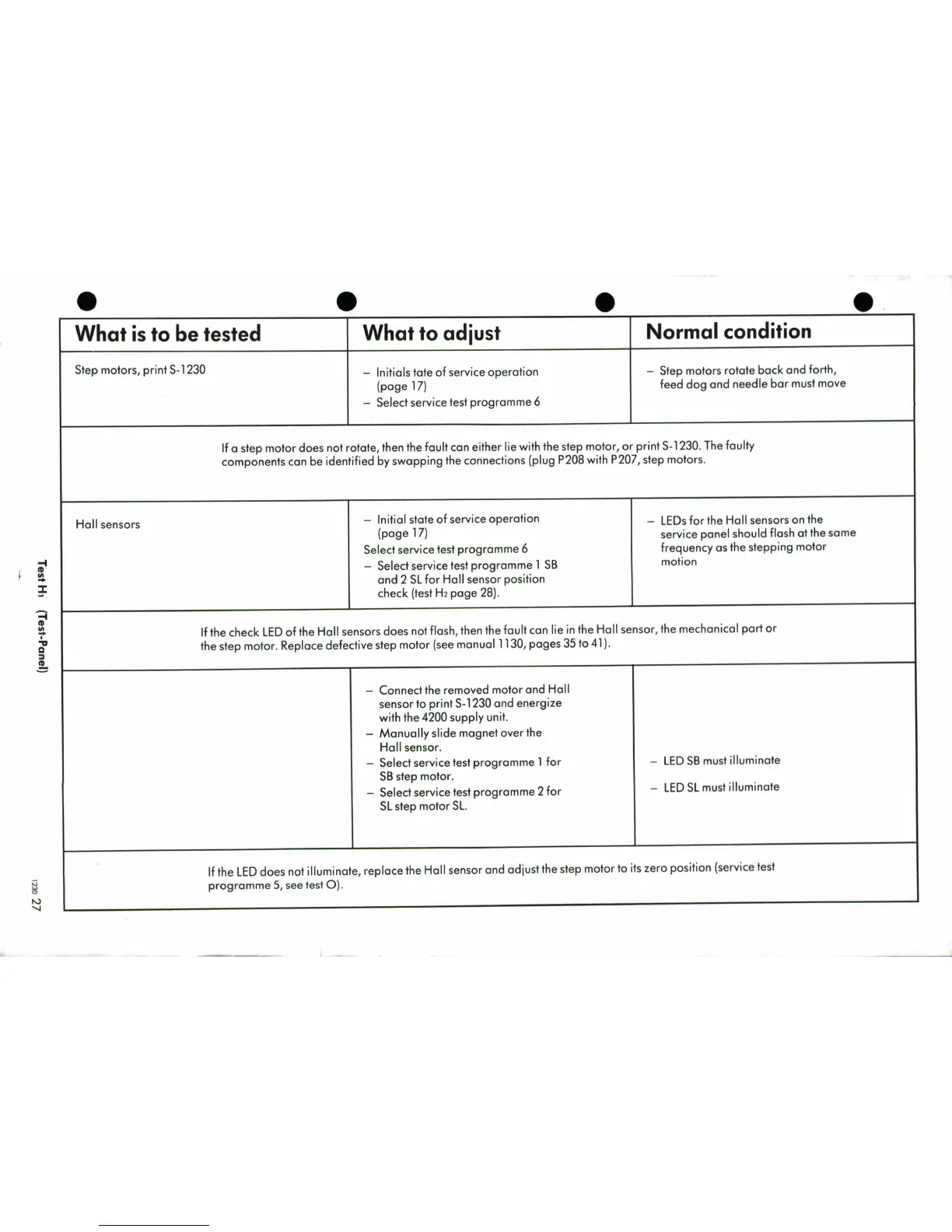
What
is
to
be
tested
What
to
adjust
Normal
condition
Step
motors,
print
S-1230
-
Initials
tate
of
service
operation
-
Step
motors
rotate
back
and
forth,
(page
17)
feed
dog
and
needle
bar
must
move
-
Select
service
test
programme
6
If
a
step
motor
does
not
rotate,
then
the
fault
can
either
lie
with
the
step
motor,
or
print
S-1230.
The
faulty
components
can
be
identified
by
swapping
the
connections
(plug
P208
with
P207,
step
motors.
Hall
sensors
-
Initial
state
of
service
operation
-
LEDs
for
the
Hall
sensors
on
the
(page
17)
service panel
should
flash
at
the
same
Select
service
test
programme
6
frequency
as
the
stepping
motor
a-
Select
service
test
programme
1
SB
motion
and
2
SL
for
Hall
sensor
position
Zcheck
(test
H2
page
28).
If
the
check
LED
of
the
Hall
sensors
does
not
flash,
then
the
fault
can
lie
in
the
Hall
sensor,
the
mechanical
part
or
40
aw
the
step
motor.
Replace
defective
step
motor
(see
manual
1130,
pages
35
to
41
).
-
Connect
the
removed
motor
and
Hall
sensor
to
print
S-1
230
and
energize
with
the
4200
supply
unit.
-
Manually
slide
magnet
over
the
Hall
sensor.
-
Select
service
test
programme
1
for
-
LED
SB
must
illuminate
SB
step
motor.
-
Select
service
test
programme
2
for
-
LED
SL
must
illuminate
SL
step
motor
SL.
If
the
LED
does
not
illuminate,
replace
the
Hall
sensor
and
adjust
the
step
motor
to
its
zero
position
(service
test
programme
5
,
see
test
0).

Related product manuals