My BERNINA
36
BERNINA SEWING MACHINE WORKBOOK
COMBI MODE-LETTERING
Firm woven fabric, 4” x 6”*
Lightweight tear-away stabilizer 4” x 6”*
80/12 Universal
Polyester or cotton embroidery thread
Default
Open Embroidery foot #20/20C/20D
Stitching a word combination:
1. Close the Transition window.
2 Open the "i" menu; select Editing the Complete
Combination. Then touch Pattern Repeat 1x and stitch
the design.
3. Save the combination using the instructions on Page
34 for accessing and programming the memory.
1. Attach Open Embroidery Foot #20/20C/20D.
2. Place the stabilizer behind the fabric.
3. Open Combi Mode. (If a previous combination is on the
screen, delete the combination. See previous page for
directions.
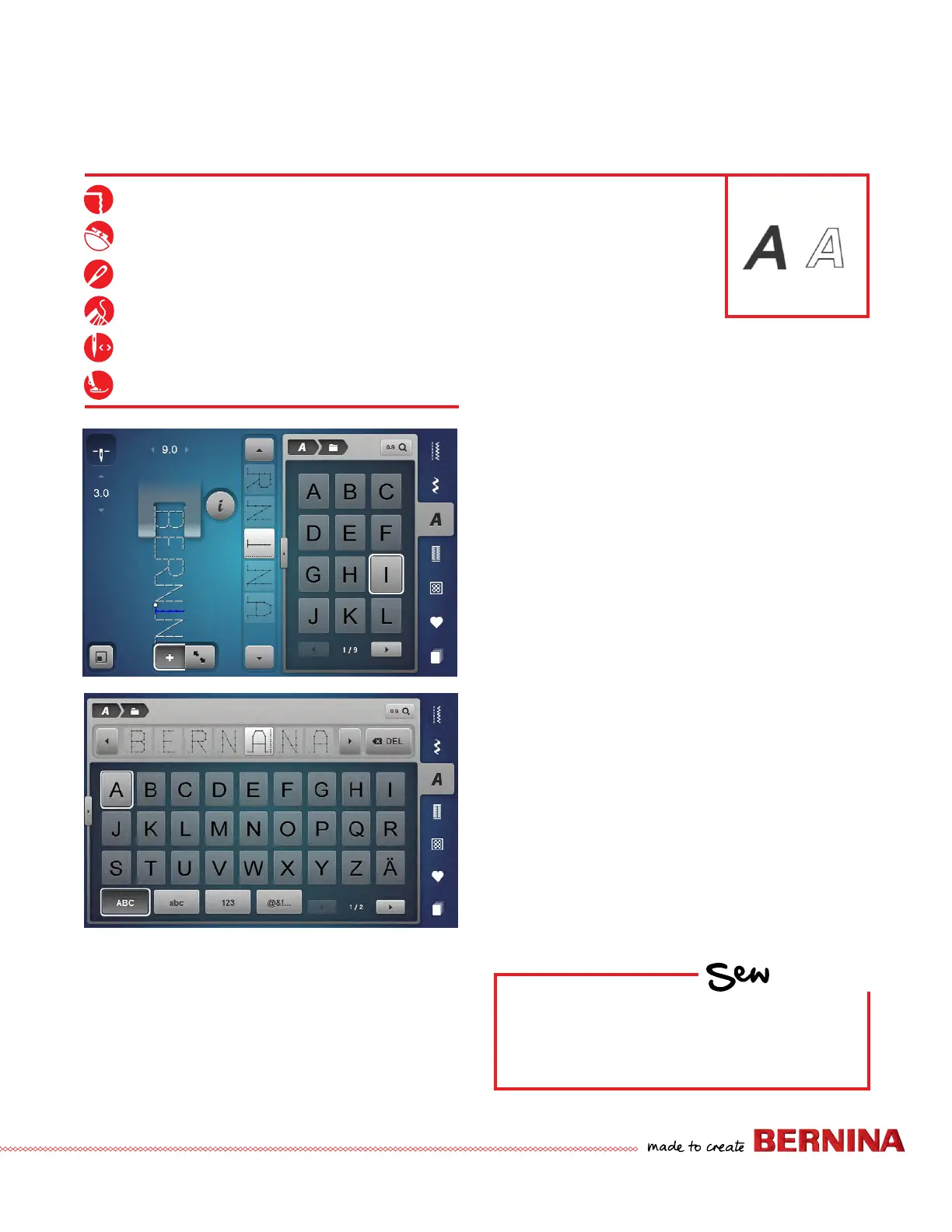
4. Select the Alphabet menu and select an alphabet.
5. Program BERNANA (misspelled).
6. To edit:
• The cursor is the dotted line. Use the navigation
arrows to scroll, OR
• Select the rst (incorrect) "A" in the list. Tap and
swipe to delete the letter.
• To insert the "I", select the letter before the insertion
point (top "N") and type the "I". The insertion
happens after the cursor.
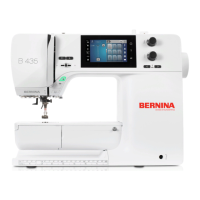
Using the Transition window to enter and edit text
1. Open Combi Mode. (If a previous combination is on the
screen, delete the combination. See previous page for
directions.
2. Touch the Transition icon to open the Transition
Window and type in BERNANA (misspelled).
3. To edit in the Transition view:
• Select the rst (incorrect) "A" and select the Delete
icon to the right.
• To insert the "I", select the letter before the insertion
point ("N") and type the "I".
• Select Transition icon to close the screen.
HOW
Do you know how to:
• Insert at the beginning of a
combination?
• Edit lettering already programmed?
• Retrieve a saved combination?



 To Next Page