My BERNINA
49
BERNINA SEWING MACHINE WORKBOOK
STITCH DESIGNER–B 880 PLUS / 790 PLUS
Editing a Stitch/Engage Triple Stitch
1.
From the Sewing screen, select Stitch #104.
2. Select the Stitch Designer icon.
3. Engage the 9 mm Lock icon.
4. Select the Move icon.
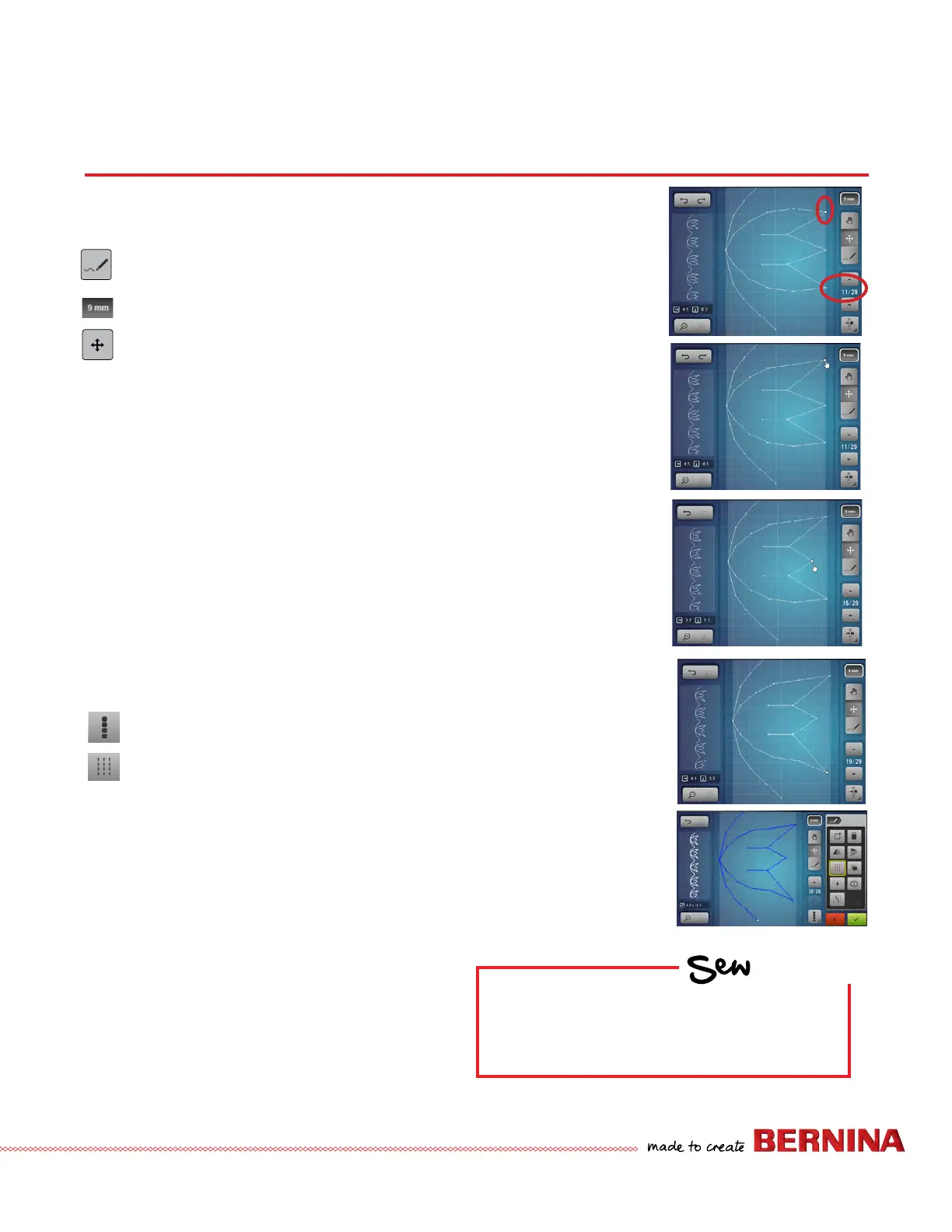
5. Touch the screen to select the point of the rst petal
(Needlepoint 11).
NOTE: Needlepoints can also be selected using the up/
down arrows when single point selection is engaged.
6. Drag the point with the stylus/ngertip or use the Lower
Multi-function knob to move the stitch upward vertically.
7. With Move still engaged, tap the middle petal. Use the
Upper Multi-function knob to move the stitch horizontally
to the left.
8. Repeat for the third petal to move it vertically downward.
Engage Triple Stitch
9. Use the Selection tool to select all; the pattern turns blue.
10. Select Triple Stitch. Stitches can be imported into the Stitch
Designer to add Triple Stitch for a bolder look. Original
stitch patterns with single stitching will look best.
11. Check to conrm; stitch and/or save if desired.
HOW
Do you know how to:
• Move through the design two ways?
• Use Undo?
# 5
# 6
# 7
# 8
# 10



 To Next Page