71
Combi mode
Combi mode/memory
Programming practical stitches/decorative stitches/alphabets
█
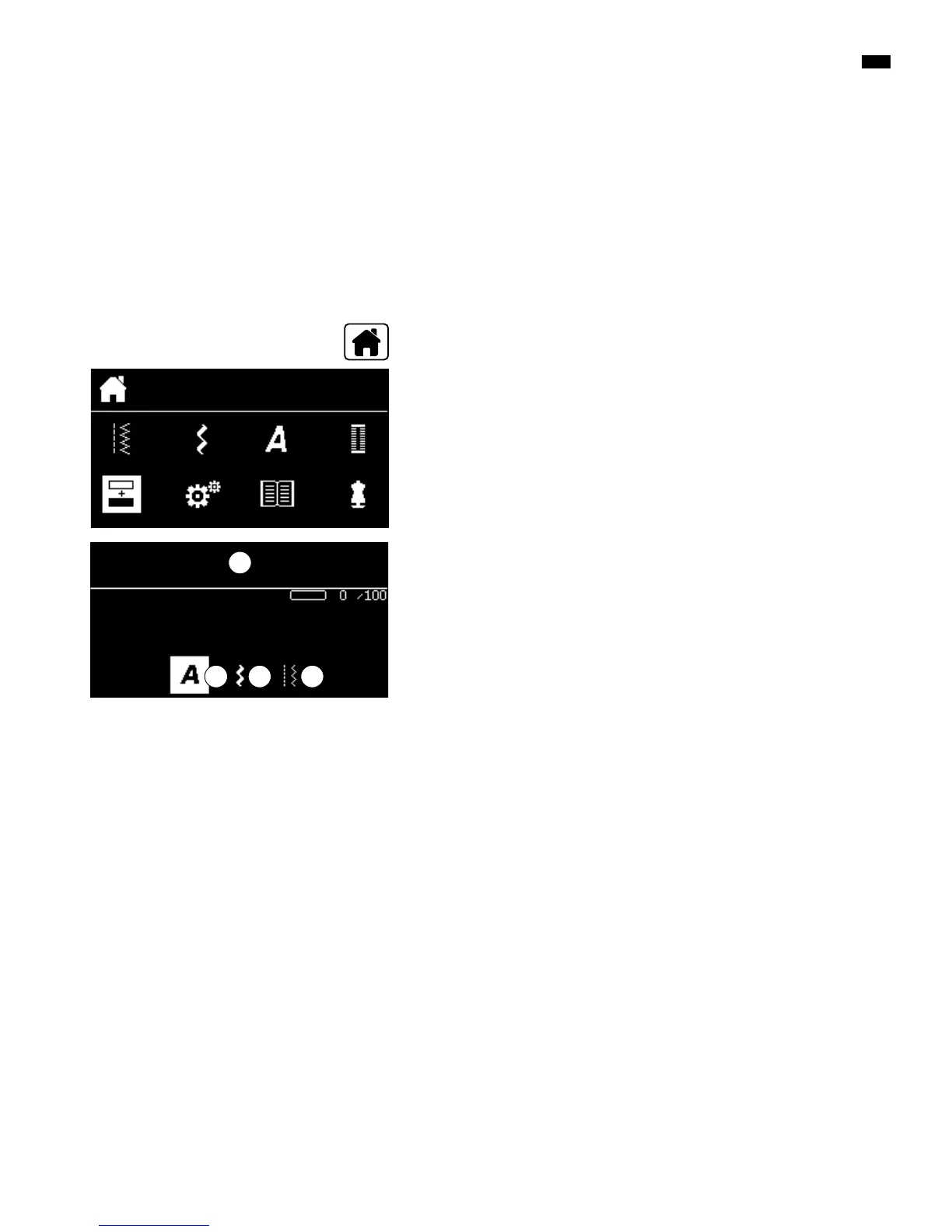
select the «Combi mode»-icon via the «Navigation»-buttons
█
press the «OK»-button to confirm
100 stitch patterns, lettering or numbers can be combined and saved in the
combi mode/memory. The memory is long term. The contents are kept until
they are deleted by the user. A power cut or switching off the sewing computer
does not have any effect on the stored contents. Alterations concerning stitch
length or stitch width as well as needle position can be made at any time.
Single stitch patterns, lettering or numbers can be deleted or added.
Application of the «Navigation»-buttons within one stitch pattern
category/alphabet
█
press and hold one of the «Navigation»-buttons
►
quick scrolling through the stitch pattern category/alphabet
█
press the «right»-button at the end of the line
►
the first pattern of the next line is activated
█
press the «left»-button at the beginning of the line
►
the last stitch pattern of the previous line is activated
█
press the «right»-button at the end of the alphabet/stitch category
►
the first pattern of the alphabet/stitch category is activated
█
press the «left»-button at the beginning of the alphabet/stitch category
►
the last pattern of the alphabet/stitch category is activated
►
stitch pattern in the last row is activated
█
press the «down»-button
►
letter/stitch pattern at the same position in the first row is activated
►
the letter/stitch pattern in the first row is activated
█
press «up»-button
►
the cursor jumps to the Edit-area
A Edit-area
B Alphabets
C Decorative stitches
D Practical stitches
█
select the desired category and the desired stitch pattern
█
press the «OK»-button to confirm
Stitch patterns can also be selected via the «Direct Selection»-buttons.
C
A
B D
█
press «Home»-button



 To Next Page