74
Combi mode
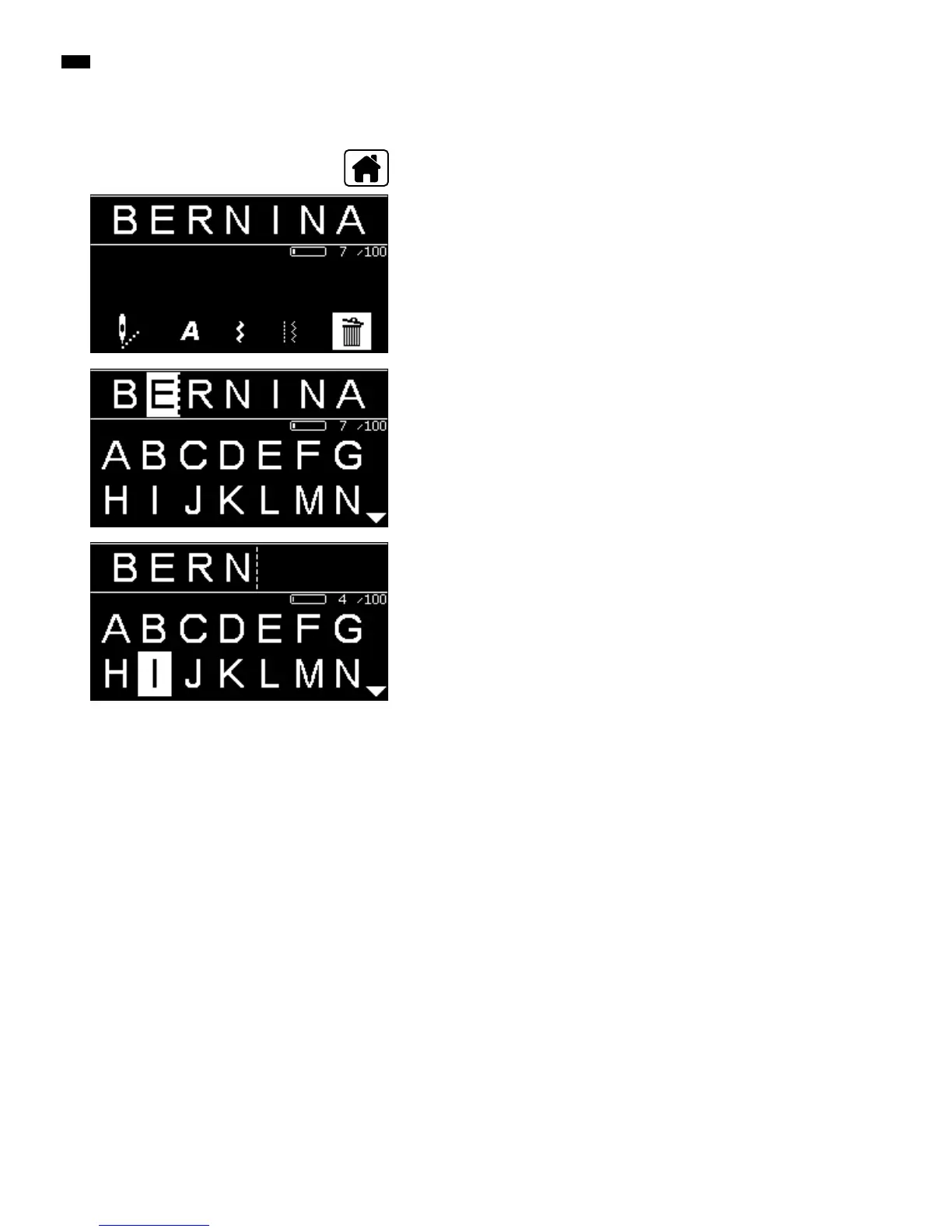
Correcting the combination
█
select the «Combi mode»-icon via the «Navigation»-buttons
█
press the «OK»-button to confirm
►
the Combi-mode-Display appears
█
select the «Delete»-icon
█
press the «OK»-button to confirm
►
the complete combination is deleted
Deleting a single stitch pattern/letter
█
press the «Navigation»-button «up» until the cursor is in the Edit-area
█
place the cursor to the right of the stitch pattern/letter to be deleted via the
«Navigation»-buttons «right/left»
█
press the «clr»-button
█
the stitch pattern/letter to the left of the cursor is deleted
Adding stitch patterns/letters
█
press the «Navigation»-button «up» until the cursor is in the Edit-area
█
place the cursor at the desired position via the «Navigation»-buttons «right/
left»
Adding the stitch pattern/letter at the beginning of a combination.
█
place the cursor to the «left» of the first stitch pattern/letter via the
«Navigation»-buttons
█
press the «Navigation»-button «down»
█
select the desired stitch pattern/letter in the selected category
█
press the «OK»-button to confirm
►
the stitch pattern/letter is inserted to the right of the cursor in the Edit-area
Leaving the combi mode/memory
█
press «Home»-button
►
the Main Display appears
►
the combination is saved
Delete the complete combination
█
press «Home»-button



 To Next Page