72
Combi mode
►
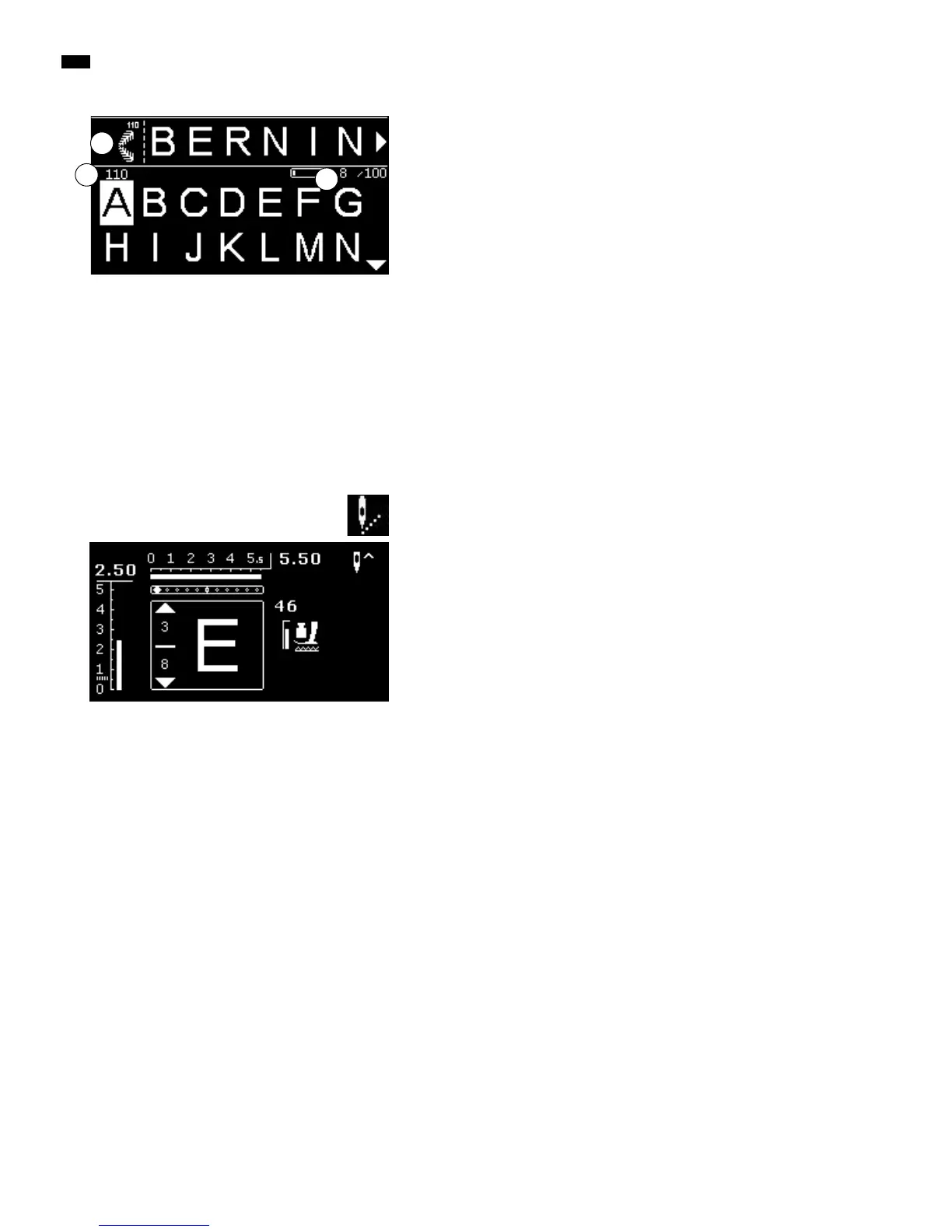
the entered stitch patterns/letters are displayed in the Edit-area 1
►
the cursor indicates where the desired stitch pattern/letter is added
►
to the right of the cursor you can add, to the left of the cursor you can
delete
►
the number 2 of the active stitch pattern is shown
►
if the complete combination can't be displayed, it will be indicated by arrow
symbols on the right and on the left of the combination
█
scroll through the combination via the «Navigation»-buttons «right/left»
►
the occupied memory locations 3 are indicated
█
jump from the selected category to the Edit-area and back via the
«Navigation»-buttons «up/down»
2
1
These stitch patterns and programs can't be programmed:
Securing program No. 5
Darning program No. 22
Basting stitch No. 30
Buttonholes
Button sew-on program No. 60
Eyelets No. 61, No. 62
Sewing a combination
Creating a combination.
█
press the «Back»-button twice
►
the Combi-mode-Display appears
█
select the «Needle»-Symbol
█
press the «OK»-button to confirm
►
the Sewing Display of the combi mode appears
█
sew combination
█
you can scroll through the combination via the «Navigation»-buttons
►
the displayed stitch pattern can be edited (e.g. mirroring etc.)
3



 To Next Page