Be242 Be242RB Be242-22 OEM's Manual V4.X.XX - March - 2023 page 10
6.12 Programming
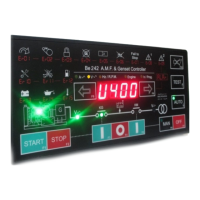
1) - Enter the Programming mode (see section 6.10).
2) - Press the [←F8] or [F9→] push button to select a parameter (see the list in section 7.0).
3) - To adjust the parameter, press [START-F1] and [TEST ↑] (or [AUTO ↓]) simultaneously.
(example: [P.10] = [500]; the Overvoltage limit is set to 500 Volt. If you want to set 450, push and hold
[START-F1] and [AUTO ↓] until the display indicates 450 )
4) - To adjust additional features of the same parameter, press [STOP-F2] and [TEST ↑] (or [AUTO ↓])
simultaneously (example: [P.10] [10'']; the timing delay of Overvoltage is set to 10 seconds)
5) - Press the [←F8] or [F9→] push button to select another parameter.
6) - Follow the instructions of sections 6.13 or 6.14 according to your needs.
6.13 Saving
Press and hold the [ACK-F10] and [F9→] push buttons simultaneously until the [SaVE] message appears
(approximately 5 seconds); the Be242 saves the settings and will enter the OFF mode. You can select the mode
of operation as indicated in section 2.0.
Note: if the memory fails, the message [FAIL] will appear. Try again to save or remove the power supply. If the
message persists, the Be242 is damaged and should be returned to Bernini Design for repair.
6.14 Exit without Saving
Press the [OFF] push button to enter the OFF mode without saving the parameters. You can select a mode of
operation as indicated in section 2.0.
6.20 Re-programming Default settings
The parameters of the Be242 are programmed in the factory with default settings (section 7.0). To restore them,
enter the Programming Mode (section 6.10). When the message [P.0] appears, follow the instructions:
1) - Press and hold the [←F8] and [F9→] push buttons simultaneously until the display blinks twice. Select
options 2A or 2B according to your needs.
2A) - Press the [OFF] push button to exit the procedure without saving the parameters.
2B) - Press and hold the [ACK-F10] and [F9→] push buttons simultaneously until the [SAVE] message appears
(approximately 5 seconds); the Be242 saves the settings and the display will indicate [P0]. Push the [OFF] push
button in order to enter the OFF mode.
6.30 Reading the parameters
To read the parameter settings, follow the instructions:
1) - Press the [OFF] push button until the LEDs and display turn off (OFF mode of operation).
2) - Push the [←F8] or [F9→] push button to select a parameter (section 7.0).
3) - Push [START-F1] to display the setting of the parameter (example: [P.10] > [450]; the Overvoltage limit is
set to 450 Volt).
4) - Push [STOP-F2] to display the setting of the sub-parameter (example: [P.10] > [2'']. The timing delay of
Overvoltage is set to 2 seconds).
5) - Push the [←F8] or [F9→] push button to select another parameter.
NOTE: if the push buttons remain inoperative for more than 5 minutes, the Be242 enters the OFF mode.


 To Next Page