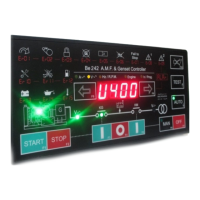
Be242 Be242RB Be242-22 OEM's Manual V4.X.XX - March - 2023 page 9
4.30 LOG EVENTS
To have access to the LOG events follow the instructions:
- Push the [OFF] button.
- Push and hold the [STOP] button until the message [Hist.] appears on display (approx. 10 seconds).
- Release the [STOP] button.
- Using [←F8] and [F9→] you can browse the events E01 up to E100.
- Push the [STOP] button to display the code of the EVENT (see table 4.10). The message [----] indicates ‘No
Event’ in the memory.
- To quit the LOG EVENTS push the [OFF] button.
Note: to cancel the LOG EVENTS push the [←F8] and [F9→] buttons simultaneously until the display blinks one
time (approx. 10 seconds).
Section 5.0 LED indicators
5.1 Lamp and Display Testing
To test the LEDs and DISPLAY push the [OFF] push button; the display turns off (OFF mode of operation). Push
and hold the [←F8] and [F9→] push buttons simultaneously. The LEDs and DISPLAYs remain energized as long
as the push buttons are pressed and held together.
Section 6.0 Programming / Reading the Parameters
The 4-digits display indicates the code of a parameter and its setting. Section 7.0 lists all parameters. To enter
the Programming Mode, use the following instructions. To use a password see sections 6.40, 6.50 and 6.60.
Monitoring via TCP-IP is also allowed.
6.10 Enter the Programming Mode
1) - Provide a voltage from a battery supply of over 11.5 V. Push the [OFF-F7] push button to enter the OFF
mode; the LEDs and display turn OFF (the dot on the right side of the display will start to blink)
2) - Push and hold the [F9→] and [ACK-F10] push buttons simultaneously for about 5 seconds, until the yellow
Led [h/Prog.] starts to blink. When the display indicates [ProG], release the buttons.
3) - If the Be242 is password protected (*), the messages [PASS] and [42.42] will appear in sequence; you are
required to follow the instructions of Table 6.11. If the Be242 is not password protected, the programmable
parameter [P.0] will be displayed and the Be242 is ready for programming (section 6.12, step-2).
(*) Note: the password consists of 2 groups of digits ranging from 0 to 99. Example: [12.34]; 12 is the 2-digit code
on the left, and 34 is the 2-digit code on the right.
TABLE 6.11: Enter the PASSWORD
1) - Push [TEST] or [AUTO] in order to choose the proper code (between 00 and 99, except 42).
2) - Push [F9→] to select the 2 digits on the right side.
3) - Push [TEST] or [AUTO] in order to choose the proper code (between 00 and 99, except 42).
4) - Push [ACK-F10] to confirm the password; if the password is ok, the Be242 will indicate [P.0] and the unit is ready
for programming. If the password is wrong, the display will indicate [4242] and you are required to insert the correct
password.
If you lose the password, the unit must be returned for service.


 To Next Page