Be242 Be242RB Be242-22 OEM's Manual V4.X.XX - March - 2023 page 7
Section 3.0 Display measurements
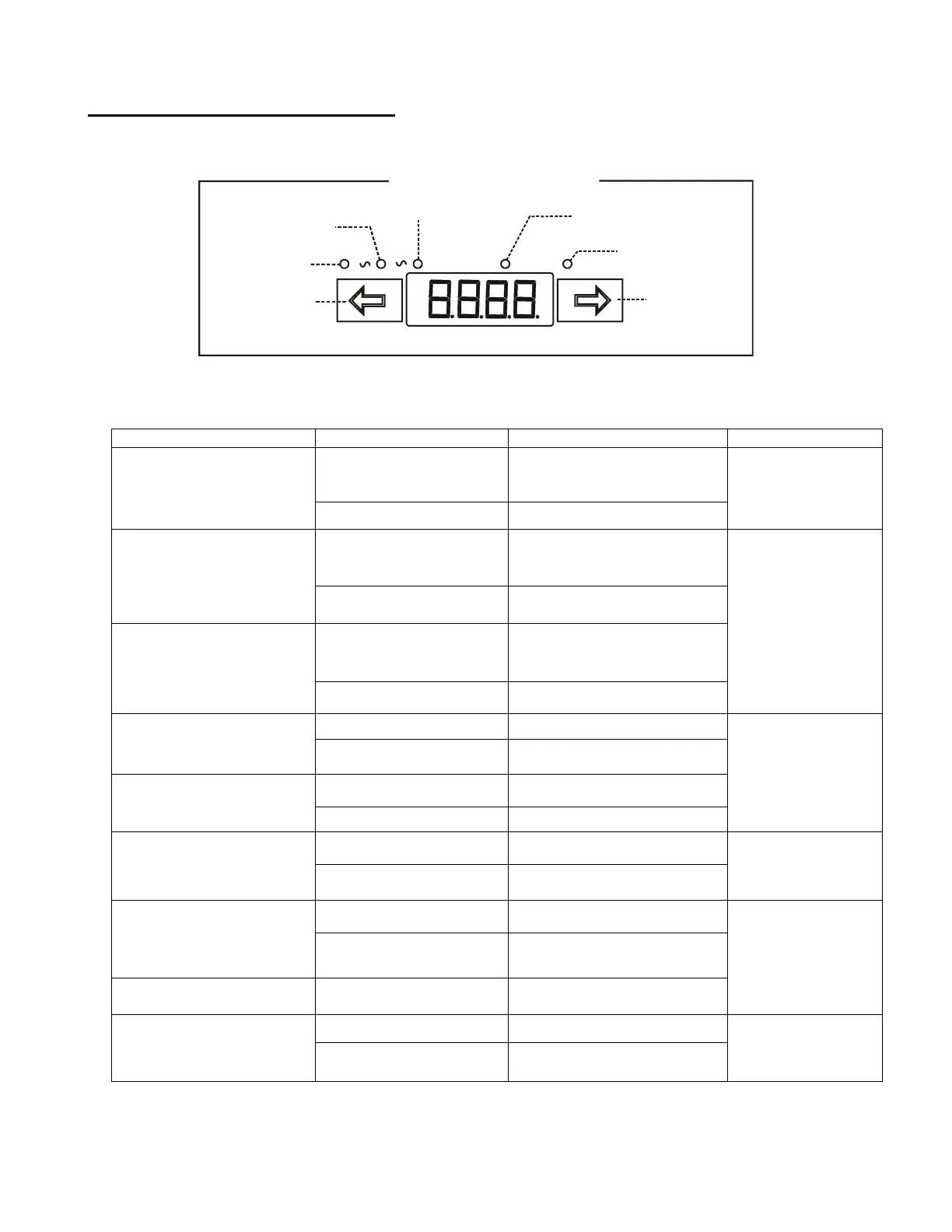
The Be242 features a 4 Digit display, two push buttons and 5 yellow LEDs as indicated below.
[ F9 ]
Display control
[ F8 ] control
F8
F9
4Digit Display
OIL-°C-%FUEL-Vb
Display menu
h-count - Programming
Display menu
Frequency-Speed
Display menu
Vac-Generator-Mains
Display menu
Generator-Current
Display menu
Pushbutton
Pushbutton
EngineA V Hz / R.P.M. h / Prog.
Display and Menus
Use [←F8] and [F9→] to select a menu. Use [ACK-F10] (see the layout in section 1.0) to display the name of the
parameter. The OFF mode of operation shuts down the display and turns on the dot on the right side of it. Push
a button to turn on the panel. The following table includes the functions of the display.
The Current of the
Generator or Utility Power
(0 up to 1000A)
[AXXX] Ampere L1
[-XXX] Ampere L2
[_XXX] Ampere L3
A ac menu
yellow indicator
The Voltage of the
Generator
(60V up to 998V)
[GXXX] Volt L1-L2
[-XXX] Volt L2-L3
[_XXX] Volt L1-L3
V ac menu
yellow indicator
The Voltage of the Mains
(60 V up to 998 V). If the
Mains is simulated, the
display will show the
message [n-on]
[nXXX] (V R-S)
[-XXX] (V S-T)
[_XXX] (L R-T)
The Generator Frequency
(20Hz up to 70Hz)
Hz/RPM menu
yellow indicator
The Mains Frequency
(20Hz up to 70Hz)
The Speed indication
(600RPM up to 4000RPM)
Hz/RPM menu
yellow indicator
Battery Voltage
(5.5 Vdc up to 36 Vdc)
Charger Voltage
(3.0 Vdc up to 36 Vdc)
The Hours-count: 0 up to
50,000 h.
h/Prog menu
yellow indicator
(*)NOTE: X indicates a numerical digit, if the measurement is out of range, the display will indicate [- - - -]


 To Next Page