Better Packages Inc. 10
Motor Brush
The motor brushes will last a long time but usually not as long as the rest of the machine.
If the motor stops working or runs excessively slow, the motor brushes may need
replacing.
(Note: Always unplug machine when performing service to machine)
Procedure
1. Remove the water bottle, tank and brushes
2. Remove the right side cover from the machine by removing the (5)
screws that fasten the cover to the frame.
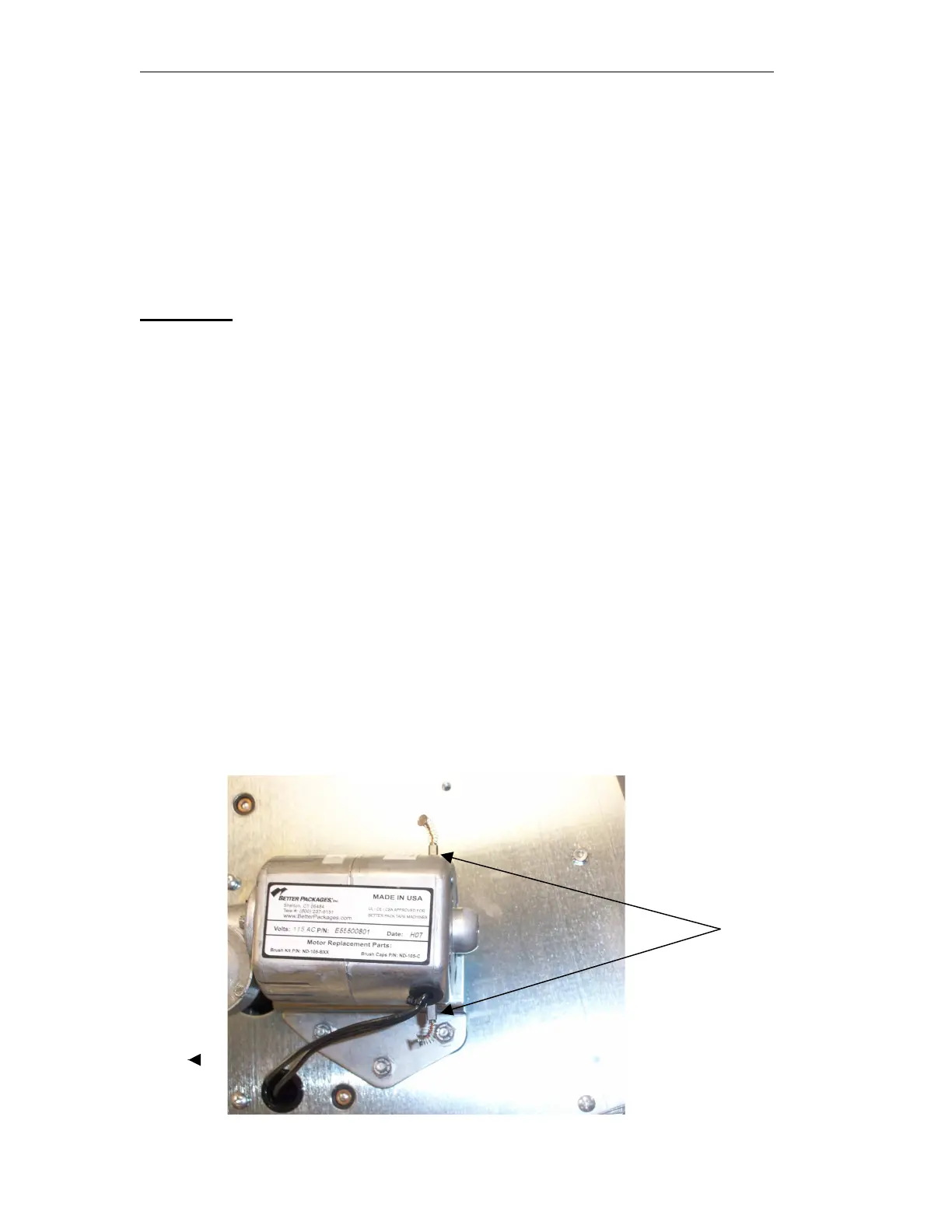
3. The motor should now be visible. Locate the (2) black slotted brush
caps on the top and bottom of the motor. Remove them with a flat
screwdriver by turning them counterclockwise.
4. Pull the brushes out of the motor. Attached to the cover is a spring,
which is attached to a small rectangular shaped carbon brush. Make
sure the brush comes out before inserting the new brush in. Usually the
brush will come right out, but if it doesn’t, insert a small object, e.g. a
paper clip into the hole to free it up. If necessary tip the machine up so
that the brush will fall out. If you have compressed air now is a good
time to blow the residual carbon dust out of the motor. If air is not
available, just tap on the motor with it positioned so the dust can fall
out of the brush holder.
5. If either brush is less than ¼” long, both brushes should be replaced.
Insert the brush into the brush holder being sure to match the concave
of the brush with the motor. Screw the brush caps back onto the motor.
Remove caps to
Change brushes


 To Next Page