17
Room temperature mode
If you want to use the thermometer to measure the room temperature you
need to switch to room temperature mode.
•
With the thermometer switched on, briefl y press the MODE/MEM but-
ton twice.
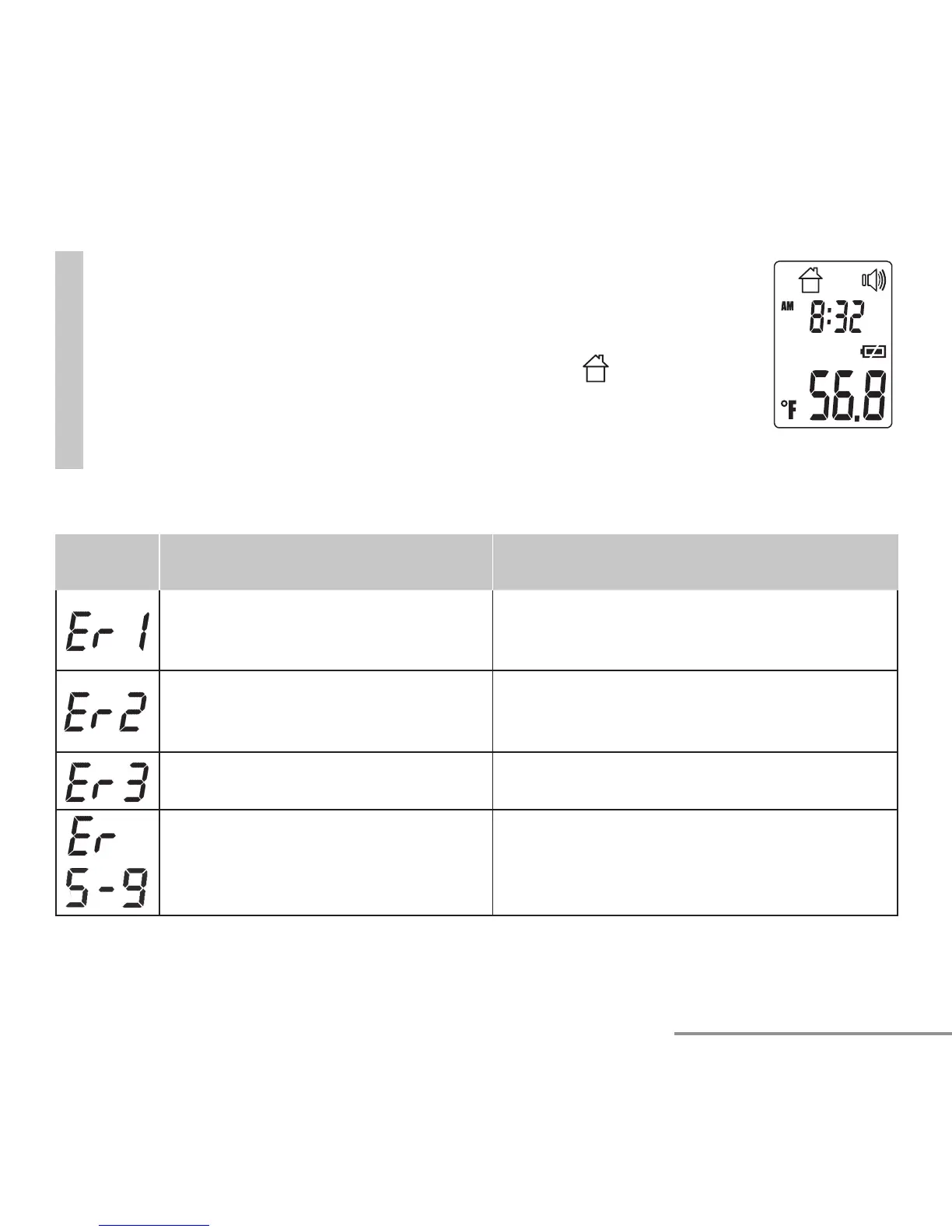
The device switches to the room temperature mode
.
•
The room temperature is immediately displayed (fi g. 10).
Measurements taken in room temperature mode are not stored.
Fig. 10
9. Error messages
Error
message
Problem Solution
Measurement during self-test,
device not yet ready for measure-
ment.
Wait until the forehead symbol stops fl ash-
ing.
Large variation in room tempera-
ture.
Store the device for at least 30 minutes
in a room with room temperature
(50 –104 °F / 10 – 40 °C ).
Room temperature below <50 °F,
>1 0 4 ° F ( < 1 0 ° C o r o v e r 4 0 ° C ) .
Room temperature must be between 50 °F
and 104 °F (10 °C and 40 °C).
Faultless functionality cannot be
guaranteed.
Remove the battery for approx. 1 minute
and then reinsert. In the event of a
repeated error message, contact your
retailer or Customer Services.


 To Next Page