TG 500 – Diversity receiver
10
2.7 Initial operation
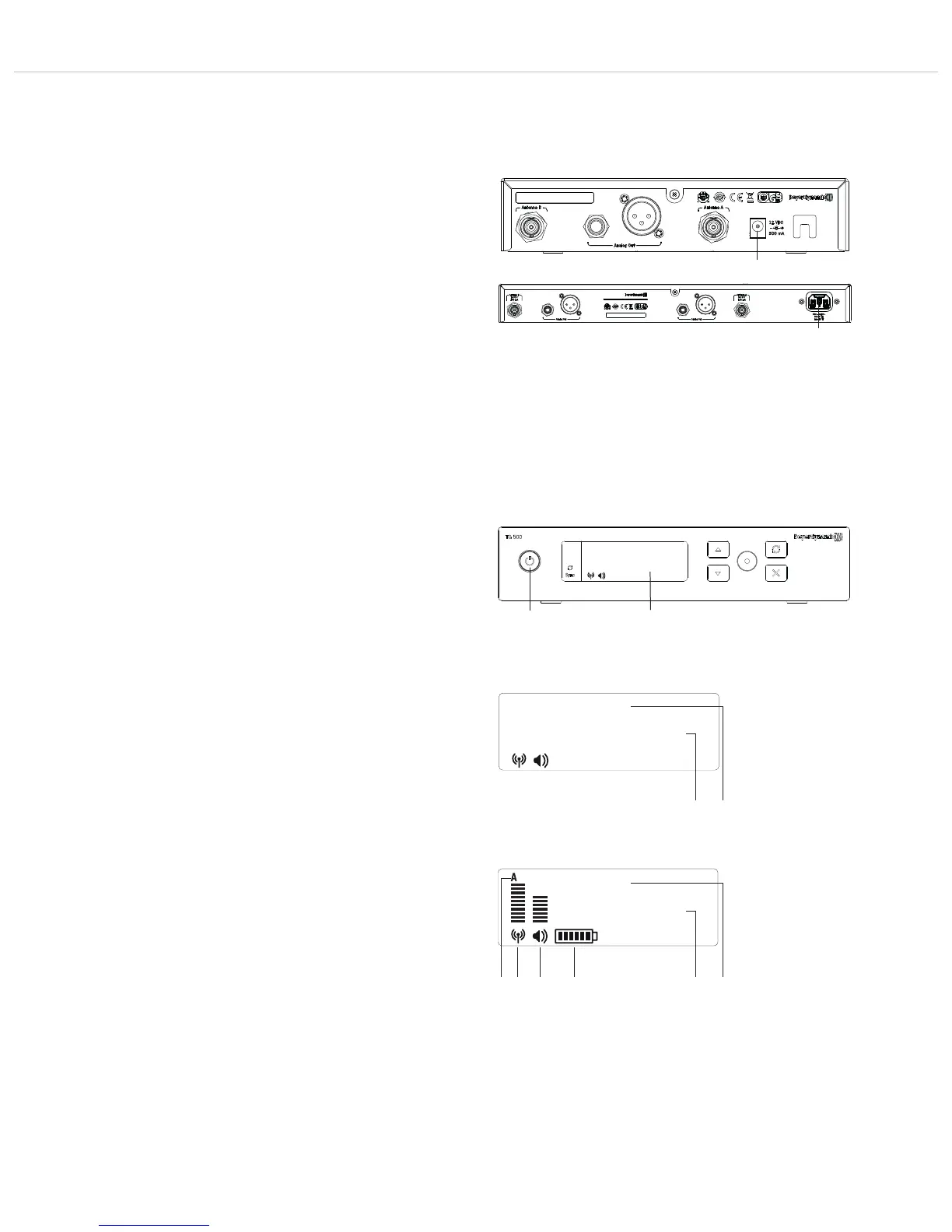
2.7.1 Switching the receiver on/off
• After you have mounted and connected the receiver, switch it on
at the on/off button .
• After switching on the receiver without a transmitter switched on
at the same frequency, the display shows the following by
default:
The currently set name (e.g. name of the performer)
The currently set frequency or group and channel
• Once you have turned on a TG 500 transmitter at the same
frequency or synchronised it with the receiver, you can read off
the audio and HF level on the display from the bar charts.
Note:
If the HF level is displayed even though there is no transmitter
switched on, there may be interference/faults caused by another
transmitter at the same frequency. In this case, you should
select a different frequency on the receiver and then
synchronise your transmitter. You can set a suitable frequency
with the scan function. See chapter 2.8 “Menu settings”,
“Scan” section.
• The receiver has a receiver unit for the antennas A and B. It
automatically switches to and transmits the strongest signal
received. The currently active diversity channel (A or B) is
shown on the display.
• A battery symbol displays the battery status of the switched-
on transmitter. Six bars in the battery symbol indicate full
batteries. If no more bars are shown, or if the battery symbol is
flashing, the batteries only have an operating time of approx.
10 to 30 minutes remaining. In this case, you should replace
the batteries in the transmitter as soon as possible.
Figure 2-19: Display screen with a valid
transmitter signal available
Figure 2-18: Display screen without
a valid transmitter signal available
2.6 Connecting/disconnecting the receiver to/from
the mains
• Check whether the mains voltage indicated on the receiver
corresponds to the mains voltage at the operation site
Caution: Operating the device at a different mains voltage may
lead to irreparable damage to the device
• TG 500SR:
Connect the power adaptor to the DC connector and a power
socket.
TG 500DR:
Connect the power cable to the mains connection and a
power socket.
• To disconnect the receiver from the mains, pull TG 500SR the
plug out of the DC connector and the power adaptor out of
the power socket or, on the TG 500DR, pull the power cable
out of the power socket.
user
794.000
user
800.000
user
794.000
Figure 2-16: TG 500SR receiver mains connection
TG 500SR
TG 500DR
Figure 2-17: Receiver on/off



 To Next Page