Shaoxing Bibo Automatic Equipment Co., Ltd.
Tel:+86 575 88918283 Mobile:+86 133 25759139
Url: www.ourbibo.com E-Mail: bibo@ourbibo.com
1. Caution
Please be careful for human electrostatic especially in winter when touching the
motherboard or extruders. The easiest way to solve this problem is that we can
touch the metal part nearby by hand first before touching the motherboard or
extruders. So the electrostatic usually will be gone before touching the
motherboard or extruders.
SD card or USB drive for the printer should be smaller than 16GB. SD card should be class 4.
★★★If unloading the filament, please load it first, then unload it AT ONCE.
1. Do not leave the extruder heated for long time, just stay with the printer for heating.
The filament might decompose after leaving it at high temperatures, leaving a layer of
contaminants behind in the hot-end nozzle, and the extruder will be clogged.
2. Printing PLA not more than 200 degree, usually 180-190 degree is the best. Setting a
printing temperature above 230-245 degree for PLA is starting to get into bad territory as
the plastic will start to change properties if left in the nozzle for too long and can cause
clogs.
3. During heating or close heating or stop the printing on touch screen or inserting
SD card to the printer, the other operation on touch screen will be not responded as
the former action (heating or close heating or reading the sd card) should be finished first,
and temperature reading will not be correct. You can power off the printer and power
on again, everything will be ok too. Touch screen sometimes may have crash fault
like computer or phone. Restart the printer and it will be ok.
4. It is strongly not recommended to replace the parts, as replacing the parts usually
causes the damage or the new problem. Please kindly contact bibo@ourbibo.com first
before replacing, as there may be much easier way to solve your problem without
disassembling anything. For example, pushing down filament or the metal stick to the
heated extruder is much easier then replacing the hot ends for the extruder clog problem.
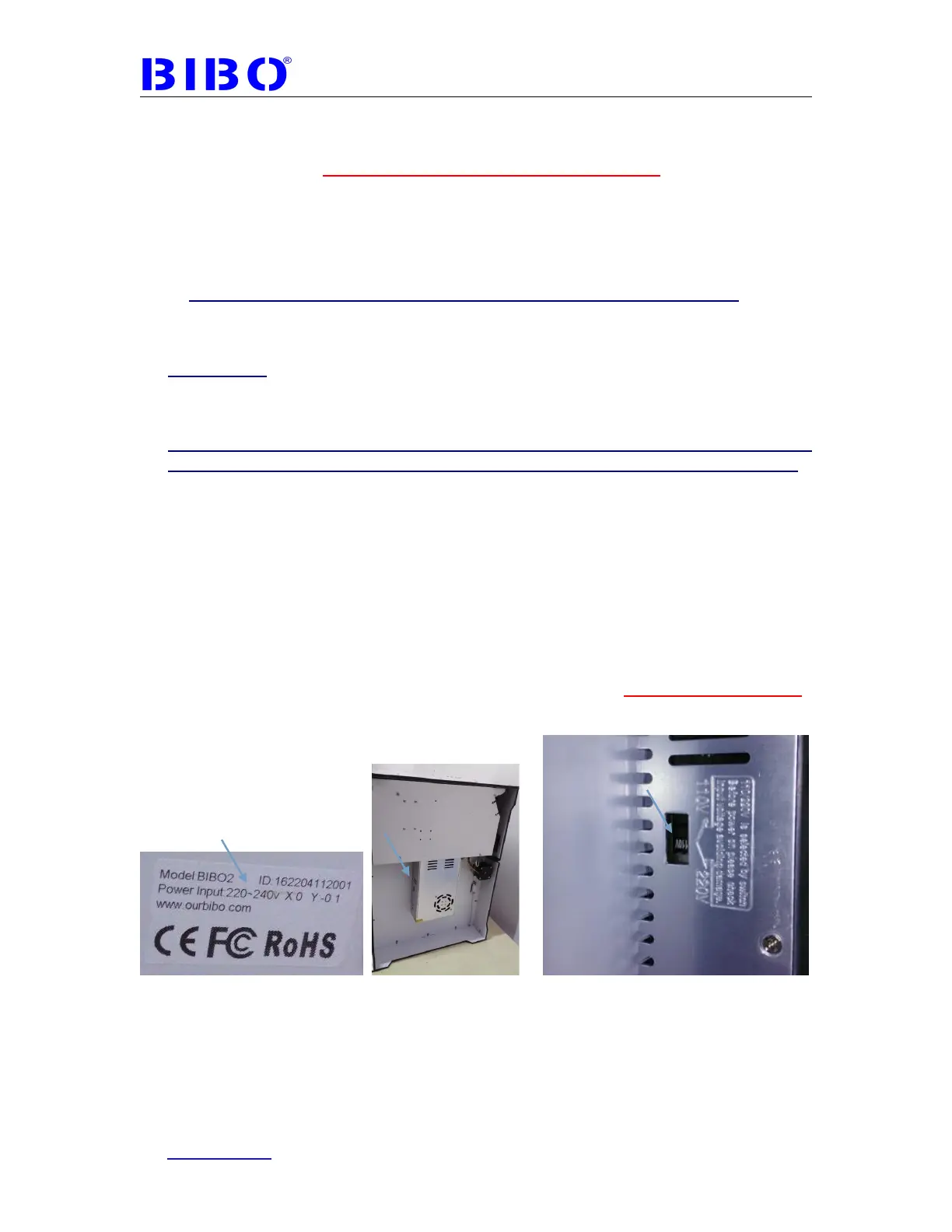
NOTE: Before power on the printer, please check printer input voltage showed on
nameplate whether fit for your local power supply. Nameplate is stick on the backside
or two sides of printer. If not fit for your local power supply or no power to the printer,
change the switch position on power source under the bottom plate of the printer to
avoid damage.
Before repairing or making any alterations to the BIBO 3D printer, it is essential that the machine is turned off
and the power cord is unplugged.
The BIBO 3D printer operates at very high temperature; allow the nozzle, the extruded plastic and heating.
Do not wear gloves when operating or repairing, as entanglement may occur and cause injury.
Do not leave the machine unattended when in operation.



 To Next Page