Shaoxing Bibo Automatic Equipment Co., Ltd.
Tel:+86 575 88918283 Mobile:+86 133 25759139
Url: www.ourbibo.com E-Mail:
bibo@ourbibo.com
9. Function Introduction(including copy printing)
Copy printing means that you can let two extruders printing at the same time
for two same objects, to cut the printing time at least in half. The object size
should be smaller than 33mm in X axis direction. When you generate a
single extruder printing gcode file, just open this file by repetier-host or
notepad (text editor).
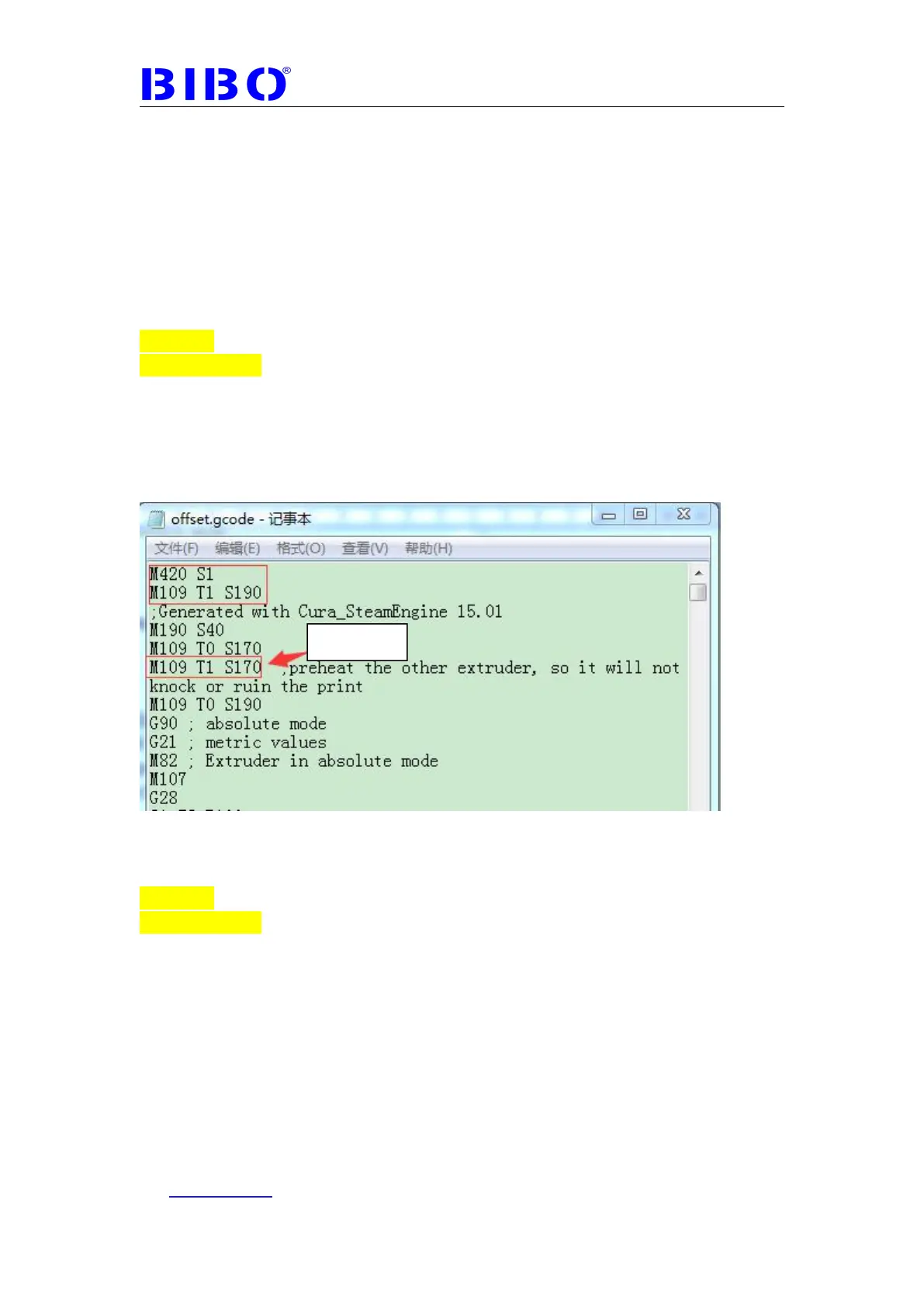
For example, you generate an extruder 1(right extruder) ‘s printing gcode
file, you should add
M420 S1
M109 T1 S190
In the first and second line in the gcode file.
If there is already M109 T1 S169 or M109 T1 S170 in the start gcode, please
delete this line, or the printing temperature will be low as 169 degrees or 170
degrees. Please check the screenshot below:
If you generate an extruder 2(Left extruder) ‘s printing gcode file, you
should add
M420 S1
M109 T0 S190
In the first and second line in the file.
If there is already M109 T0 S169 or M109 T0 S170 in the start gcode, please
delete this line, or the printing temperature will be low as 169 degrees or 170
degrees. Please check the screenshot below:



 To Next Page