AB 01 01/2009 page 16/26
Activating the Alarm Box
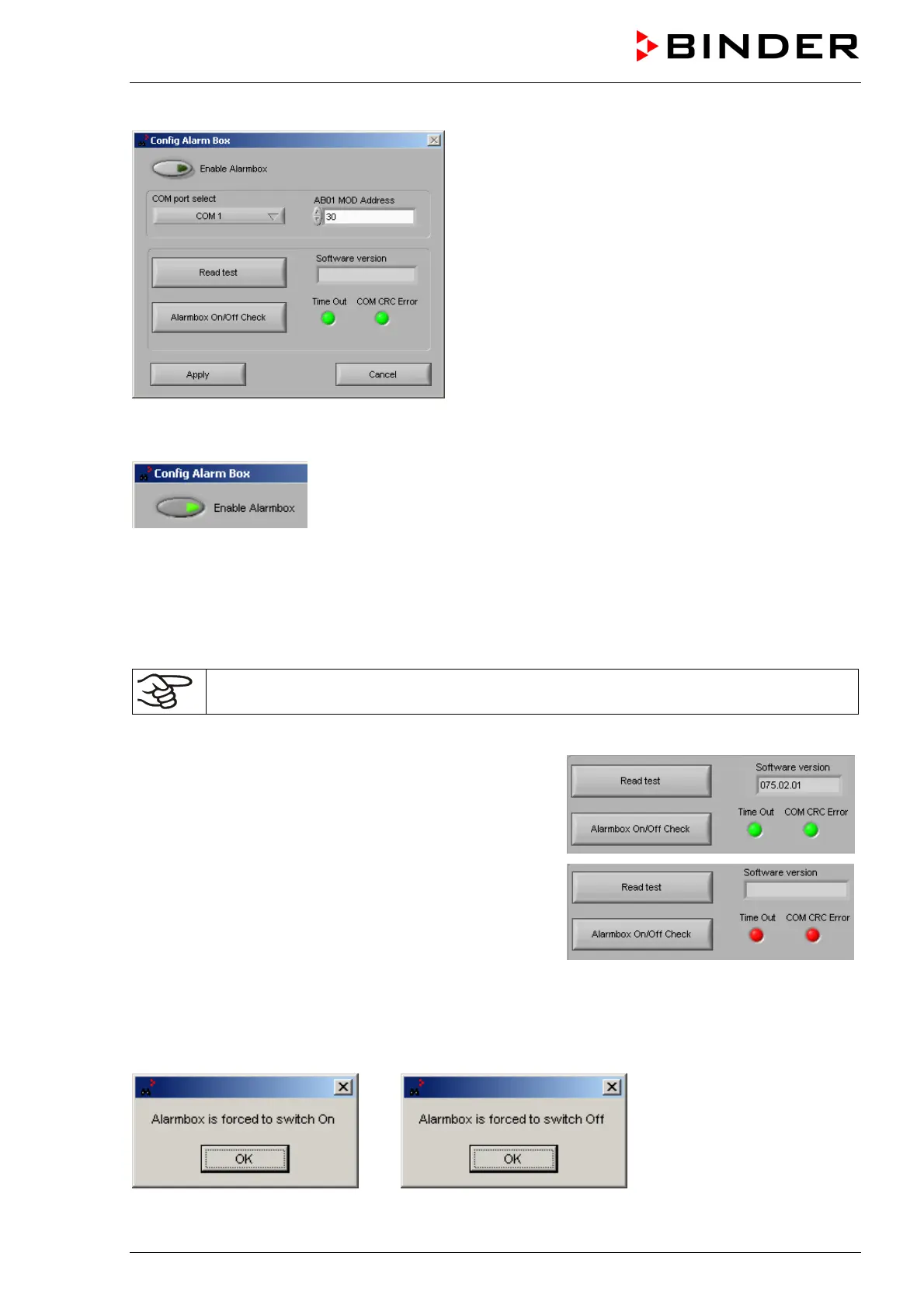
Hit button “Enable Alarmbox“.
Entry of the connection data for the Alarm Box if it is connected to the monitoring computer
Under “COM port select” you can select the COM port of the monitoring computer to which the Alarm
Box is connected
Under “AB01 MOD Address” enter 30, the default Alarm Box address.
Check of the connection to the Alarm Box AB 01 if it is connected to the monitoring computer
The Alarm Box AB 01 must be switched on for the Alarm Box test.
The button “Read Test” serves to check the connection between the Alarm Box and the Watch Tool.
Hit button “Read test”. If the signs “COM CRC Error” and
“Time out” remain green, the connection to the Alarm Box is
OK and functional.
Under “Software version” the answer-back code of the Alarm
Box controller is displayed.
If one of the signs “COM CRC Error” or “Time out” or both of
them light up red, the Alarm Box AB 01 is not or not correctly
connected or for another reason communication is not
possible.
Function “Alarmbox On/Off Check”
The button “Alarmbox On/Off Check” permits manually switching on and off the alarm pilot lamp of the
Alarm Box AB 01. This permits simulating the state of alarm for test purpose.



 To Next Page