AB 01 01/2009 page 17/26
6. Alarm
The alarm function of APT-COM™ 3 is activated only if the supervised parameter previously
has been within the tolerance limits for at least one data sampling.
6.1 Alarm course in the Watch Tool (APT-COM™ 3)
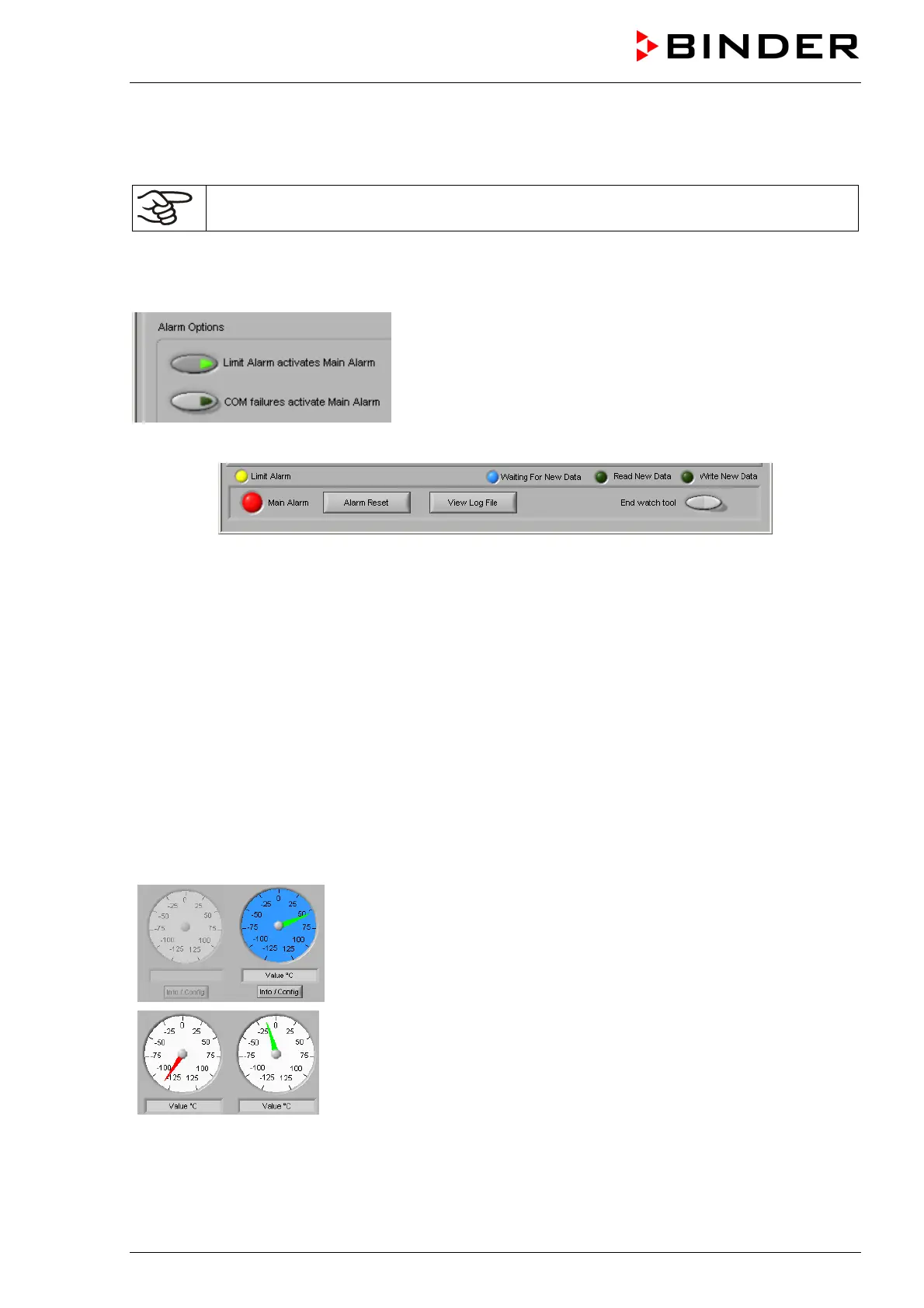
In the submenu “Alarm Options” you can set if a collective alarm
shall be triggered when exceeding the ob limits (“Limit alarm”)
or in case of communication errors (“COM failures”). This
means the red “Main Alarm” sign lighting up, addressing the
Alarm Box AB 01, and, with the appropriate configuration,
sending an e-mail message.
An alarm is indicated by the following signs located in the lower part of the Watch Tool window:
Figure 5: Indications of measurement alarm
• The red collective alarm sign „Main Alarm“ indicates that at least at one of the chambers an error has
occurred.
In addition two signs provide detailed information in addition to the collective red alarm sign
• The blue sign “Waiting For New Data“ lighting up indicates that Watch Tool is waiting fort he next
measuring value and that the monitoring interval set in the measurement window has been exceeded.
• The yellow sign “Limit alarm“ lighting up indicates that APT-COM™ 3 limit overrun or underrun at
least at one of the chambers has occurred.
For limit alarm detailed information is given in the Watch Tool window “Overview. The round pointer
displays indicate (in percent) whether the limits are respected by the monitored parameters. They
show that the last values read from the database are located inside the limit range set at APT-COM™
3. A red or orange pointer color indicated that the limit for the corresponding parameter , has been
exceeded. Limit Alarm is triggered beginning with a deviation of more than 100% from the set limit
(red pointer color), i.e. the yellow sign for limit alarm and the red collective alarm sign light up, and the
Alarm Box AB 01 responds.
No pointer: No active measurements
Red pointer: Deviation of the actual value from the set-point value is more
than 100% of the set limit for this parameter in this measurement: limit
overrun or underrun. In this case, following rundown of the alarm delay
time Limit Alarm is triggered
Orange pointer: Deviation of the actual value from the set-point value
between 75% and 100% of the set limit for this parameter in this
measurement.
Green pointer: Deviation of the actual value from the set-point value up to
75% of the set limit for this parameter in this measurement.
Blue background: Waiting for the next measuring value, monitoring
interval exceeded
If the corresponding menu is activated, an e-mail message is sent to the address indicated in the
“Options“ menu (see for details the APT-COM™ 3 operating manual).



 To Next Page