Redline Operating Manual RE / RF / RI 12/2010 page 42/46
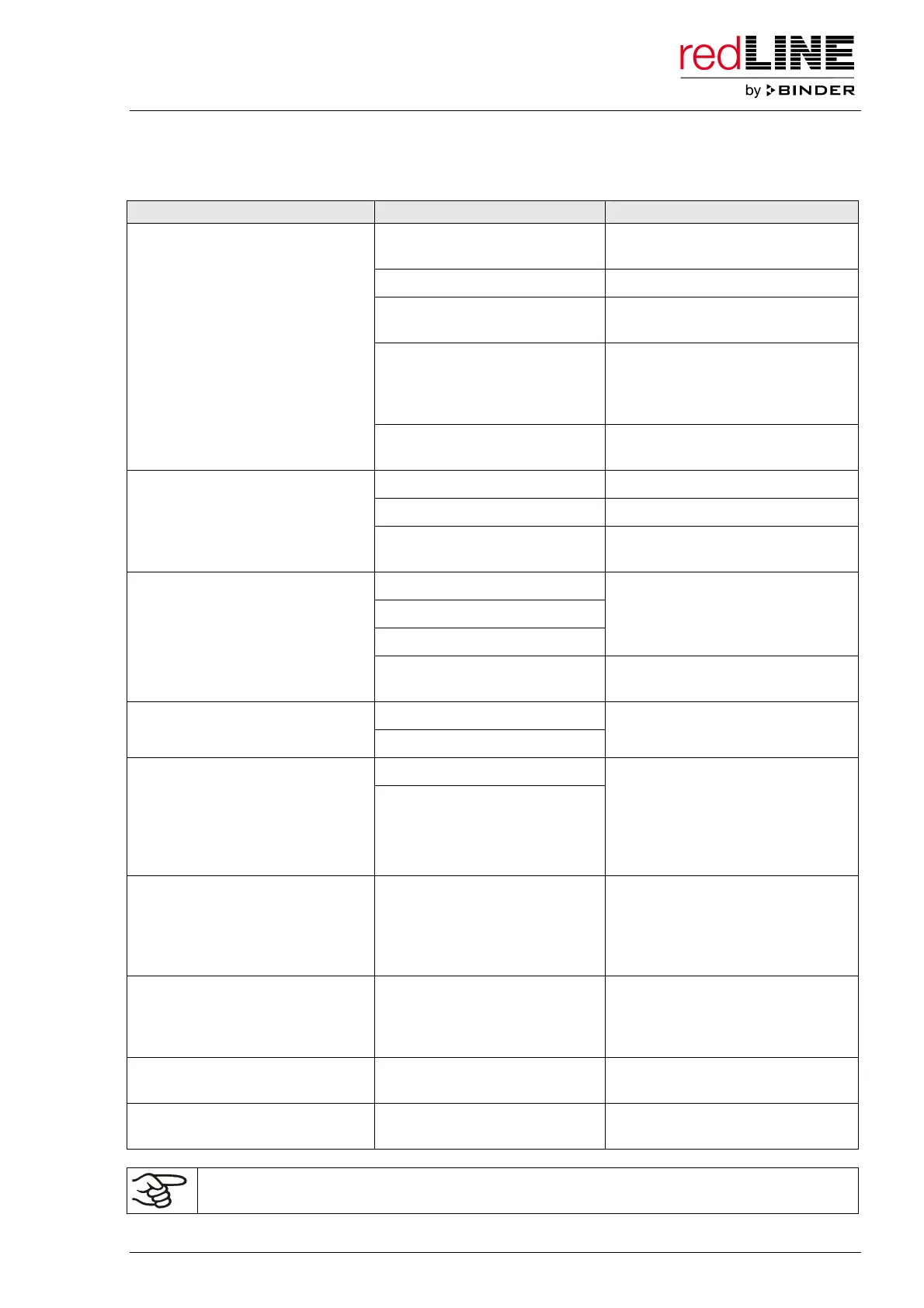
13. Troubleshooting
Fault description Possible cause Required measures
Unit turned off Turn on the unit at the main power
switch (7).
No power supply. Check connection to power supply.
Wrong voltage. Check power supply for voltage of
100-120V or 230V.
Unit fuse has responded. Check unit fuse and replace it if
appropriate. If it responds again,
contact a service technician (for
qualification see Service Manual).
Unit without function.
Controller defective. Contact a service technician (for
qualification see Service Manual).
Unit door not properly closed. Close unit door properly.
Door gasket defective. Replace door gasket.
Set-point temperature is not
reached after specified time.
Controller not adjusted, or
adjustment interval exceeded.
Calibrate and adjust controller.
Controller defective.
Temperature sensor defective.
Semiconductor relay defective.
Contact a service technician (for
qualification see Service Manual).
Chamber heating permanently,
set-point not held.
Controller not adjusted, or
adjustment interval exceeded.
Calibrate and adjust controller.
Heating element defective. Chamber doesn’t heat up.
Heating pilot lamp OP1 is lit.
Semiconductor relay defective.
Contact a service technician (for
qualification see Service Manual).
Semiconductor relay defective. Chamber doesn’t heat up.
Heating pilot lamp OP1 is not lit.
Controller shows the actual value
and the set-point value. The set-
point is higher than the actual
value.
Controller defective.
Contact a service technician (for
qualification see Service Manual).
Chamber doesn’t heat up.
Heating pilot lamp OP1 is not lit.
Controller shows the actual value
and “OFF”. Scrolling message
“TIMER END”.
Timer expired. Controller in
operating mode stand-by.
Repeat timer programming / start
or change to different operating
mode.
Chamber doesn’t heat up.
Heating pilot lamp OP1 is not lit.
Controller shows the actual value
and “OFF”.
Controller in operating mode
stand-by.
Change to different operating
mode.
Deviations from the indicated
heating-up times.
Chamber fully loaded. Charge the oven less or consider
longer heating-up times.
The controller returns to the main
menu from any level.
No button was hit for more than
1 minute.
Repeat entries, enter the values
rapidly.
Only qualified service personnel with electrotechnical training must perform repair.
Repaired units must comply with the manufacturer’s quality standards.



 To Next Page