Redline Operating Manual RE / RF / RI 12/2010 page 29/46
6.2 Operating mode Automatic Mode – entering the set-point
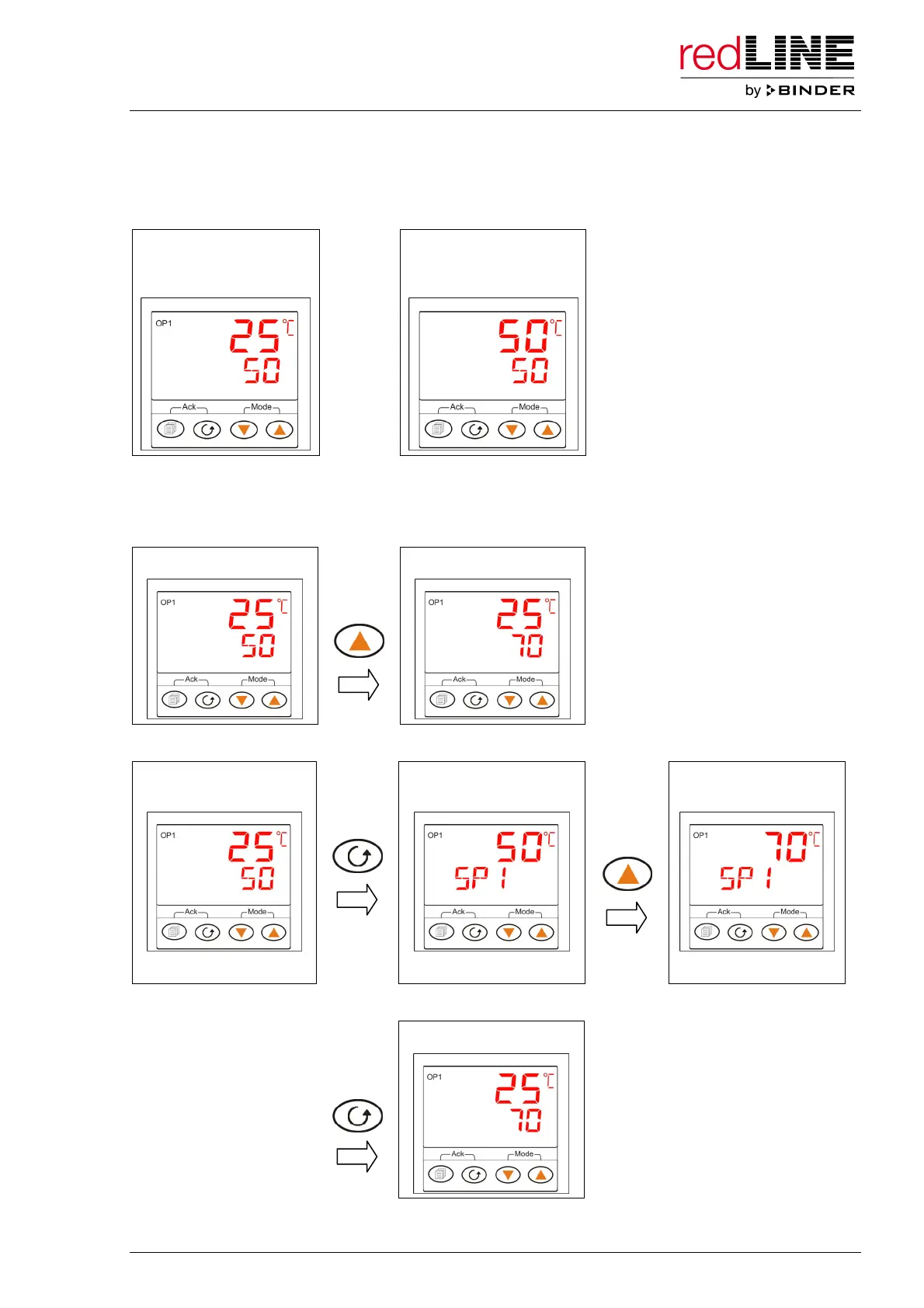
The main menu display indicates on top the actual temperature value and below the temperature set-
point. If the set-point is higher then the actual value, the actual value is controlled to the set-point.
Main menu (Automatic):
heating on, adjusting to
the set-point
Main menu (Automatic):
heating off, equilibrated
state
or
There are two different ways to enter the temperature set-point:
1. In the operating mode “Automatic Mode”, enter the set-point directly in the main menu using the arrow
keys.
Main menu (Automatic) Main menu (Automatic)
several
times
2. Toggle to the set-point setting menu via the functional button. Enter the set-point using the arrow keys.
Main menu
(e.g. Automatic)
Setting menu for
temperature set-point
Setting menu for
temperature set-point
several
times
SETPOINT 1 SETPOINT 1
Back to the main menu display: press the functional button 4 times or wait for 1 minute.
Main menu (Automatic)
4 x
Now the controller operates continuously with the entered set-point until cancellation. The heating is
active (Heating pilot lamp lit or flashing).



 To Next Page