24 | Chapter 3: UEFI BIOS & Soware
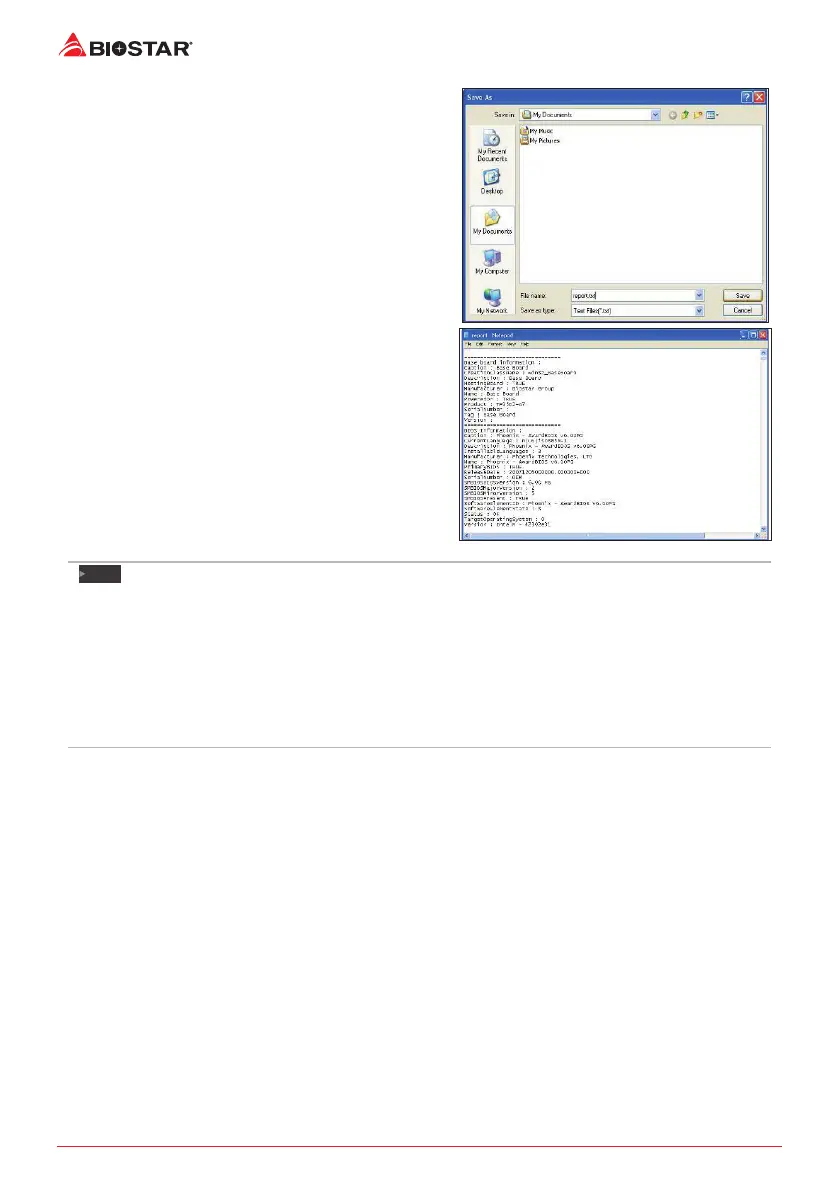
Enter the le name and then click “Save”. Your
system informaon will be saved to a .txt le.
Open the saved .txt le, you will see your system
informaon including motherboard/BIOS/CPU/
video/device/OS informaon. This informaon is
also concluded in the sent mail.
Note
»
Beforeyouusethisulity,pleasesetOutlookExpressasyourdefaulte-mailclientapplicaon
program.
»
Wewillnotsharecustomer’sdatawithanyotherthirdpares,sopleasefeelfreetoprovideyour
systeminformaonwhileusingeHot-Lineservice.
»
IfyouarenotusingOutlookExpressasyourdefaulte-mailclientapplicaon,youmayneedto
savethesysteminformaontoa.txtleandsendtheletoourtechsupportwithothere-mail
applicaon.Gotothefollowingwebsitehp://www.biostar.com.tw/app/en/about/contact.phpfor
gengourcontactinformaon.


 To Next Page