Chapter 2: Hardware installaon | 19
B560MX-E PRO | B560MH-E PRO
Note
»
WhenusingthefrontHDaudiojackandplugintheheadset,therearsoundwillbeautomacally
Disabled.
»
Itisrecommendedthatyouconnectahigh-denionfrontpanelaudiomoduletothisconnectorto
availofthemotherboard’shighdenionaudiocapability.
»
Pleasetrytodisablethe“FrontPanelJackDetecon”ifyouwanttouseanAC’97frontaudiooutput
cable.ThefunconcanbefoundviaO.S.AudioUlity.
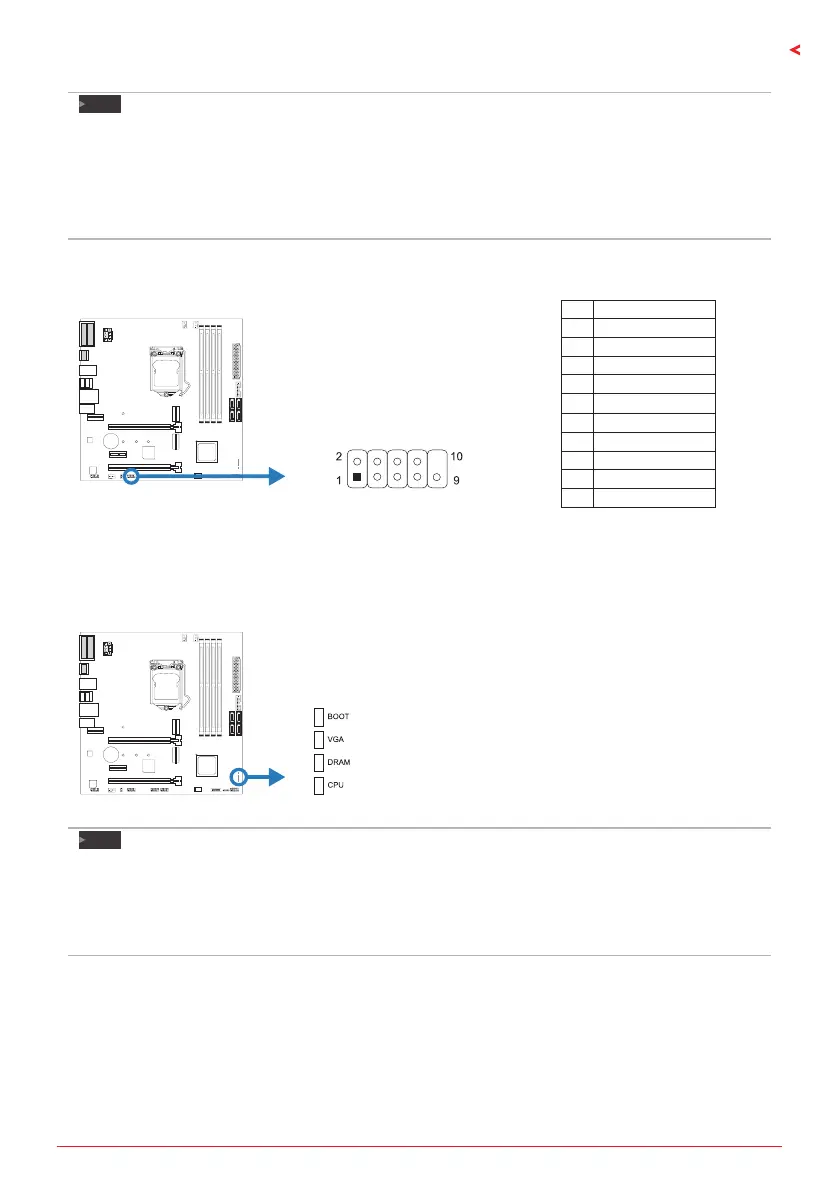
COM1: Serial Port Header
The motherboard has a serial port header for connecng RS-232 Port.
Pin Assignment
1 Carrier detect
2 Received data
3 Transmied data
4 Data terminal ready
5 Signal ground
6 Data set ready
7 Request to send
8 Clear to send
9 Ring indicator
10 Key
2.8 LEDs
Debug LED: Debug LED Indicators
This LEDs indicate the status of the motherboard.
CPU - indicates CPU is not detected or fail.
DRAM - indicates DRAM is not detected or fail.
VGA - indicates GPU is not detected or fail.
BOOT - indicates boong device is not detected
or fail.
Note
»
Aerstarngthecomputer,theLEDindicatorswilllightupinthefollowingorder:
CPU→DRAM→VGA→BOOT
»
Whenthecomputerisready,theLEDindicatorwillshowwheretheerroroccurredandwillstayon
unltheproblemissolved.
»
Aerthecomputerisstarted,theDebugLEDwillnotlightupifthereisnoabnormalitydetected.





 To Next Page