24 | Chapter 2: Hardware installaon
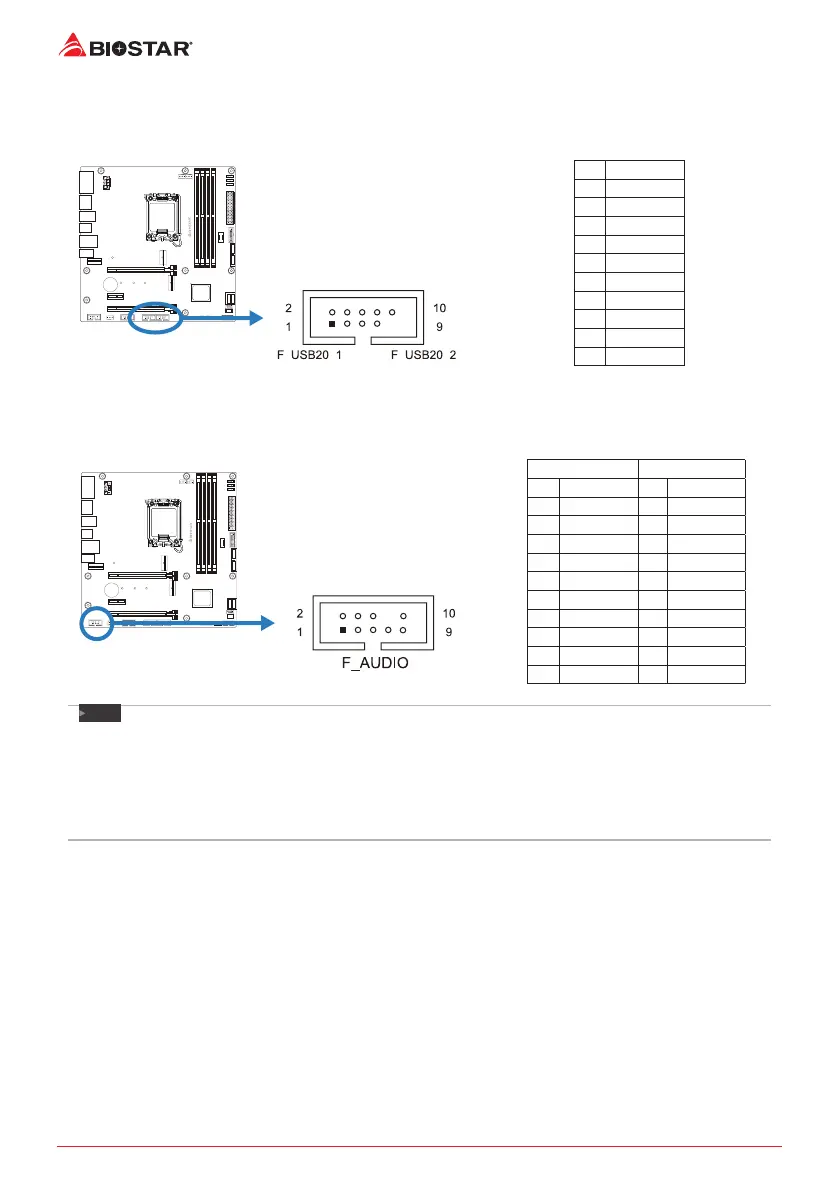
F_USB20_1/ F_USB20_2: Header for USB 2.0 Ports at Front Panel
This header allows user to add addional USB ports on the PC front panel, and also can be
connected with a wide range of external peripherals.
Pin Assignment
1 +5V (fused)
2 +5V (fused)
3 USB-
4 USB-
5 USB+
6 USB+
7 Ground
8 Ground
9 Key
10 NC
F_AUDIO: Front Panel Audio Header
This header allows user to connect the chassis-mount front panel audio I/O which supports HD
and AC’97 audio standards.
HD Audio AC’97
Pin Assignment Pin Assignment
1 Mic Le in 1 Mic In
2 Ground 2 Ground
3 Mic Right in 3 Mic Power
4 GPIO 4 Audio Power
5 Right line in 5 RT Line Out
6 Jack Sense 6 RT Line Out
7 Front Sense 7 Reserved
8 Key 8 Key
9 Le line in 9 LFT Line Out
10 Jack Sense 10 LFT Line Out
Note
»
»
When using the front HD audio jack and plug in the headset, the rear sound will be automacally
Disabled.
»
»
It is recommended that you connect a high-denion front panel audio module to this connector to
avail of the motherboard’s high denion audio capability.
»
»
Please try to disable the “Front Panel Jack Detecon” if you want to use an AC’97 front audio output
cable. The funcon can be found via O.S. Audio Ulity.







 To Next Page