16 | Chapter 2: Hardware Installaon
Note
»
Ifthegraphicscardneedsexternalpowersupply,connectthecablethroughPEX16_OUT1~8
connector.
»
Insucientpowersuppliedtothesystemmayresultininstabilityortheperipheralsnotfunconing
properly.UseofaPSUwithahigherpoweroutputisrecommendedwhenconguringasystemwith
morepower-consumingdevices.
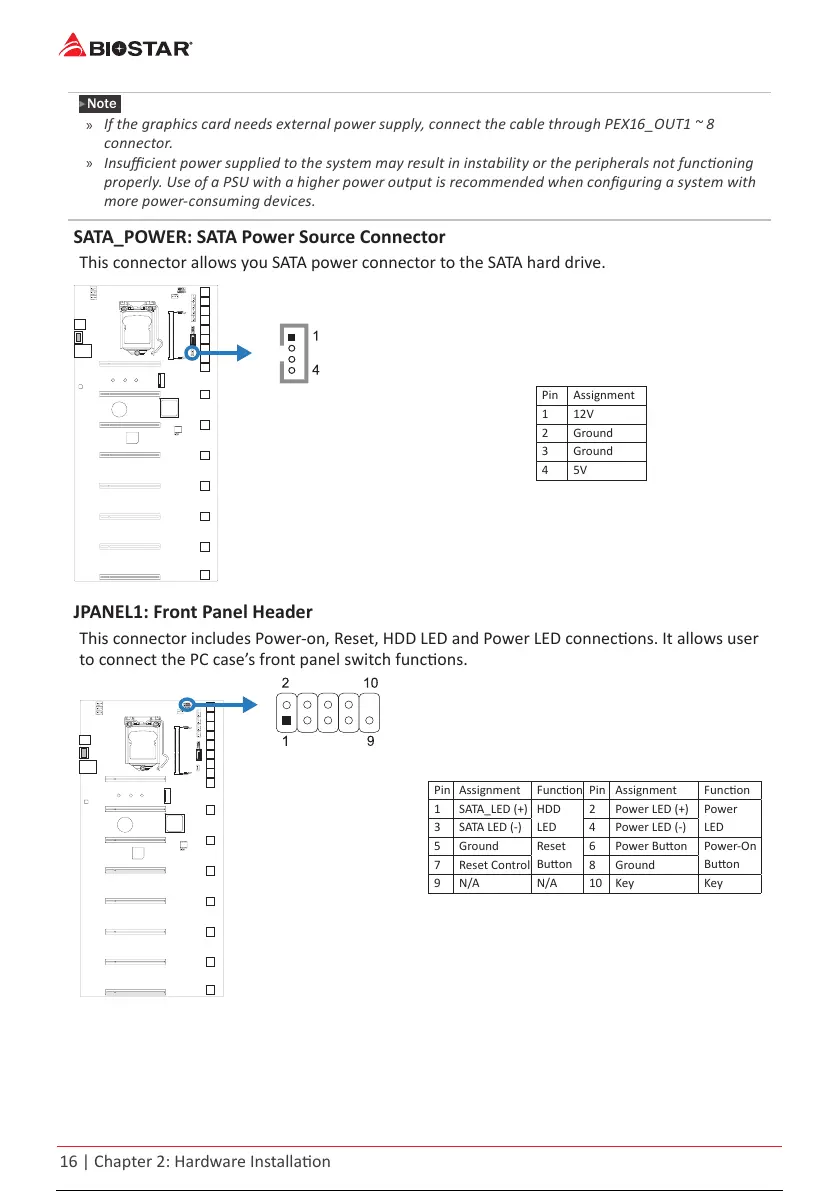
SATA_POWER: SATA Power Source Connector
This connector allows you SATA power connector to the SATA hard drive.
Pin Assignment
1 12V
2 Ground
3 Ground
4 5V
JPANEL1: Front Panel Header
This connector includes Power-on, Reset, HDD LED and Power LED connecons. It allows user
to connect the PC case’s front panel switch funcons.
Pin Assignment Funcon Pin Assignment Funcon
1 SATA_LED (+)
HDD
LED
2 Power LED (+)
Power
LED
3 SATA LED (-) 4 Power LED (-)
5 Ground
Reset
Buon
6 Power Buon
Power-On
Buon
7 Reset Control 8 Ground
9 N/A N/A 10 Key Key
17 / 36 16 / 34 17 / 36 16 / 34 17 / 36



 To Next Page