Chapter 2: Hardware Installaon | 17
TB360-BTC D+
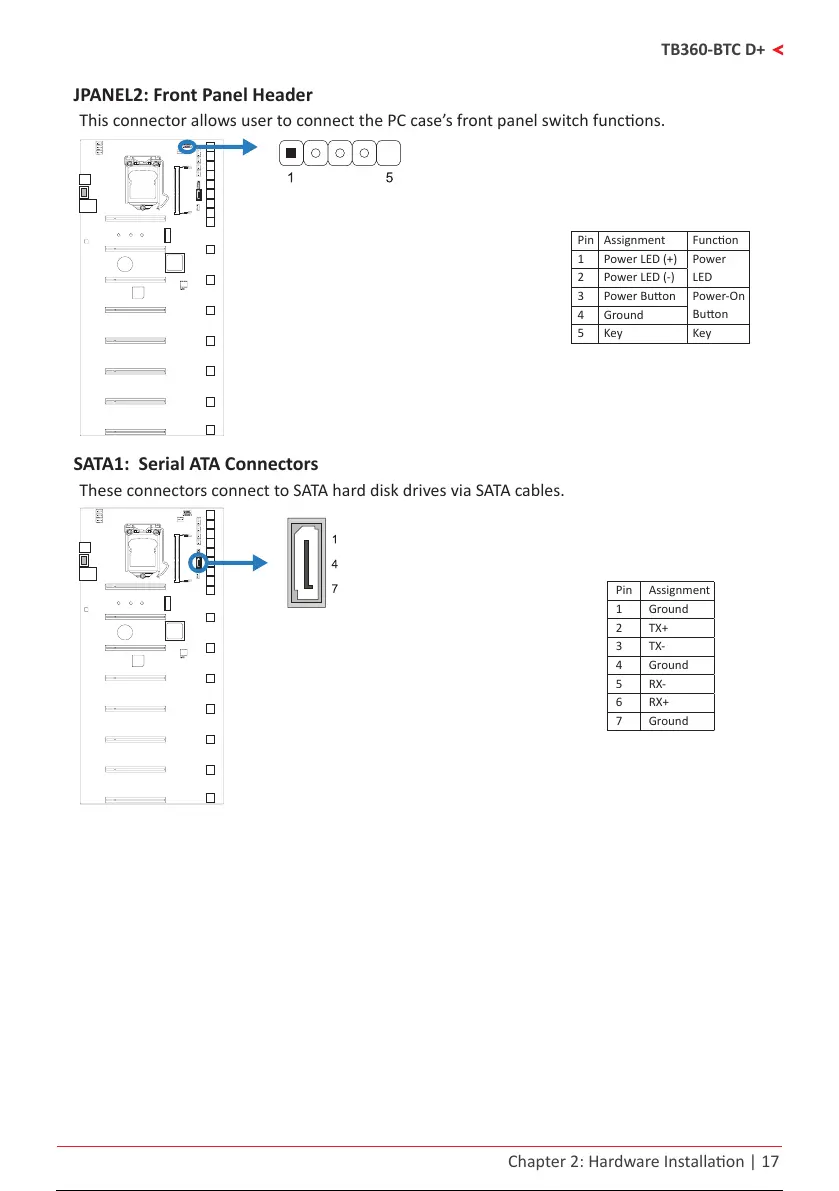
JPANEL2: Front Panel Header
This connector allows user to connect the PC case’s front panel switch funcons.
Pin Assignment Funcon
1 Power LED (+)
Power
LED
2 Power LED (-)
3 Power Buon
Power-On
Buon
4 Ground
5 Key Key
SATA1: Serial ATA Connectors
These connectors connect to SATA hard disk drives via SATA cables.
Pin Assignment
1 Ground
2 TX+
3 TX-
4 Ground
5 RX-
6 RX+
7 Ground
18 / 36 17 / 34 18 / 36 17 / 34 18 / 36



 To Next Page