8
PAPER PUSHER ASSEMBLY LOADING AND INSTALLATION
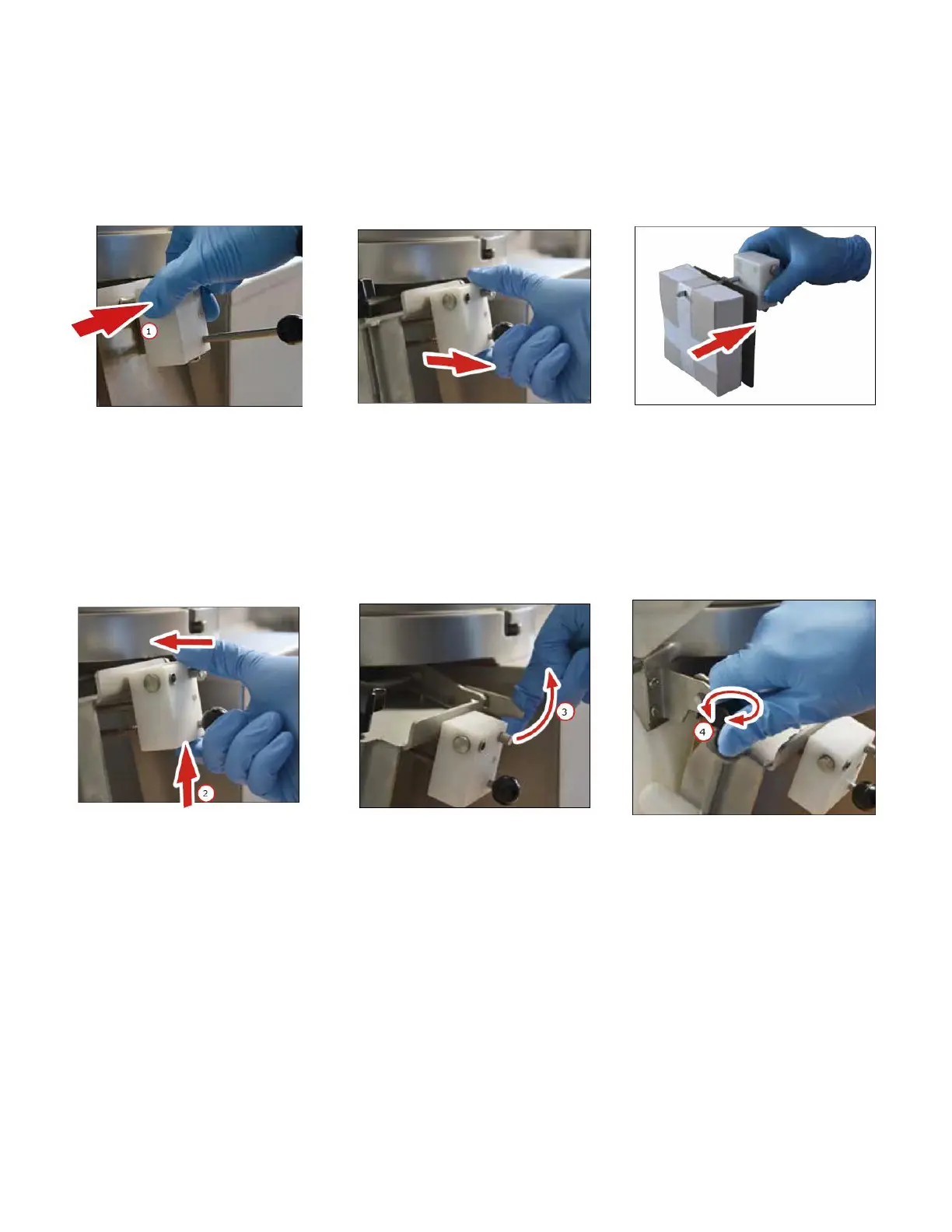
1. To Remove Paper Pusher Assembly lift to lock into Release Lever, press locking pin to remove assembly.
a. Slide Paper Pusher Assembly from machine.
b. Bring Paper Pusher plate and Paper Housing together, locking spring under tension.
c. Insert Patty Paper onto exposed pin and remove the wrapper from paper.
2. Install the loaded Paper Pusher Assembly.
a. Slide Paper Pusher Assembly onto the guiding pin and locking pin. You will hear a click when fully engaged.
b. Press the locking pin on the bottom of the Paper Housing to push Patty Paper forward.
3. Unlock Paper Pusher Assembly by lifting up on the Release Lever.
4. Adjusting and centering the paper to your Patties can be done with the Cam Adjusting Knob during operation.



 To Next Page