ANTSPACE HK3 Water cooling container & Dry-Wet Tower Product Manual
20
6.2 Installation and Connection of Container Water Cooling and Cooling Tower
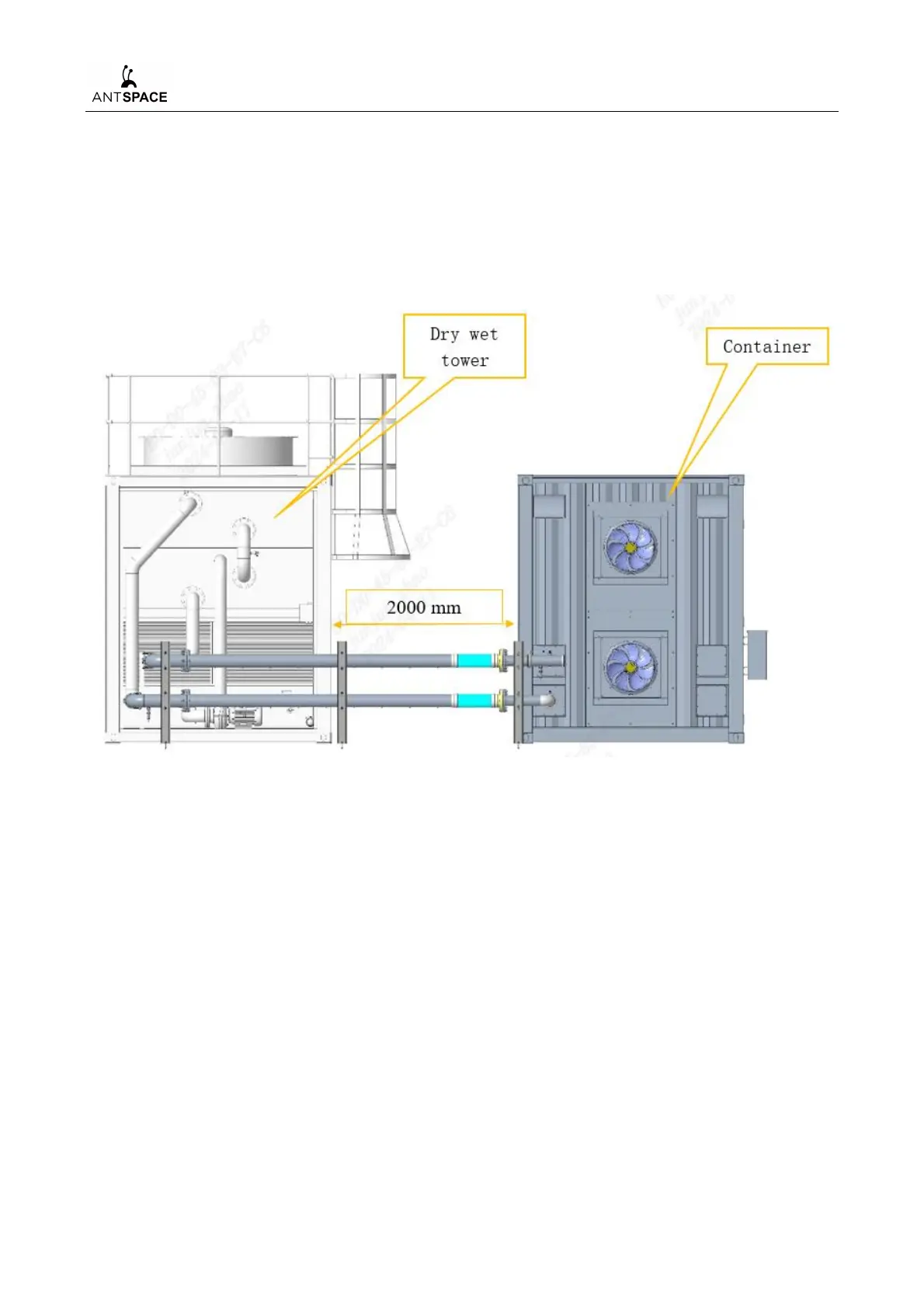
Place the container on the ground with a certain bearing strength (capable of bearing a weight
of 25 tons and a ground level of ±1°). The cooling tower is installed on the side of the container,
and the distance between them is required to be 2 m. The cooling tower, container, and connecting
pipelines are installed on site as shown in Figure 6-2.
Figure 6-2 Location of container and cooling tower
6.3 Installing Exhaust Fans for Container Water Cooling
After determining the relative position of the container and the cooling tower, take out the
container exhaust fan assembly (exhaust fans G04&G05, louvers, and insect proof nets are
integrated, as shown in Figure 6-3 (b) from the container accessories wooden box, unpack it and
perform installation:
a) Installed at the rear door of the container, as shown in Figure 6-3 (b).
b) Remove the protective sealing plate on the rear door.
c) Secure the fan assembly as a whole to the rear door using bolts (M10 outer hexagonal bolts).



 To Next Page