EasyManua.ls Logo

BIXOLON SLP-TX403 - Paper Installation

BIXOLON SLP-TX403
41 pages
Print Icon
To Next Page IconTo Next Page
To Previous Page IconTo Previous Page
Loading...
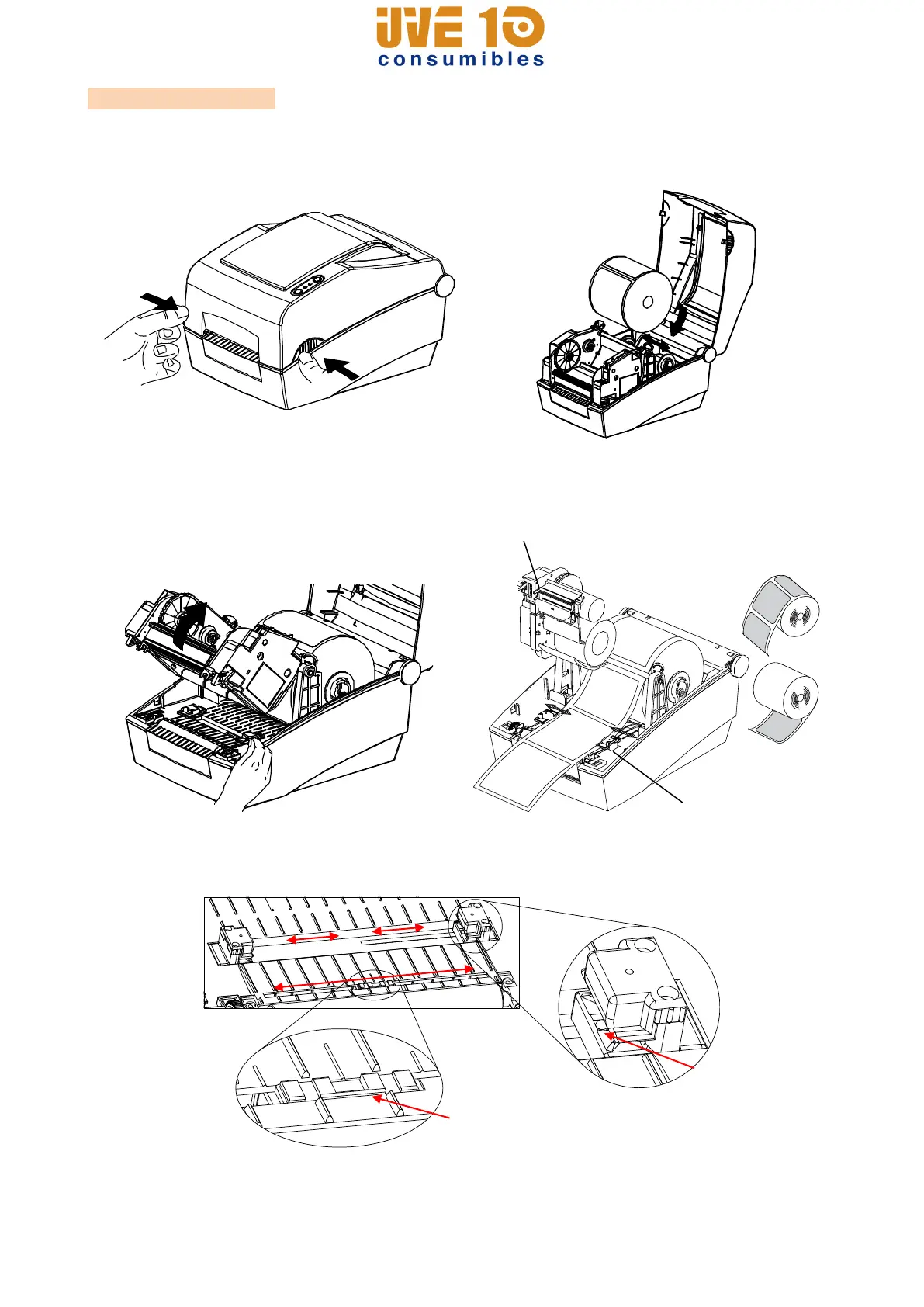
3-3 Paper Installation
1) Open the Paper Cover.
2) Spread the paper holder and insert
paper as shown.
3) Open the Ribbon Assembly and spread
the paper guide.
4) Feed the paper between the Paper
Guide on both sides.
5) After Installation the paper, manually set the sensor(Gap & Black-Mark) and Paper
Guide to the correct position.
6) Close the Ribbon Assembly until a click sound is heard, close the Paper Cover.
Paper Guide
Ribbon Assembly
Moveable Black-Mark Sensor
and Notch Sensor
Moveable(half)
Gap Sensor
V10 CONSUMIBLES S.L.
Calle Llanos de Jerez 18 Nave 9 Coslada https://v10consumibles.com Tel: 910 269 309

Table of Contents

Other manuals for BIXOLON SLP-TX403

Related product manuals