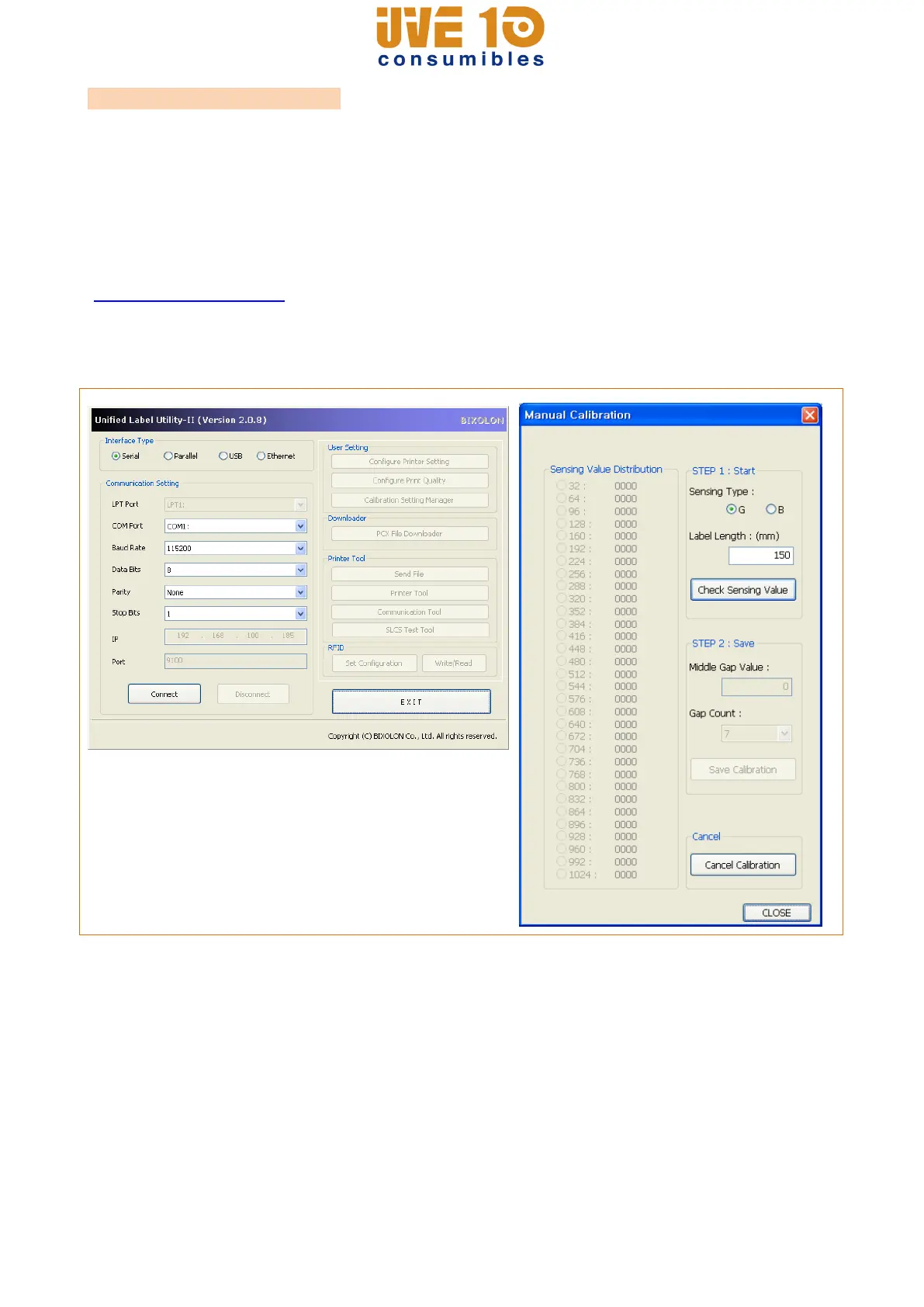
5-8 Manual Calibration Mode
Manual-calibration of media detection can be used when the printer cannot detect a media
gap (or black mark) even after auto-calibration has been executed.
Users can calibrate sensor parameters in detail by using the utility program provided by
the manufacturer.
The installation files and manuals are provided on the BIXOLON official website.
(http://www.bixolon.com)
Please make sure the printer is connected and execute the utility program.
Please the Calibration Setting Manager Button after setting the interface type.
1) Select the sensing type and input the label length by millimeter and click on “Check
Sensing Value” tap. Then printer starts to calibrate.
2) The scanned values will appear on the Utility.
3) Optimal sensing values will appear in black bold letters on the left of the utility screen
and select one of the values and click on “Save Calibration”
4) If chosen value does not work properly, please try the other values among the black
bold letters.
5) To go back to the initial value, please click on “Cancel Calibration”
V10 CONSUMIBLES S.L.
Calle Llanos de Jerez 18 Nave 9 Coslada https://v10consumibles.com Tel: 910 269 309

















 To Next Page