The printer may incur serious damage if the AC adapter provided by BIXOLON
is not used. BIXOLON is not legally liable for any such damages.
(The voltage and electrical current specifications of the printer and battery
charger must match.)
Turn off the power before charging the battery for the printer.
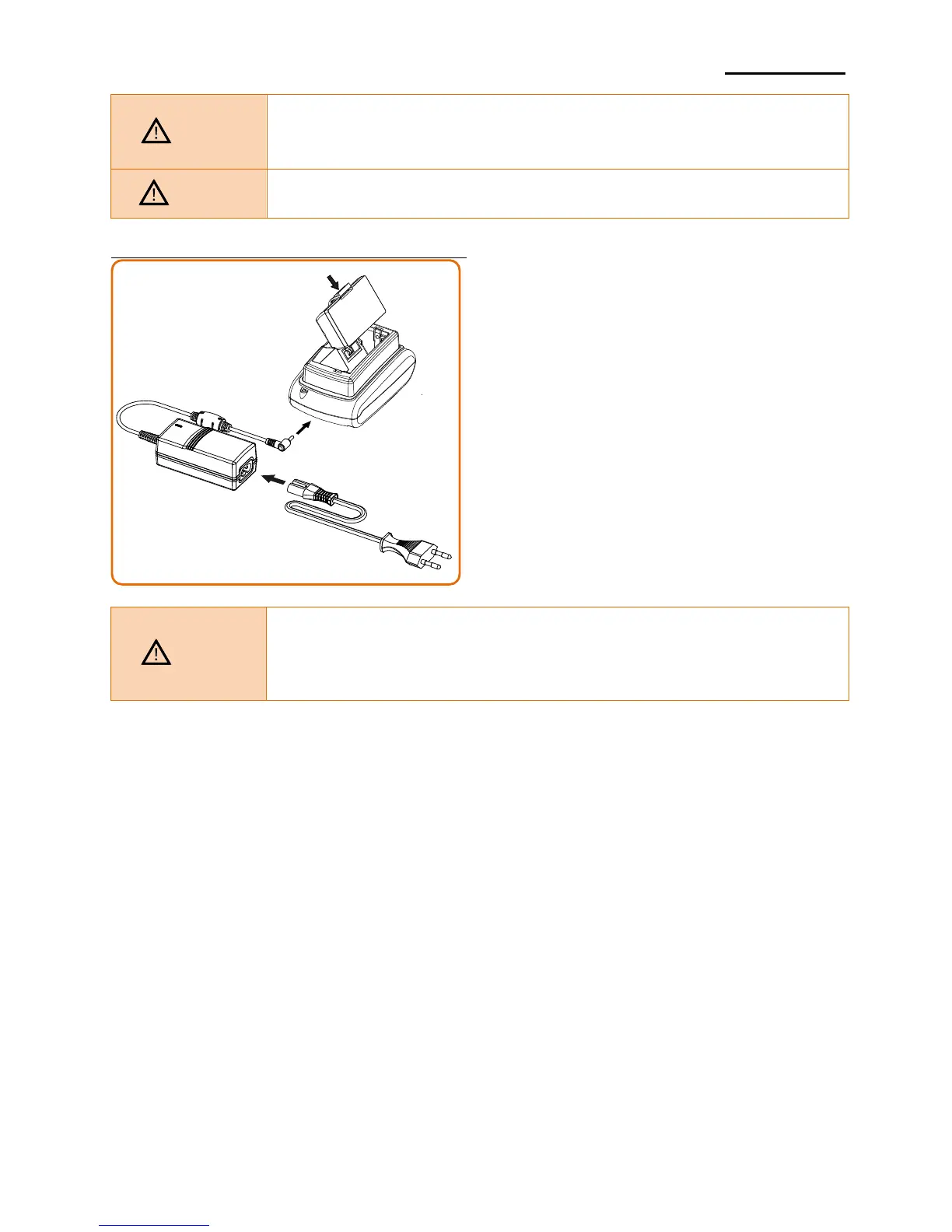
3-2-2 Using Single Battery Charger (Optional)
1) Connect the power cord ② to the
battery charger ①.
2) Connect the battery charger ① to the
power connector of the cradle ③.
3) Plug the power cord ② into an electrical
outlet.
4) Insert the battery ④ into the cradle ③ a
snapping sound is heard.
- The printer may incur serious damage if you do not use the battery charger
provided by BIXOLON when using a single battery charger.
BIXOLON is not legally liable for any such damages.
- You must use the battery charger provided by BIXOLON to use the singles
battery charger. (AC adapter is not available)














 To Next Page