
 Need help?
Do you have a question about the BIXOLON SPP-L3000 and is the answer not in the manual?
Instructions to prevent serious physical harm, equipment damage, or data loss.
Information on development, referring to specific software manuals.
Guides for Bluetooth and Wireless LAN connections and functionality.
Information on the protocol and functions of control commands for the product.
Crucial warnings for preventing serious injury or death, covering electrical safety and child safety.
Cautions to prevent slight wound or appliance damage, covering operational and environmental safety.
Important warnings regarding battery handling, charging, storage, and usage to prevent hazards.
Guidelines for proper battery charging, storage, and maintenance to ensure performance and longevity.
Procedures for safely disposing of the battery in accordance with regulations.
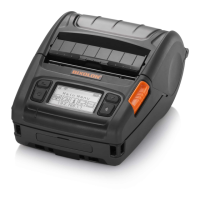
Identifies and labels the various components on the front of the printer.
Identifies and labels the various components on the rear of the printer.
Step-by-step instructions for correctly inserting the battery into the printer.
Procedures for charging the printer's battery using AC adapter and optional chargers.
Step-by-step guide for loading paper rolls into the printer.
Instructions for using the peeler, belt strap, and optional shoulder strap.
Guide on loading and using fan-fold paper and 3-inch (80mm) paper.
Explanation of the printer's control panel buttons and their functions.
Lists recommended receipt and linerless papers for optimal printing.
Step-by-step guide on how to perform a self-test on the printer.
Explains the meaning of various icons displayed on the printer's LCD screen.
Details the functions and settings accessible through the printer's main menu icons.
How to connect the printer to devices using Bluetooth and Wireless LAN.
Instructions for connecting the printer using an interface cable (Serial/USB).
Guide for connecting the printer using a fixed interface cable.
Step-by-step guide for cleaning the printer's printhead and internal components.
Comprehensive technical specifications of the printer, including printing, paper, and battery details.
Information about the materials used for labels on the product.
FCC compliance information and warnings for Class A digital devices in the USA.
Compliance notice for Class A digital devices in Canada.
Warnings regarding static electricity damage to semiconductor devices and the printer.
Information and guidance on the proper disposal of electronic waste according to WEEE regulations.
 General
| Color | - |
|---|---|
| Print technology | Direct thermal |
| Maximum resolution | 200 x 100 DPI |
| Maximum printing width | 72 mm |
| Media thickness | 0.07 ~ 0.15 mm |
| Maximum label width | 80 mm |
| Maximum roll diameter | 66 mm |
| Wi-Fi | Yes |
| Wi-Fi standards | Wi-Fi 4 (802.11n) |
| Bluetooth version | 4.1 |
| Connectivity technology | Wired & Wireless |
| Storage temperature (T-T) | -30 - 70 °C |
| Operating temperature (T-T) | -15 - 50 °C |
| Operating relative humidity (H-H) | 10 - 80 % |
| Mobile operating systems supported | Android |
| Battery type | Built-in battery |
| Battery voltage | 7.3 V |
| Battery capacity | 2850 mAh |
| Display | LCD |
| Product color | Black |
| Display resolution | 200 x 100 pixels |
| Harmonized System (HS) code | 84433210 |
 Weight and Dimensions
| Depth | 159 mm |
|---|---|
| Width | 119 mm |
| Height | 79 mm |
| Weight | 694 g |












 To Next Page

