Operation Operating instructions iS10 / iS20
36 38019417000 en
5
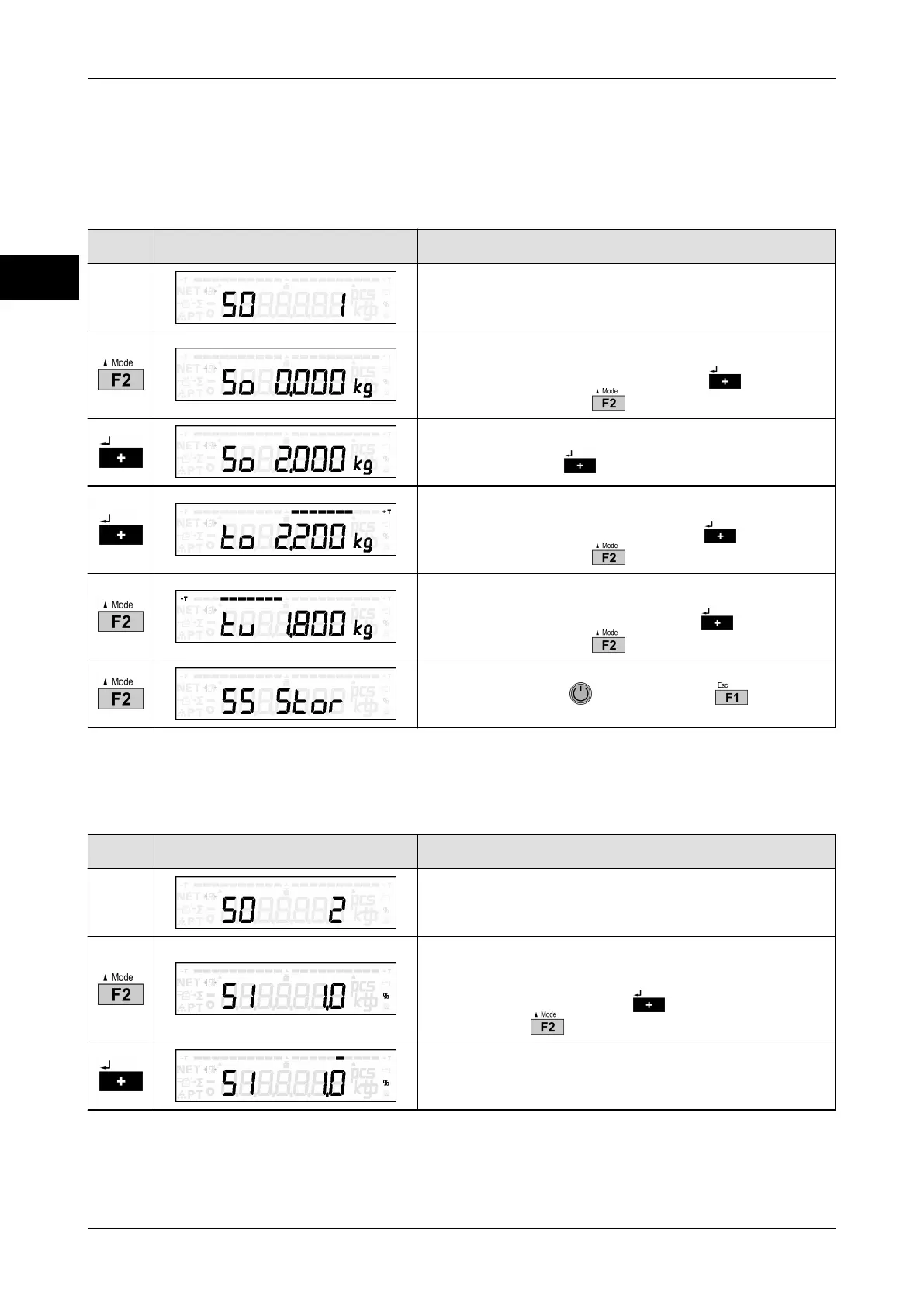
5.10.2 Enter target value and tolerance limits
Tolerance weighed
Display only if 50 = 1
Key Display presentation Process description
Tolerance weighed.
Current target value is displayed.
Change target value weighed with or call up
next parameter with .
Change value: Place new target weight on scale
and confirm with
.
Current upper tolerance limit is displayed.
Change upper tolerance limit with or call up
next parameter with .
Current lower tolerance limit is displayed.
Change lower tolerance limit with or call up
next parameter with .
Save setting with or cancel with .
Call up % ± tolerance
Display only if 50 = 2
Key Display presentation Process description
% ± tolerance of target value is selected.
Current % deviation from target value is dis-
played.
Change % deviation with or call up next pa-
rameter with .
Change value: % table is selected.



 To Next Page