Operating instructions iS10 / iS20 Service menu
38019417000 en 81
9
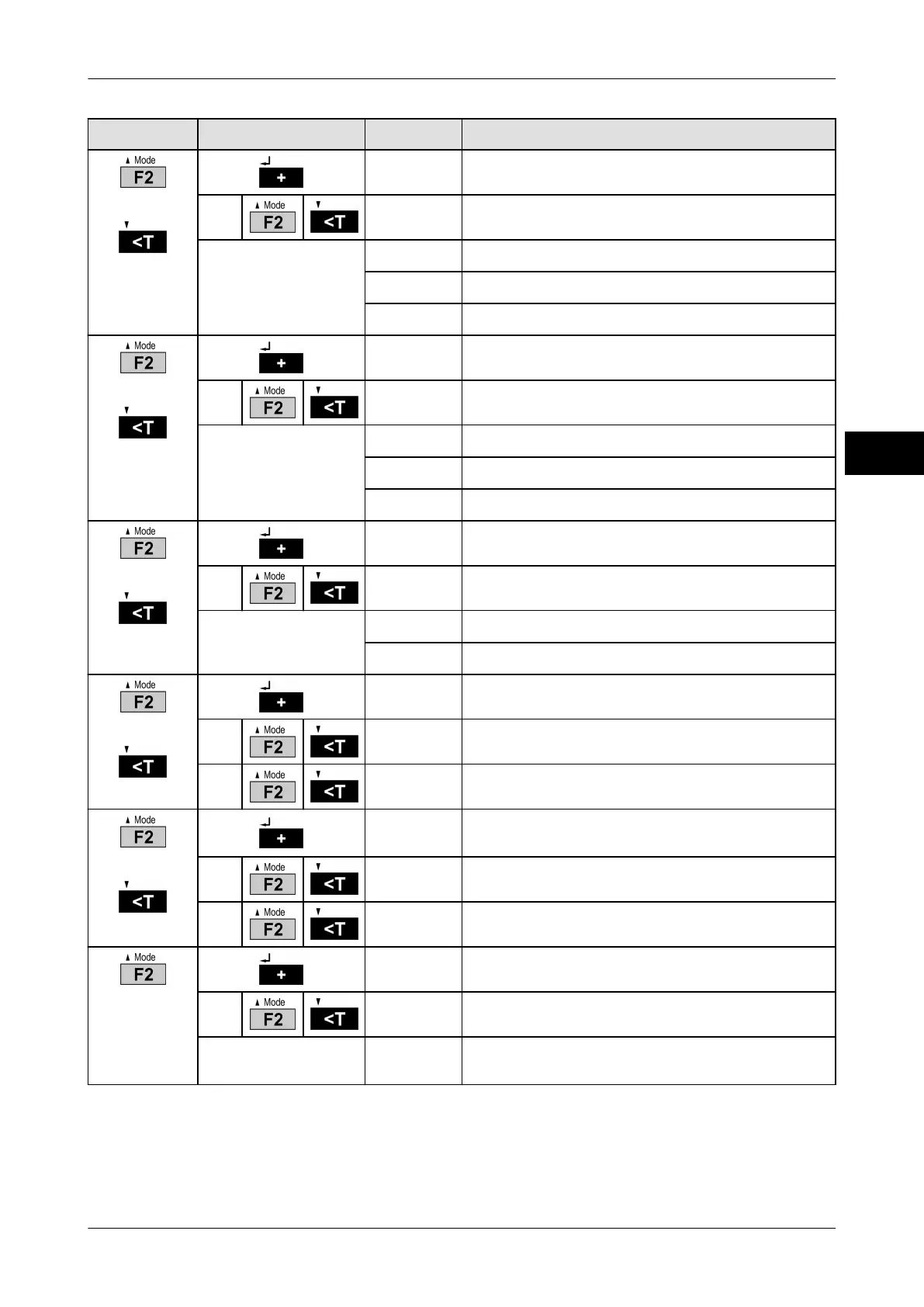
Selection
Subselection Display Explanation
or
13 0
Output operating mode
0
Control cable and LED permanently active
Setting changes with
each keystroke.
1
Control cable only active in no motion
2
LED only active in no motion
3
Control cable and LED only active in no motion
or
14 0
Lock keyboard
0
Recording free, F1 function free
Setting changes with
each keystroke.
1
Recording locked.
2
F1 function locked.
3
Recording locked. F1 function locked.
or
15 0
F1 function Autostart
0
No Autostart
Setting changes with
each keystroke.
1
Load tolerance control during start
2
Load fine display during start (not legal for trade)
or
16 0
F2 menu
0
F2 menu locked. Call-up via restart only.
1
F2 menu free.
or
17 0
Recording only if weight is within tolerance
limits. Only with tolerance control.
0
Function off.
1
Function on.
18 0
Tare Autostart
0
Function off.
Setting changes with
each keystroke.
1
Last tare value loaded during start.



 To Next Page