25
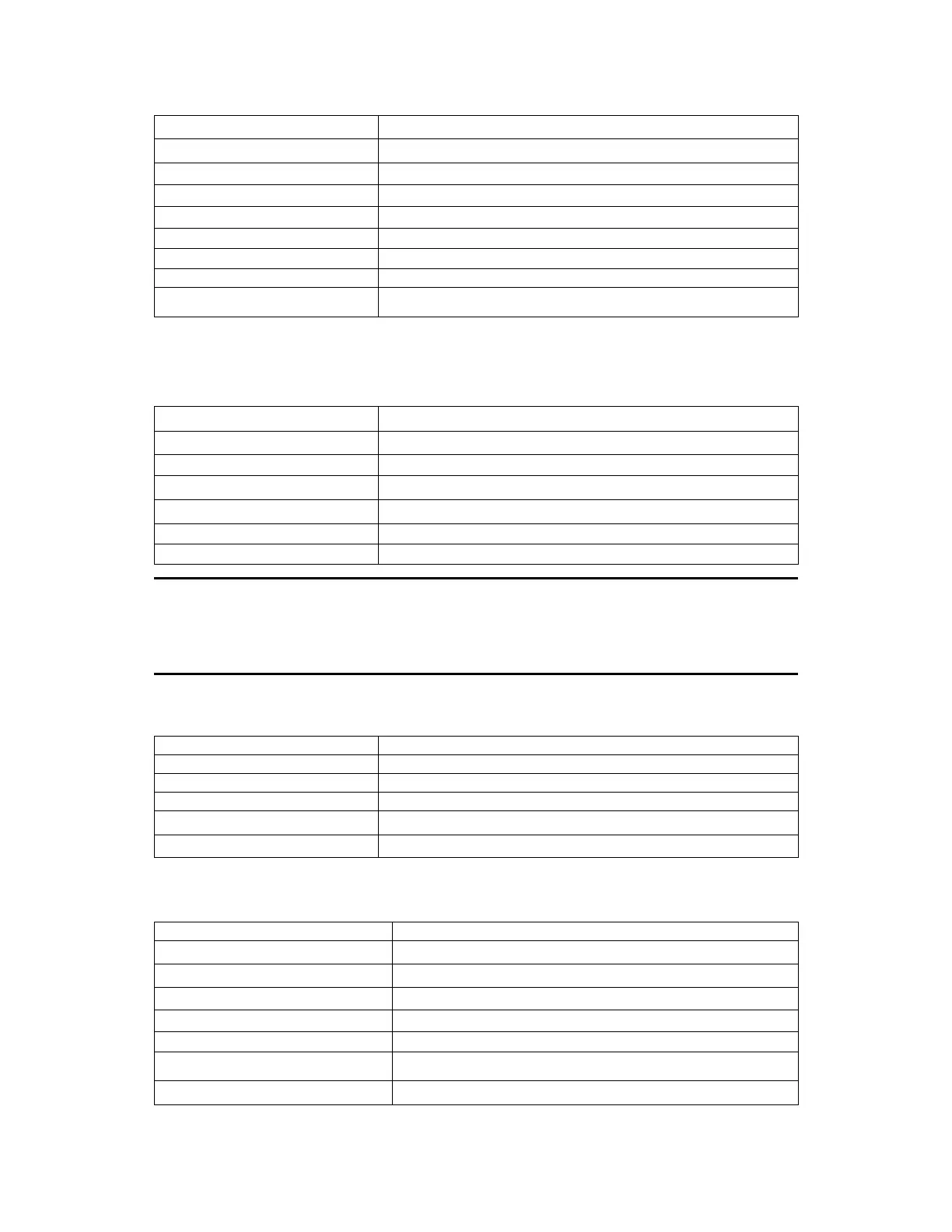
4. Setting the output voltage (0x23)
Command(0x23)
4
byte The byte 0 of output voltage value
The byte 1 of output voltage value
6
byte The higher byte of output voltage value
The highest byte of output voltage value
5.Setting the output current (0x24)
2
byte Address (0x00~0xFE)
Command(0x24)
To set the low byte of current value (1 represents 1 mA)
To set the high byte of current value
6
to 25
byte System reserve
26
byte Check sum
6. Setting the communication address (0x25)
The current address of power supply(0x00~0xFE)
7. Reading the present current/voltage, maximum voltage, setup
voltage/current and the states of power supply. (0x26)
3
byte
Command(0x26)
4
byte Byte 0 of present output current value
Byte 1 of present output current value
Byte 0 of present output voltage value
Byte 1 of present output voltage
8
byte Byte 2 of present output voltage
Suppose you want to set the maximum current to 3.12 A. Since 1
represents 1 mA, 3.12 A translates to 3,120 in decimal. With 2 bytes in Hex, that
would be 0x0C30. Since the bytes are ordered in little-endian format, 0x30 would
be the 4
th
byte, and 0x0C as 5
th
byte.











 To Next Page