W ALL MOUNT INSTALLATION
PRINTED N OVEMBER 3, 2009
1-6
WALL MOUNT INSTALLATION
The VESA mounting bracket allows for two wall mount installation options:
• Attended Wall Mount Installation (Page: 6)
•
Unattended Wall Mount Installation (Page: 8)
Attended Wall Mount Installation
1 Find a location on a single gang box to mount the MF4100.
Ensure there is enough clearance for the operator to access the touchscreen and swipe cards.
2 Remove the two base extensions by removing the 4 screws (1/8” Pin hex driver).
See: VESA Bracket Assembly Details (Page: 4).
3 Place the two locking screws in the position that allows the tilt plate to pivot (1/8” Pin hex driver).
See: VESA Bracket Screw Position - Attended (Page: 3).
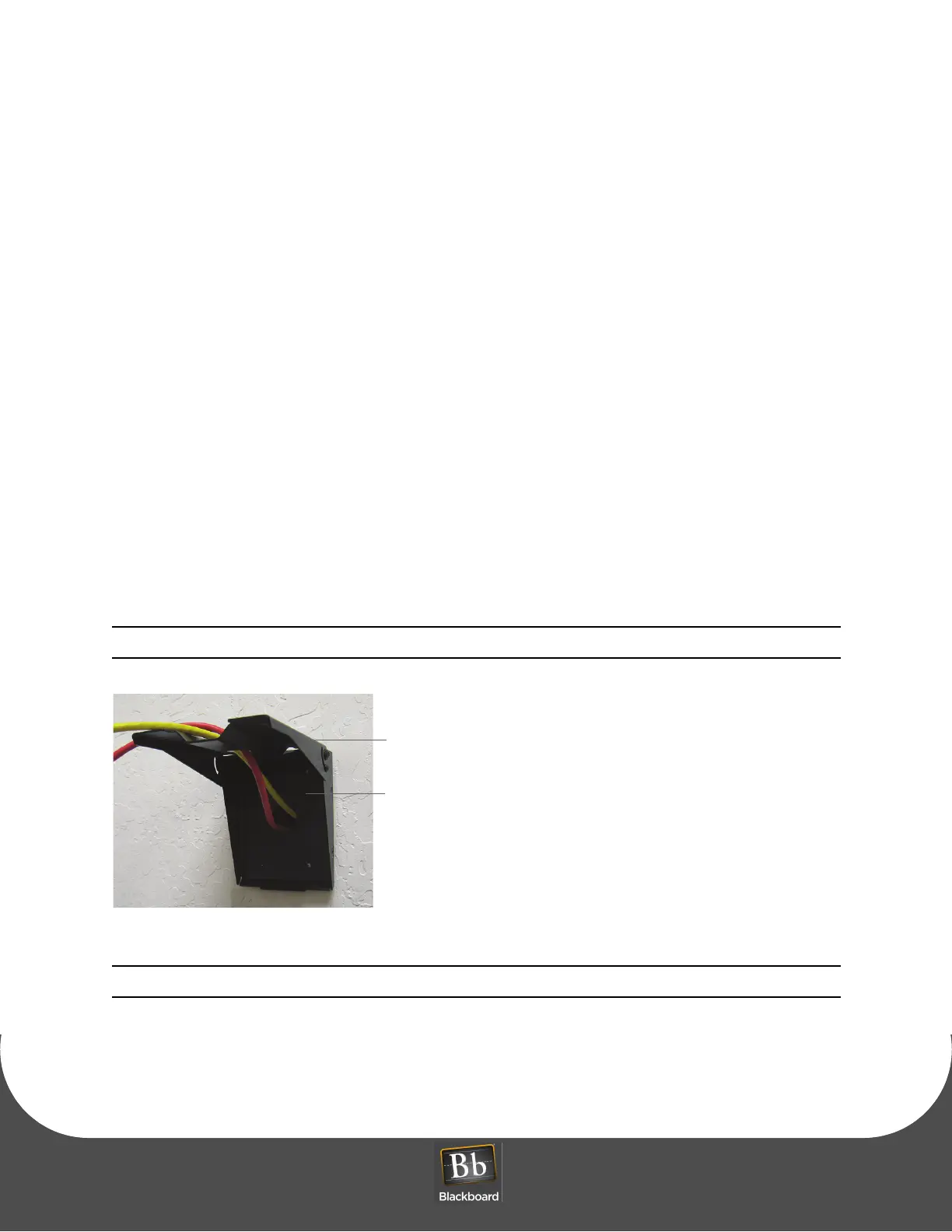
4 Route the required cables through the VESA bracket cable hole, and then the pivot bracket hole.
Note the orientation of the VESA bracket to the wall.
Figure 1-10 VESA Bracket - Attended Wall Mount
Note: The pivot plate attaches to the bottom of the MF4100 reader.
5 Attach the mounting base to the gang box using the two #6-32 pin hex screws provided in the
hardware kit.
6 Install cables to the connectors of the MF4100.


 To Next Page