•
USING THE
PROGRAMMER
•
Setting the time.
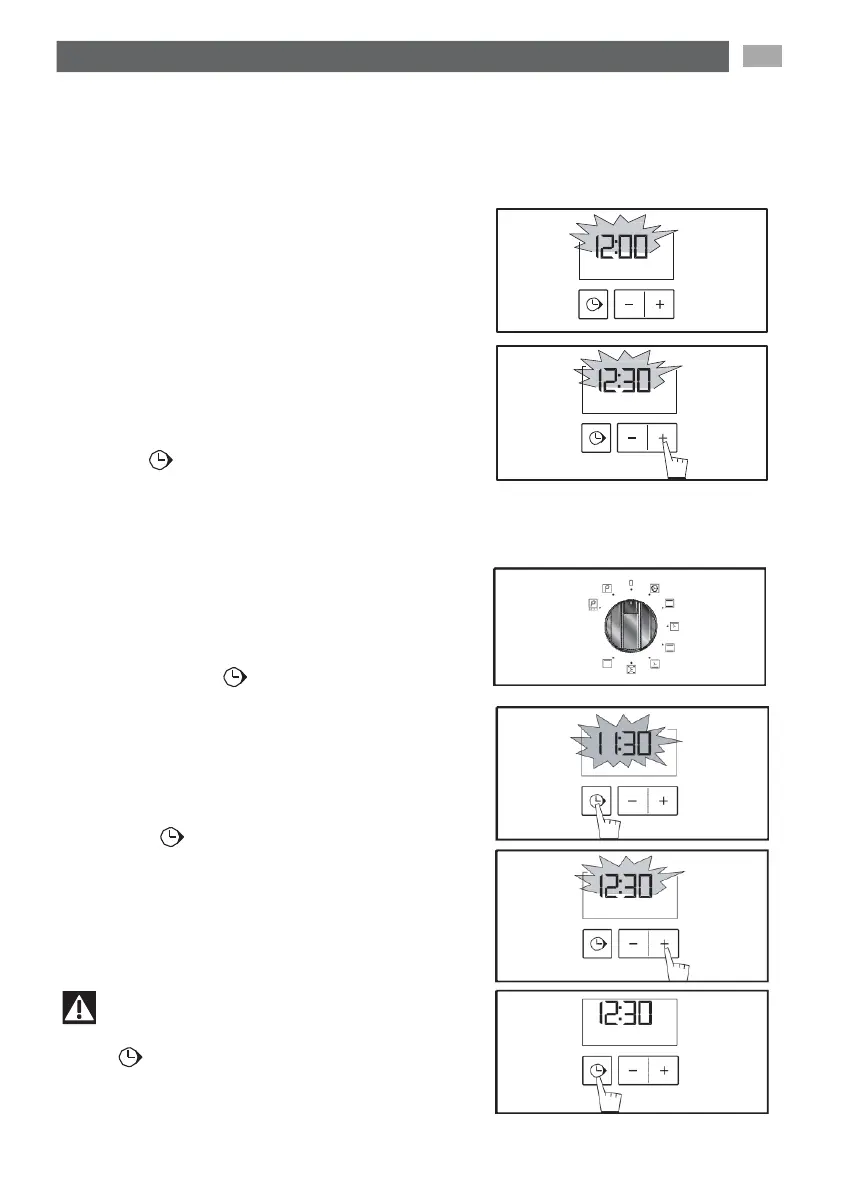
- When
the
appliance
is started up:
12:00
will
flash
on the
display
(fig.1)
Adjuste the time by
pressing
the
+
or
-
adjustement
buttons (if you hold them down,
the time will count up
quickly)
(fig.2).
Example:
12:30
Press
the “ ” touch control to enter.
The display
stops flashing.
-
To reset the clock time
The function selector must be in the 0 posi-
tion (fig.1).
Press
and hold the “ ” touch control for a
few seconds until the display is flashing
(fig.2), then release. Beeps are sounded
t
o
indicate
that it is now
possible
to set.
Adjust the clock setting with the
+ and -
touch
controls (fig.3).
Press the “ ” touch control to confirm
(fig.4).
fig.1
fig.2
fig.1
fig.2
Important
If the “ ” touch control is not
pressed,
the
setting will be automatically recorded after a
few seconds.
fig.3
fig.4


 To Next Page