•
USING THE TIME SWITCH
FUNCTION
-
Your oven’s programmer can be used as an
independent timer that allows you to count
down a time without operating the oven.
In this
case,
the timer
display
has priority over
the clock display.
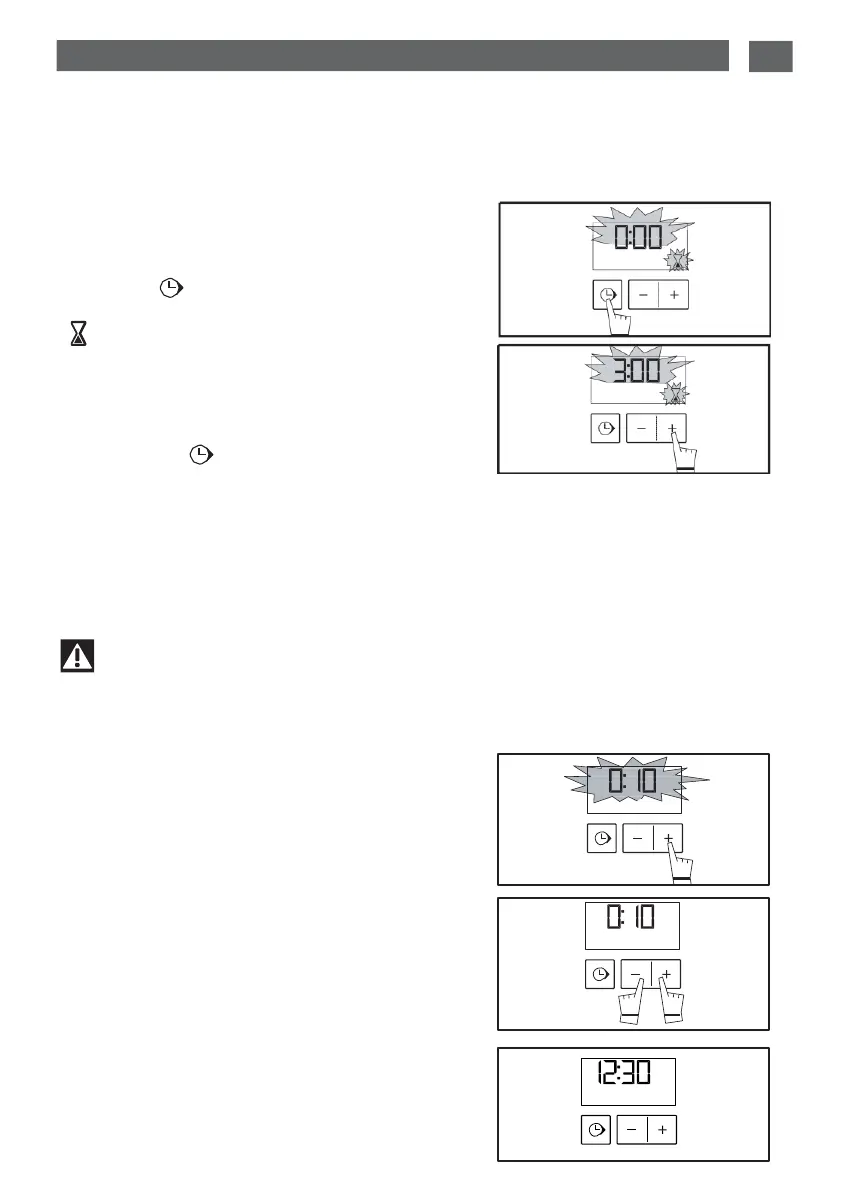
- Press
the “ ”
TOUCH CONTROL
(fig.1)
until the
timer
symbol
flashes
-> 0.00 and
a
small hourglass
flashes.
-
Set the desired time by pressing the
+
or
-
buttons until the desired duration is shown
(max.60 minutes).
(fig.2).
- Press
on the “ ” touch control to confirm
or wait a few seconds.
Wait
for a few
seconds. The display
will stop flashing
and
the time switch will start up, counting down the time in seconds.
When
the time
has elapsed,
a
series
of
warning beeps
will sound.
fig.1
fig.2
These beeps
can be stopped by
pressing any
button, or
they
will stop
automatically
after
a few seconds
Important
The
time switch programming can be altered or cancelled at any time.
•
ADJUSTING THE DISPLAY
BRIGHTNESS
The
brightness of the display is adjustable.To
change
it:
-
Set the
programmer
time to
00:10 and
confirm
(fig.1).
- Press simultaneously
on the
+ and -
touch con-
trols for
10 seconds
until “CO” is
displayed;
you
are
not in
configuration mode
(fig.2).
- Press
the
+
and
-
touch controls to obtain the
desired
brightness.
After
having adjusted
the
brightness
to your lik-
ing, wait a few seconds and return your pro-
grammer
to the current time of day.
fig.1
fig.2


 To Next Page