-
Cooking with delayed start and select-
ed end of cooking time.
-
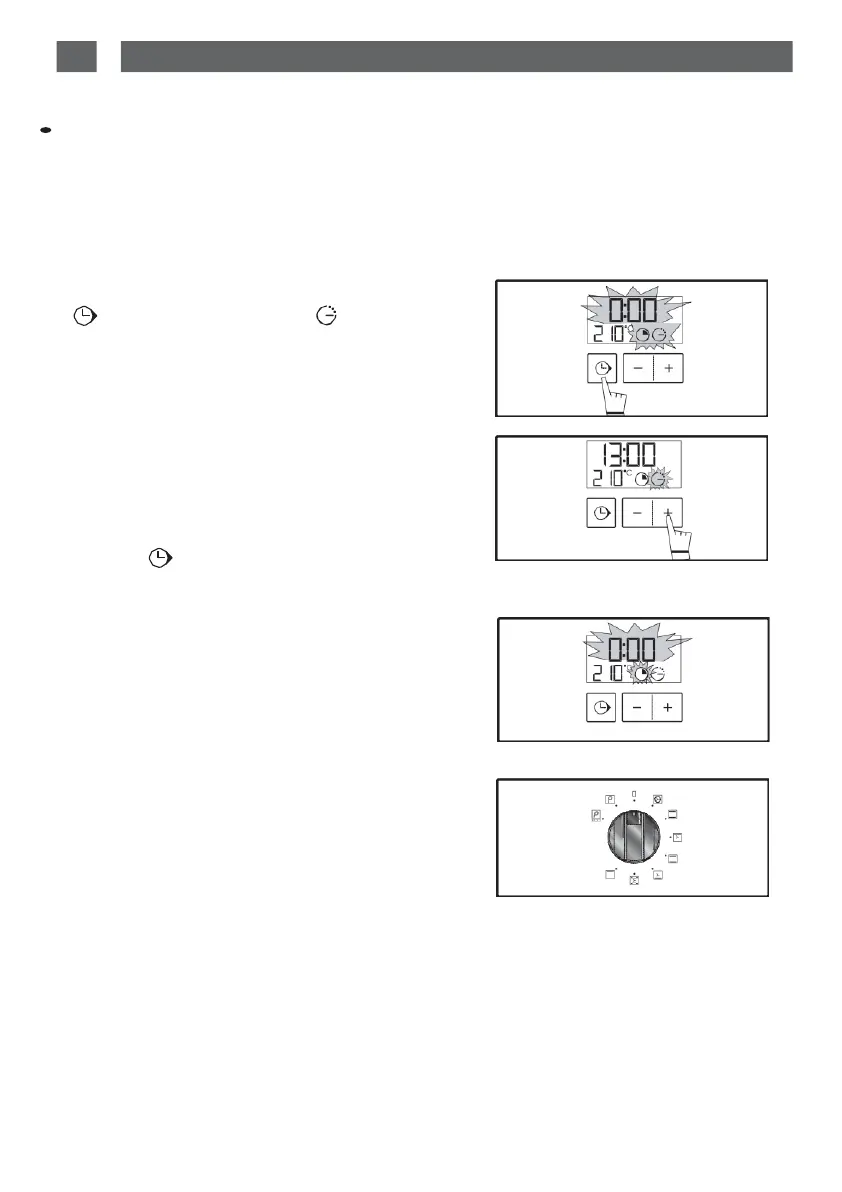
After setting the cooking time, press the
“ ” touch control until the “ ” end of
cooking
indicator
flashes
The display flashes 0:00
to indicate that you
can now adjust the setting (fig.1).
- Press
the
+
or
-
touch control to set the de-
sired
cooking end time.
Example:
end of cooking at
13:00
(
f
i
g
.
2
)
.
recorded after a few seconds or when you
press the “ ” touch control.
The
end of cooking time
display
stops flash-
ing.
After these three steps, the oven heating is
delayed
so that cooking ends at 13:00.
At the
end
of cooking
(the end
of the
time
pro-
grammed),
- The oven switches
off,
- 0:00 flashes
on the
display
(
f
ig.
3)
.
-
a
series
of
beeps
sound for
several
minutes.
These beeps
can be stopped by
pressing
any
button.'
The displays once again shows the time of
day
when
the function selector is returned
t
o
0
(f
ig.4
).
fig.1
fig.2
fig.3
fig.4


 To Next Page