24
Ensure that the analog programmer displays the
time of day and that it is not flashing.
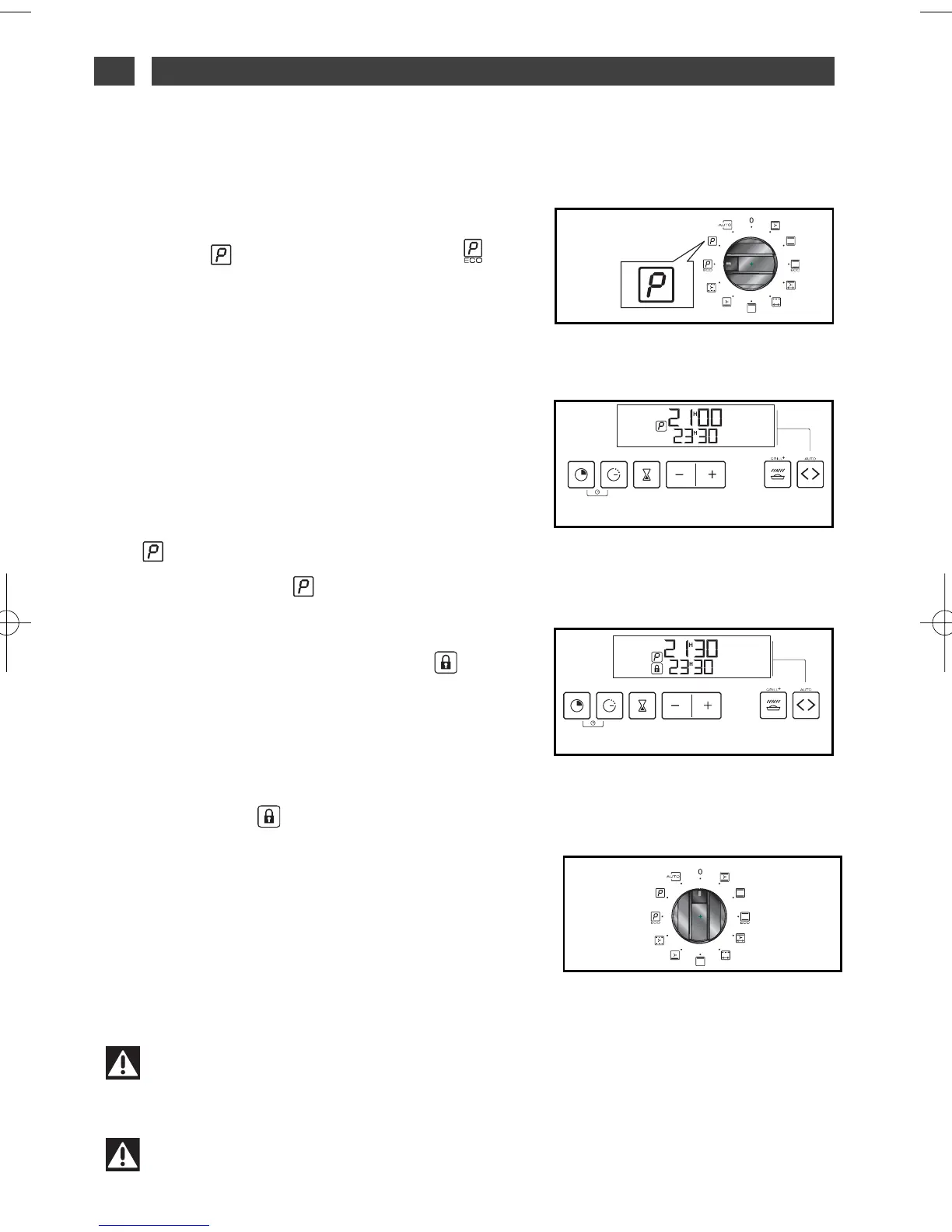
All you have to do is position your cooking selector-
switch on the “Self-cleaning” position or the
“ECO self-cleaning” position (fig.1).
The period of time during which the oven cannot
be used is 2hrs 30 mins (2 hours for cleaning + 30
minutes cooling time) in “Self-cleaning” mode or
2hrs (1hr 30 mins cleaning + 30 minutes cooling
time) en “ECO self-cleaning” mode (this period of
time cannot be changed). This period of time in-
cludes cooling up to the time the door unlocks.
The display will tell you at what time you can use
your oven again (fig.2).
The on the display will tell you that you are in a
self-cleaning cylcle or ECO in an ECO self-
cleaning cycle.
During the self-cleaning cycle, a padlock ap-
pears on the display, to tell you that the door is
locked (fig.3).
At the end of the self-cleaning cycle, the display
will tell you (see (fig.2).
When the padlock has disappeared from the
display, the door can now be opened.
Rotate the function selector to the 0 position
(fig.4).
When the oven is cool, use a damp cloth to re-
move the white ashes. The oven is clean and once
again ready for the cooking application of your
choice.
fig.1
Warning
Before beginning a self-cleaning cycle, remove the pots and pans from the oven and
clean any major spill residue.
IMMEDIATE SELF-CLEANING
••
fig.2
fig.4
fig.3
6 / CARING FOR AND CLEANING YOUR APPLIANCEEN
Warning
Do not hang a towel or cloth on the oven handle.



 To Next Page