25
•
Please contact your SIM provider to get the
APN, PPP ID and password.
*Note: PPP ID and password maybe options
depend on your SIM provider.
•
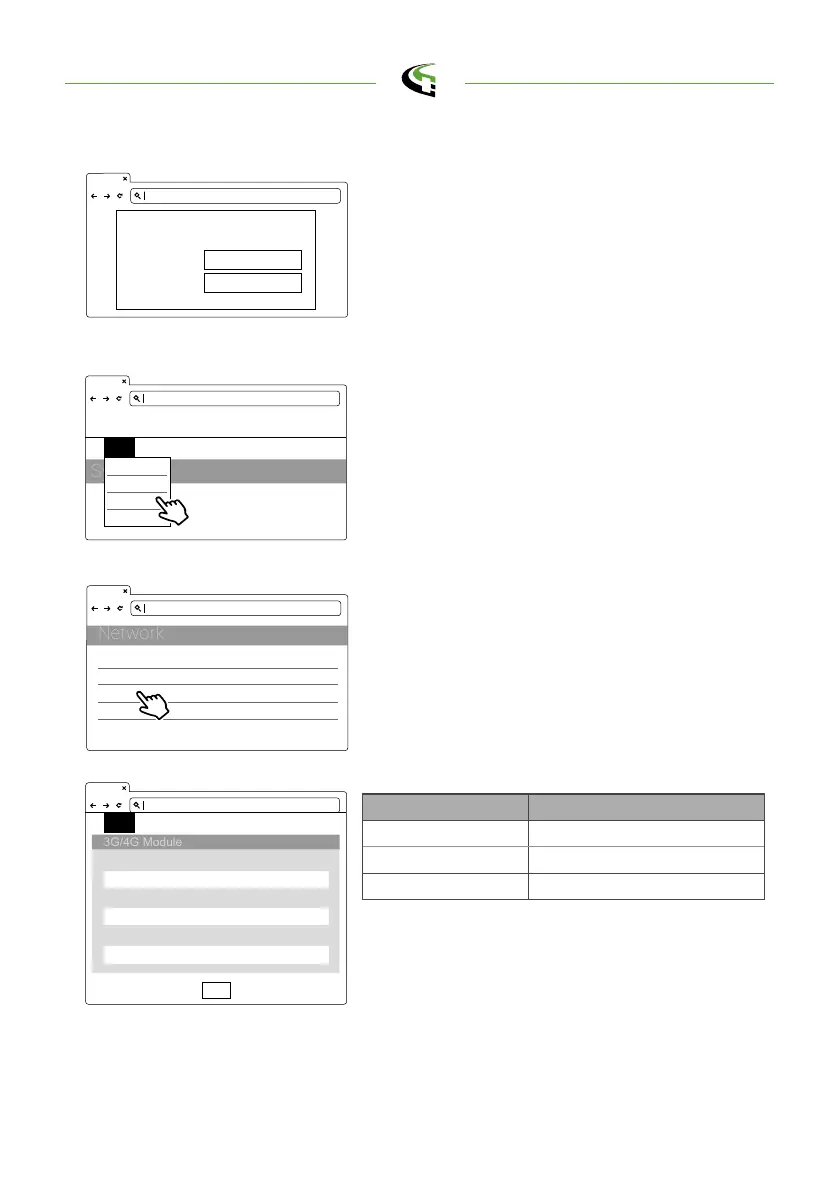
Open the web page of charger and sign-in.
TelcomApn APN Setting
TelcomChapPapId Login ID authentication
TelcomChapPapPwd Login password authentication
TelcomIpAddress IP address
Step 1.
192.168.1.10
SET UPGRADE OTHER LANGUAGE
TelcomApn
TelcomChapPapId
TelcomChapPapPwd
Set
4.2.2 Setting and Enable 3G/4G Module.
•
Network -> 3G/4G Module to fill corresponding
information into TelcomApn, TelcomChapPa -
pid and TelcomChapPapPwd.
•
Press
”
Set
”
to save those information. Then
3G/4G will be activated in few minutes.
Step 3.
192.168.1.10
Account
Password
login https://192.168.1.10
admin
1231231238
192.168.1.10
SET UPGRADE OTHER LANGUAGE
System
Charging
Network
Backend
SET -> Network.
Step 2.
192.168.1.10
Network Status
Ethernet
WiFi
3G/4G
+
+
+
+
semaconnect.com



 To Next Page