26
4.3 Time setting
Use the following IP address:
IP address: 192 . 168 . 1 . 1
Subnet mask: 255 . 255 . 255 . 0
Default gateway: . . .
Automatic setting : The time will be adjusted automatically when the charger
connects to internet.
Time server :
• time.windows.com
• cn.ntp.org.cn
• tock.stdtime.gov.tw
Note:Firewall and network environment may influence the time server connection
Manual setting :
•
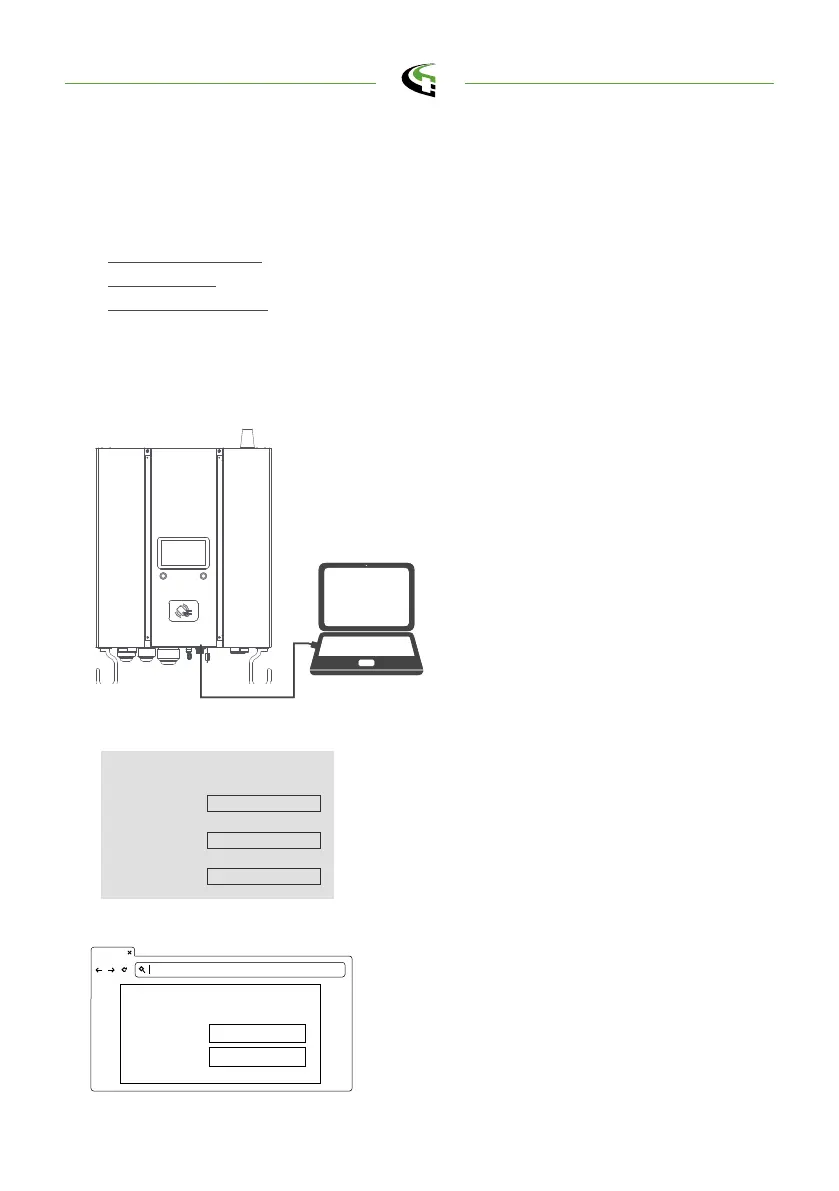
Laptop with RJ45 interface.
•
Connect RJ45 cable from Laptop to
charger
’
s RJ45 port.
•
Setup parameters in the Webservice.
Step 1.
Before opening web browser, please
enter network setting to set your IPV4
static IP to 192.168.1.1 in PC
Open web service browser, type the IP
address of charger“ 192.168.1.10”
into the URL bar to access the web
page of charger.
•
Account: admin
•
Password: 1231231238
Step 2.
Step 3.
192.168.1.10
Account
Password
login https://192.168.1.10
admin
1231231238
semaconnect.com



 To Next Page