24
1
2
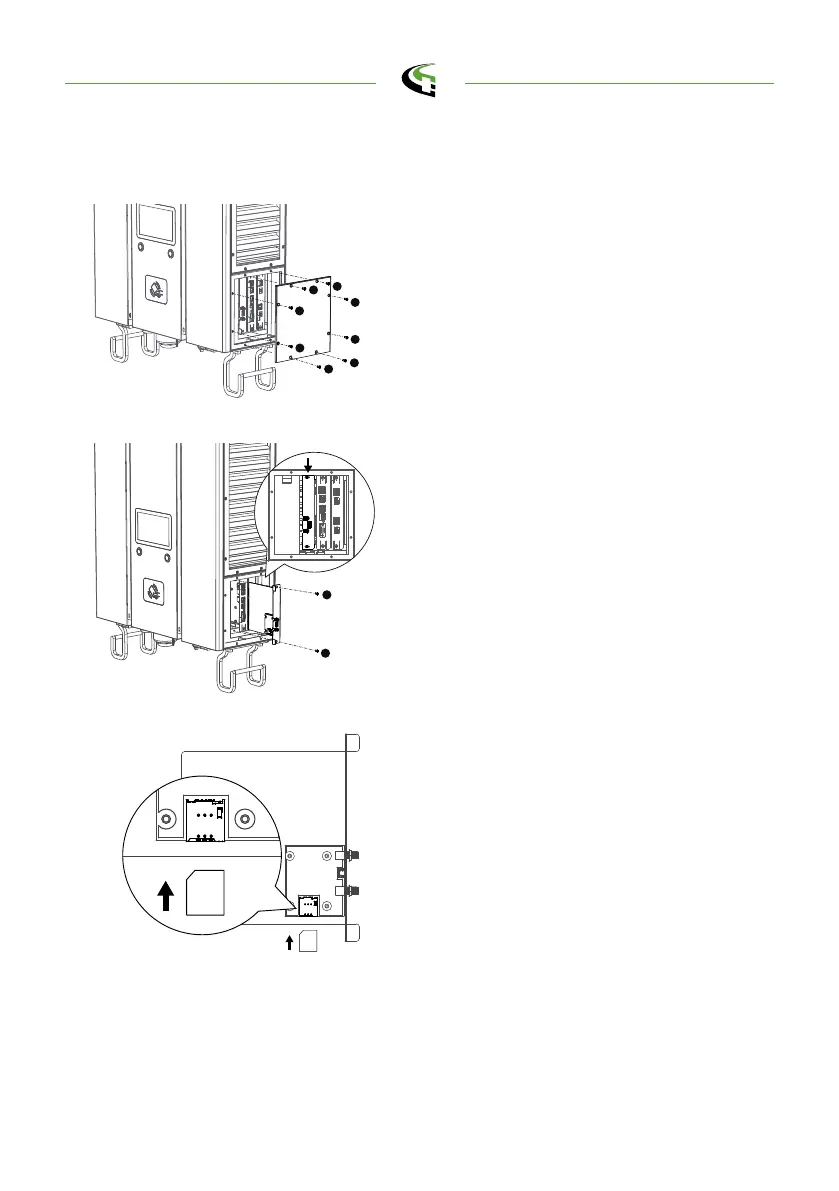
4.2 3G/4G Setting
Loosen 8pcs of M4 screws to open the
door in the right hand side.
Step 1.
4.2.1 SIM Card Installation
1
2
3
4
5
6
7
8
ni yart eht tuo ekat dna swercs nesooL
/G4 eht dnif nac uoy ,edis dnah tfel eht
Wi-Fi module.
Step 2.
Insert 3G/4G Micro SIM Card in the tray,
ensure the gold contacts are facing down
and the notch is located in the upper left
corner. Note the tray might be damaged if
insert SIM card in wrong direction.
Step 3.
SIM Card
Reinstall the tray and side door, ensure
the side door is well fixed at original po -
sition which considering water and dust
resistant.
Step 4.
semaconnect.com



 To Next Page