143
AT6020
Mounting
residue
manager
blade
assembly
10
111
9
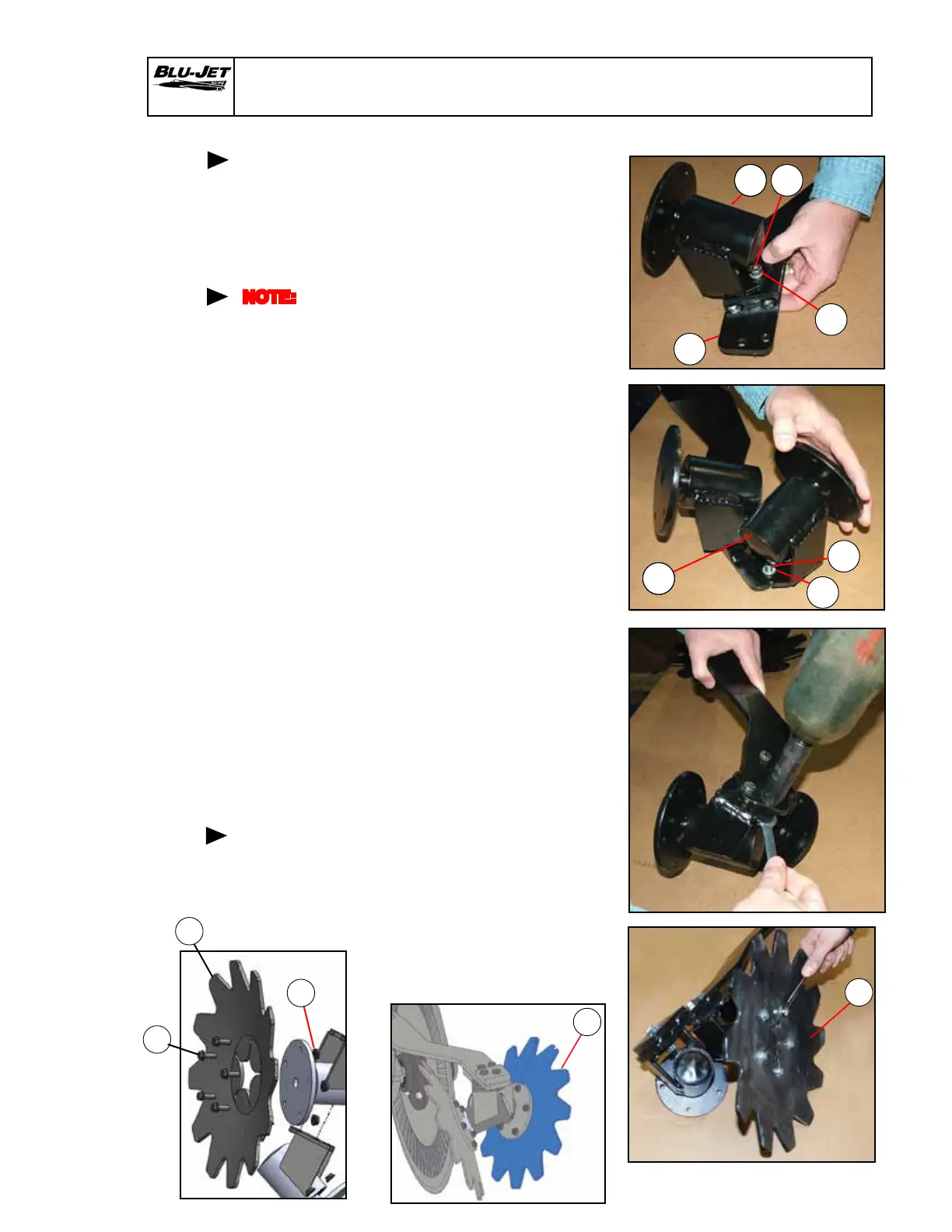
1. Place (10) (AM7671)
mounting arm upside down
and install (9) (AM7670)
blade mount on the raised
weldment and insert two (14)
(BP3005) 3/8” x 1-1/2” from
the top. Place (13) (BP3003)
3/8” hex lock nuts on
hex cap screws.
2. Install (9) (AM7670) blade
mount on lower weldment
and insert two (14) (BP3005)
3/8” x 1-1/2” from the top.
Place (13) (BP3003) 3/8”
hex lock nuts on hex cap
screws.
3. Tighten all four 3/8” hex lock
nuts on the blade mounts.
4. Attach (6) (AM7663) right-hand
blade to hub on the raised
blade mount with ve (25)
(BP3366) 1/4” x 3/4” hex ange
bolts and (26) (BP3367) 1/4”
hex ange nuts serrated.
Mounting
residue
manager
blades
13
14
111
9
14
13
NOTE:
Right-hand
and
left-hand
as viewed
from the
rear
25
26
6
Assembly (StripTill Residue Manager)
6
6


 To Next Page