134
AT6020
MaxPac AR700 Assembly
MaxPac
AR700 row
unit assembly
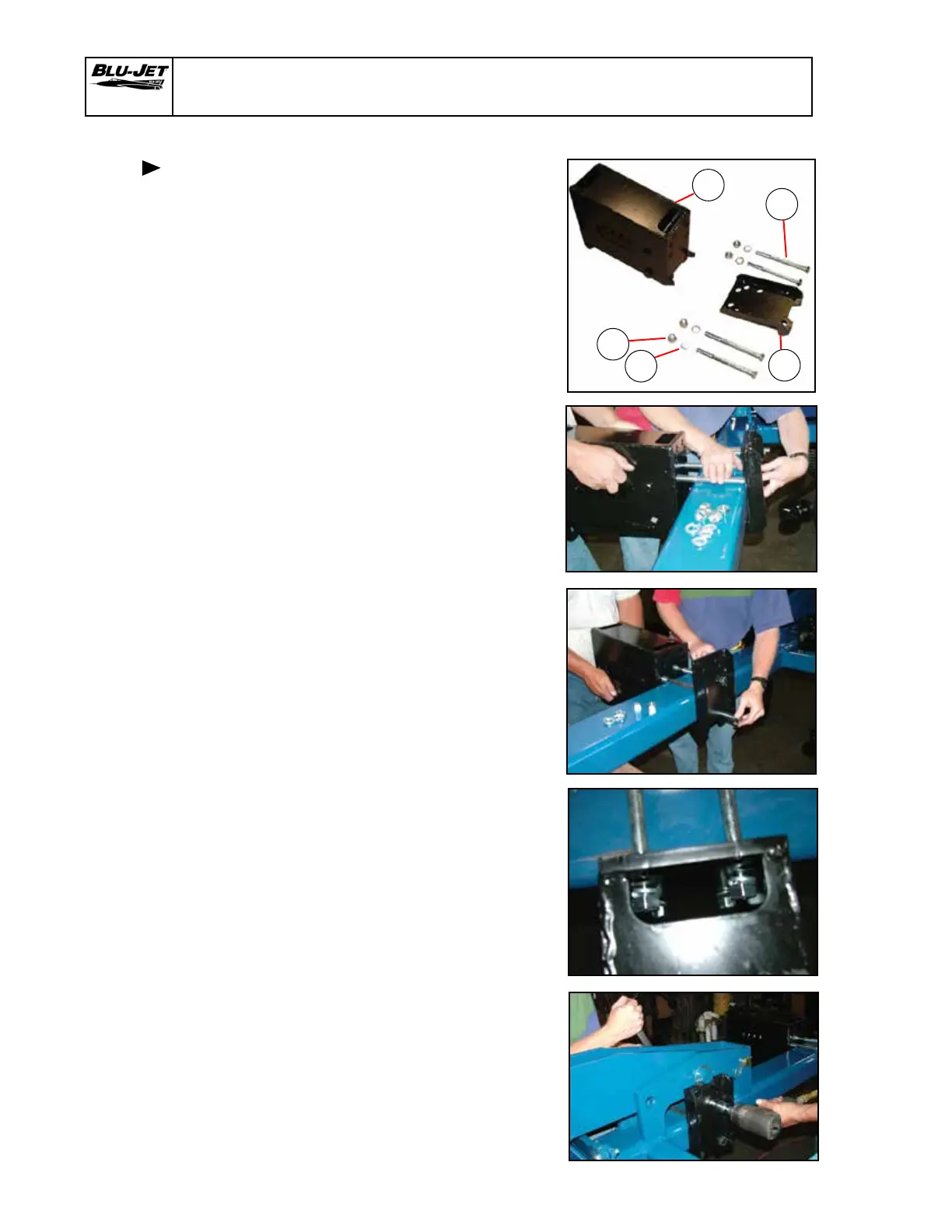
1. MaxPac AR700 row Unit
a. AM2261 (1) backing plate,
row unit AR 700 MaxPac
row unit
b. AM 2264 (1) assembly, AR700
MaxPac row unit
c. BP3034 (6) nut, hex, 3/4”-10,
grade 2, plated
d. BP3035 (6) washer, lock,
3/4”, plated
e. BP3095 (4) hex cap screw,
3/4”-10 x 8”, grade 5, plated
2. Insert (e) (BP3095) hex cap
screws, 3/4”-10 x 8”, into
holes in (a) (AM 2261) backing
plate. Select backing plate
holes to match toolbar tube
size.
Raise (b) (AM2264) Assembly,
AR700 MaxPac row unit and
insert 3/4” hex cap screws.
Insert (e) (BP3095) hex cap
screws, 3/4”-10 x 8”, into
bottom holes of (a) (AM2261)
backing plate.
3. Place (d) (BP3035) 3/4” lock
washers and (c) (BP3034)
3/4” hex nuts on each 3/4” hex
cap screws.
4. Tighten all four hex cap screws.
a
b
d
e
c
Generic Photo
Generic Photo


 To Next Page