189
Task Procedures Illustrations
Task Procedures Illustrations
AT6020
20”
22”
Stagger Bracket Mounting
Mounting
stagger
brackets
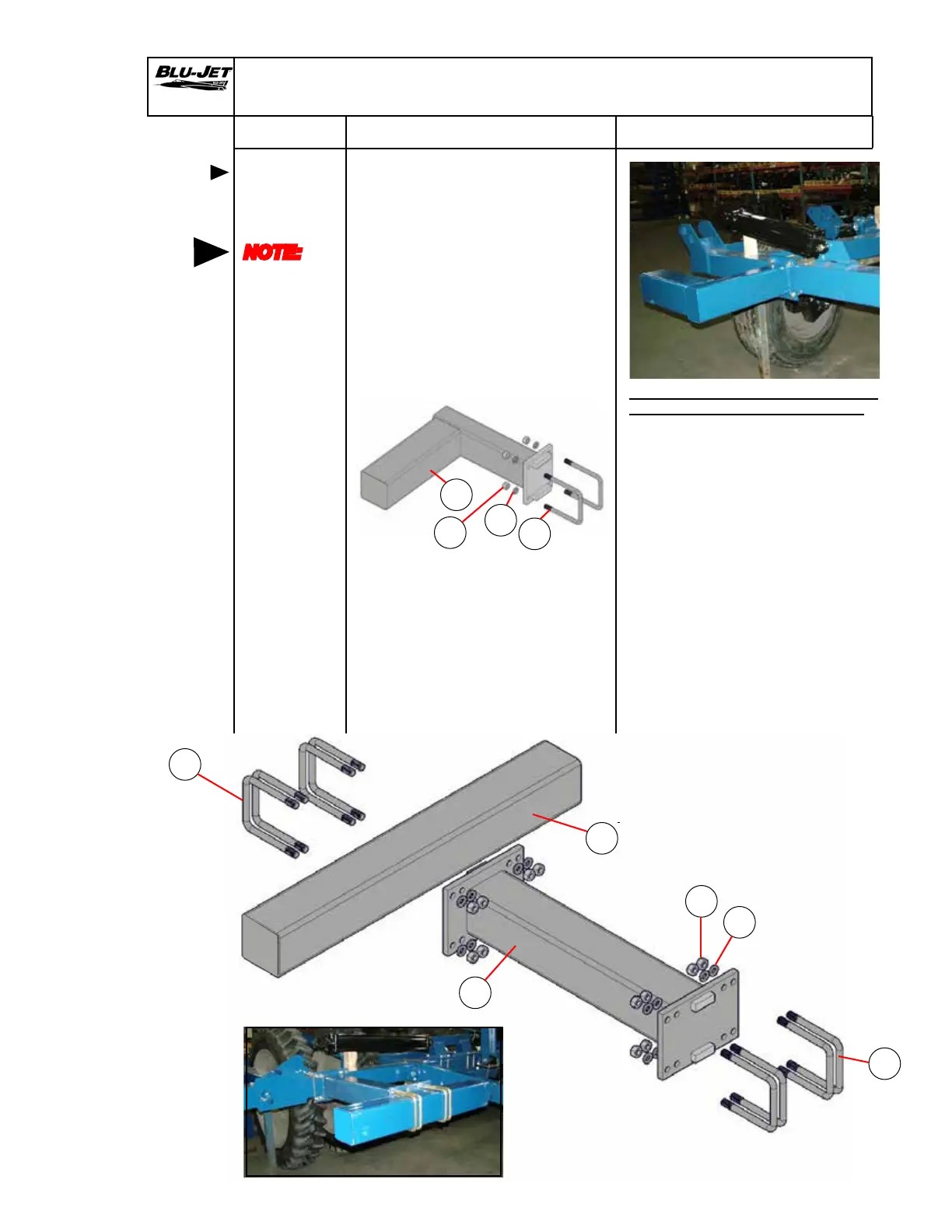
1. Attach (a) (AM4545) 22” x 20”
6 x 6 mounting offset stagger
bracket with (b) (BP3350)
3/4” x 6”W x 7-1/16” L u-bolt,
(c) (BP3035) 3/4” lock washers
and (d) (BP3034) 3/4” hex
nuts.
Consult stagger bracket parts
page for other mountings your
row spacing will require.
b
NOTE:
Consult
row
spacing
page for
required
stagger
brackets
AAM2123 Backet, Offset Stagger,
22” x 20”, 6” x 6” with hardware
a
d
c
a
b
b
1. Attach (a) (AM6161) 35” double
extension bracket 6” x 6”
mounting to frame with four (b)
(BP3350) 3/4” x 6”W x 7-1/16”L
u-bolts (c) (BP3035) 3/4” lock washers
and (d) (BP3034) 3/4” hex nuts.
2. Mount (e) (AM6160) 35” extension
bracket to 35” extension bracket
with four (b) (BP3350) 3/4” x 6”W x
7-1/16”L u-bolts, (c) (BP3035) 3/4”
lock washers and (d) (BP3034) 3/4”
hex nuts.
d
c
e


 To Next Page