9-8. BATTERY REPLACEMENT.
Replace the battery as described in paragraph 2-7.
9-9. BATTERY CHARGER.
9-9.1. Removal.
1. Engage the emergency power disconnect switch
and turn off
key switch.
2. Remove the compartment cover as described in
paragraph 4-2.1.
3. You will need to remove the Control Panel first.
Remove four screws. Tag and disconnect all
electrical cables and harness from control panel.
4. Remove four screws, four lock washers, four flat
washers and panel.
5. Remove the Control Panel Assembly out of the
wa
y.
6. Disconnect cables and harnesses from charger.
7. Remove the charger mounting screws and
charger.
9-9.2. Installation.
1. Position the new charger in frame and secure with
four screws.
2. Reconnect cables and harnesses to the charger.
3. Install compartment covers
as described in
paragraph 4-2.2.
4. Disengage the emergency power disconnect
switch and turn on key switch.
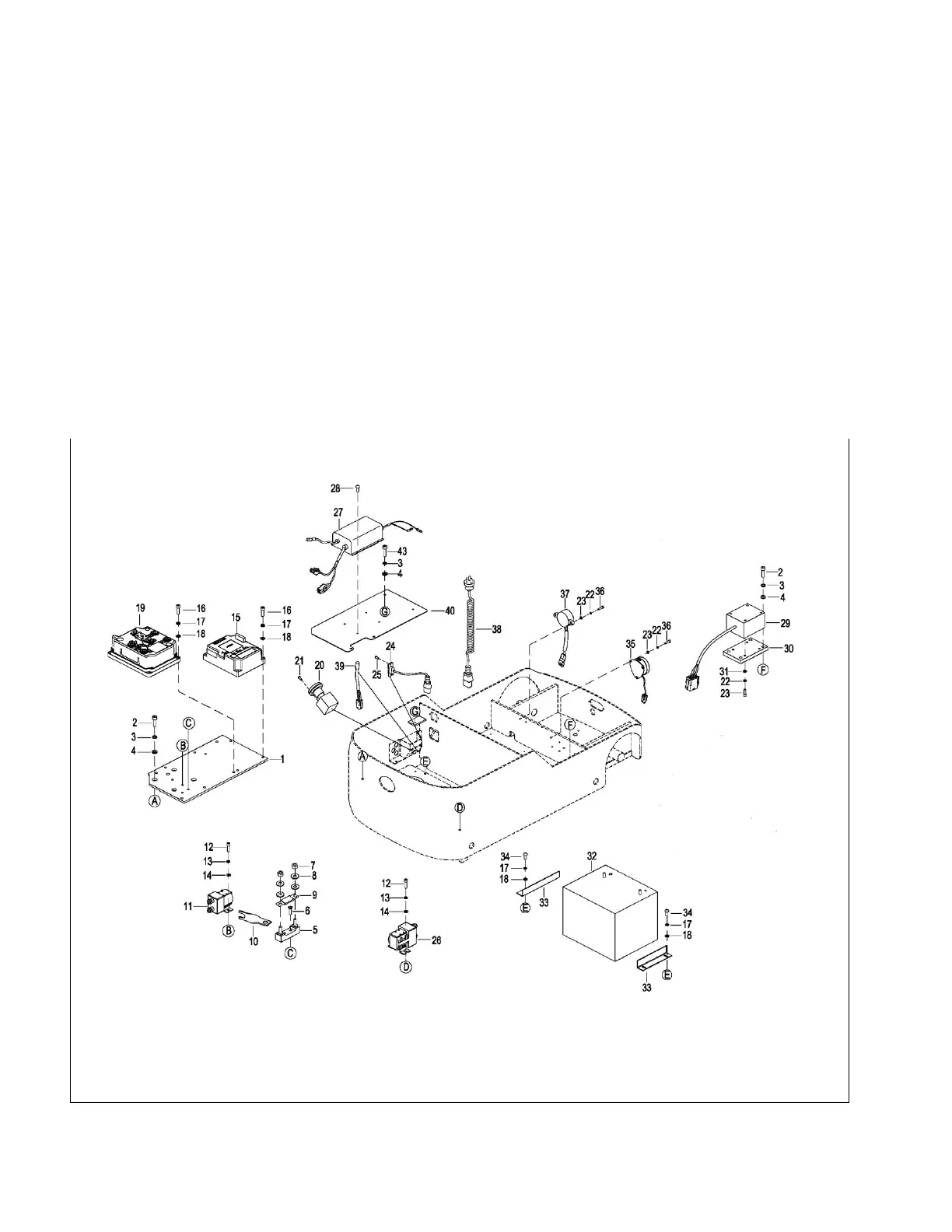
Figure 9-2 Battery Assembly


 To Next Page